こんにちわ
がじぇったー (@hackmylife7) | Twitter
です。
意外にハマったのでCentOS7へのphpPgAdmin導入方法についてメモを残しておこうと思います。

TL;DR(要約)
- 導入自体は簡単ですがSELinuxが有効化されているとPostgreへの疎通に失敗します.
前提
- RDSは9.5.2を利用(RDSの作成はマネコンからぽちぽちするだけ)
- phpPgAdminをインストールするEC2とRDS間の疎通ができている(5432ポート)
- phpPgAdminをいれるEC2にはEIPが付与されていること
導入手順
必要なモジュールのインストール
# yum -y install httpd php php-pgsql

# systemctl status httpd
● httpd.service - The Apache HTTP Server
   Loaded: loaded (/usr/lib/systemd/system/httpd.service; disabled; vendor preset: disabled)
   Active: inactive (dead)
     Docs: man:httpd(8)
           man:apachectl(8)

# php -v
PHP 5.4.16 (cli) (built: Apr  1 2020 04:07:17)
Copyright (c) 1997-2013 The PHP Group
Zend Engine v2.4.0, Copyright (c) 1998-2013 Zend Technologies
phpPgAdminのインストール
# cd /usr/local/src/
# wget https://github.com/phppgadmin/phppgadmin/archive/REL_5-6-0.tar.gz
--2020-05-08 04:50:45--  https://github.com/phppgadmin/phppgadmin/archive/REL_5-6-0.tar.gz
Resolving github.com (github.com)... 52.69.186.44
Connecting to github.com (github.com)|52.69.186.44|:443... connected.
HTTP request sent, awaiting response... 302 Found
Location: https://codeload.github.com/phppgadmin/phppgadmin/tar.gz/REL_5-6-0 [following]
--2020-05-08 04:50:45--  https://codeload.github.com/phppgadmin/phppgadmin/tar.gz/REL_5-6-0
Resolving codeload.github.com (codeload.github.com)... 52.193.111.178
Connecting to codeload.github.com (codeload.github.com)|52.193.111.178|:443... connected.
HTTP request sent, awaiting response... 200 OK
Length: unspecified [application/x-gzip]
Saving to: ‘REL_5-6-0.tar.gz’

    [ <=>                      ] 760,628     --.-K/s   in 0.1s

2020-05-08 04:50:46 (6.97 MB/s) - ‘REL_5-6-0.tar.gz’ saved [760628]

# tar -xvzf REL_5-6-0.tar.gz
phppgadmin-REL_5-6-0/
phppgadmin-REL_5-6-0/BUGS
...略
# mv phppgadmin-REL_5-6-0 /usr/share/
# mv /usr/share/phppgadmin-REL_5-6-0 /usr/share/phpPgAdmin
# cd /usr/share/phpPgAdmin/
# mv conf/config.inc.php-dist conf/config.inc.php
config.inc.phpの編集
以下の内容にします
ポイントとしては extra_login_security を false にすることです。
<?php
    $conf['servers'][0]['desc'] = 'DBの名前(phppgadmin上の表示名なので何でも良い)';
    $conf['servers'][0]['host'] = 'RDSのエンドポイント;
    $conf['servers'][0]['port'] = 5432;
    $conf['servers'][0]['sslmode'] = 'allow';
    $conf['servers'][0]['defaultdb'] = 'postgres';
    $conf['servers'][0]['pg_dump_path'] = '';
    $conf['servers'][0]['pg_dumpall_path'] = '';
    $conf['default_lang'] = 'auto';
    $conf['autocomplete'] = 'default on';
    $conf['extra_login_security'] = false;
    $conf['owned_only'] = false;
    $conf['show_comments'] = true;
    $conf['show_advanced'] = false;
    $conf['show_system'] = false;
    $conf['min_password_length'] = 1;
    $conf['left_width'] = 200;
    $conf['theme'] = 'default';
    $conf['show_oids'] = false;
    $conf['max_rows'] = 30;
    $conf['max_chars'] = 50;
    $conf['use_xhtml_strict'] = false;
    $conf['help_base'] = 'http://www.postgresql.org/docs/%s/interactive/';
    $conf['ajax_refresh'] = 3;
    $conf['plugins'] = array();
    $conf['version'] = 19;
?>
httpd.confの修正
# vi /etc/httpd/conf.d/phpPgAdmin.conf
以下内容の貼り付け
Alias /phpPgAdmin /usr/share/phpPgAdmin

<Directory /usr/share/phpPgAdmin>

<IfModule mod_dir.c>
DirectoryIndex index.php
</IfModule>
AllowOverride None

# Only allow connections from localhost:
#Require local
Require all granted

<IfModule mod_php.c>
  php_flag magic_quotes_gpc Off
  php_flag track_vars On
  #php_value include_path .
</IfModule>
<IfModule !mod_php.c>
  <IfModule mod_actions.c>
    <IfModule mod_cgi.c>
      AddType application/x-httpd-php .php
      Action application/x-httpd-php /cgi-bin/php
    </IfModule>
    <IfModule mod_cgid.c>
      AddType application/x-httpd-php .php
      Action application/x-httpd-php /cgi-bin/php
    </IfModule>
  </IfModule>
</IfModule>

</Directory>
firewallとselinuxの機能をOFFにする
# systemctl stop firewall
apacheを起動
# systemctl start httpd
#
# systemctl start status
Failed to start status.service: Unit not found.
# systemctl status httpd
● httpd.service - The Apache HTTP Server
   Loaded: loaded (/usr/lib/systemd/system/httpd.service; disabled; vendor preset: disabled)
   Active: active (running) since Fri 2020-05-08 05:01:14 UTC; 18s ago
     Docs: man:httpd(8)
           man:apachectl(8)
 Main PID: 20594 (httpd)
   Status: "Total requests: 0; Current requests/sec: 0; Current traffic:   0 B/sec"
   CGroup: /system.slice/httpd.service
           ├─20594 /usr/sbin/httpd -DFOREGROUND
           ├─20595 /usr/sbin/httpd -DFOREGROUND
           ├─20596 /usr/sbin/httpd -DFOREGROUND
           ├─20597 /usr/sbin/httpd -DFOREGROUND
           ├─20598 /usr/sbin/httpd -DFOREGROUND
           └─20599 /usr/sbin/httpd -DFOREGROUND


#
phpPgAdminの表示
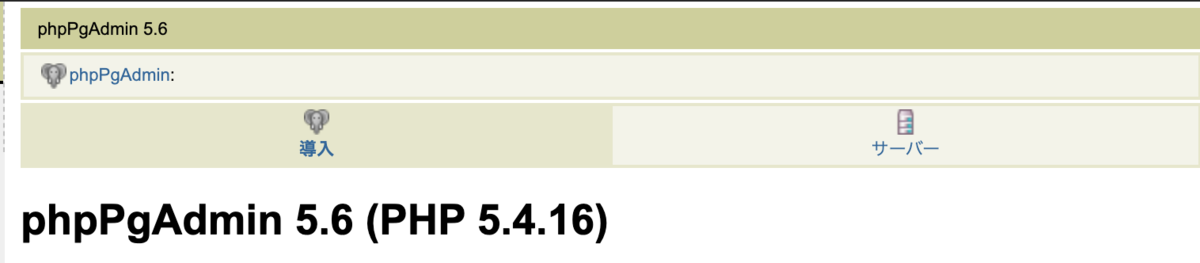
apacheを起動したら以下のURLでphpPgAdminが見えるはずです。
ユーザーはPostgresでパスワードはPostgresのものを入れます。(RDS構築時に設定するパスワード)
http://EC2に割あたっているEIP/phpPgAdmin/
超お勧めAWS本
参考URL
phpPgAdmin:Web開発者向けのPostgresクライアントツール | OSDN Magazine
linux - How to change root password for PostgreSql phpPgAdmin? - Super User
phpPgAdmin / Discussion / Help: Login fails - but I can connect OK with psql
How To Set up PostgreSQL and PhpPgadmin on Ubuntu 18.04 - Alibaba Cloud Community
php - Can't Login to phpPgAdmin - Server Fault
