汐れいらさんの No oneがよすぎてずっと聴いてます。
糸しいひと, うぶ, 笑ってベイビー あたりが特に。
fujitani soraです
No one ‑「Album」by 汐れいら | Spotify
エディタで相対path or 絶対pathを簡単にcopyできる手段があると何かと便利です。
例えばAI Agentに特定のファイルを渡すときとか。
また、環境依存の話として、自分はNeoVimのoil.nvimというテキスト編集可能なfilerを利用しています。
テキスト編集可能であるということは、NeoVimのbufferとして開いているということであり、そこではVimのコマンドが実行可能です。
vim.api.nvim_create_user_command によるkeymap登録で、copy_path関数に文字列リテラルのパラメータを渡します。
パラメータで分岐させて、一つの関数で統一的にpathの取得と変換を行います。
local function copy_path(opts, target)
  local expr = '%'
  if target == 'full path' then
    expr = '%:p'
  elseif target == 'file name' then
    expr = '%:t'
  elseif target == 'relative path' then
    -- Get path relative to the directory where nvim was started
    local current_file = vim.fn.expand('%:p')

    local nvim_start_dir = vim.fn.getcwd()
    local relative_path = vim.fn.fnamemodify(current_file, ':s?' .. vim.fn.escape(nvim_start_dir, '\\') .. '/??')
    local path = relative_path .. get_range_str(opts)
    vim.fn.setreg('*', path)
    vim.notify('Copied ' .. target .. ': ' .. path)
    return
  end

  local path = vim.fn.expand(expr) .. get_range_str(opts)
  vim.fn.setreg('*', path)
  vim.notify('Copied ' .. target .. ': ' .. path)
end

vim.api.nvim_create_user_command('Cfp', function(opts)
  copy_path(opts, 'full path')
end, { range = true, desc = 'Copy the full path of the current file to the clipboard' })

vim.api.nvim_create_user_command('Crp', function(opts)
  copy_path(opts, 'relative path')
end, { range = true, desc = 'Copy the relative path of the current file to the clipboard' })

vim.api.nvim_create_user_command('Cfn', function(opts)
  copy_path(opts, 'file name')
end, { range = true, desc = 'Copy the file name of the current file to the clipboard' })
この時に起こる問題として、通常のfile path copyは正しいが、oil.nvimによって開いたbufferでのcopyで、取得pathにツール依存のURI schemeが含まれてしまう問題がありました。
:Crp

# => lua/keymap.lua
oil.nvimで開いた lua/
:Crp

# => oil://lua/
これは不要であり、文字列を渡される側にとってのノイズになります。
解決手段として、oil://というツールに依存せずにディレクトリ文頭のURL schemeを削除する変換処理を入れてあげます。
local function copy_path(opts, target)
  local expr = '%'
  if target == 'full path' then
    expr = '%:p'
  elseif target == 'file name' then
    expr = '%:t'
  elseif target == 'relative path' then
    -- Get path relative to the directory where nvim was started
    local current_file = vim.fn.expand('%:p')

    -- Remove any URI scheme (e.g., oil://, neo-tree://, etc.)
    if current_file:match('^%w+://') then
      current_file = current_file:gsub('^%w+://', '')
    end

    local nvim_start_dir = vim.fn.getcwd()
    local relative_path = vim.fn.fnamemodify(current_file, ':s?' .. vim.fn.escape(nvim_start_dir, '\\') .. '/??')
    local path = relative_path .. get_range_str(opts)
    vim.fn.setreg('*', path)
    vim.notify('Copied ' .. target .. ': ' .. path)
    return
  end

  local path = vim.fn.expand(expr)

  -- Remove any URI scheme (e.g., oil://, neo-tree://, etc.)
  if path:match('^%w+://') then
    path = path:gsub('^%w+://', '')
  end

  path = path .. get_range_str(opts)
  vim.fn.setreg('*', path)
  vim.notify('Copied ' .. target .. ': ' .. path)
end

vim.api.nvim_create_user_command('Cfp', function(opts)
  copy_path(opts, 'full path')
end, { range = true, desc = 'Copy the full path of the current file to the clipboard' })

vim.api.nvim_create_user_command('Crp', function(opts)
  copy_path(opts, 'relative path')
end, { range = true, desc = 'Copy the relative path of the current file to the clipboard' })

vim.api.nvim_create_user_command('Cfn', function(opts)
  copy_path(opts, 'file name')
end, { range = true, desc = 'Copy the file name of the current file to the clipboard' })
patchはこんな感じ
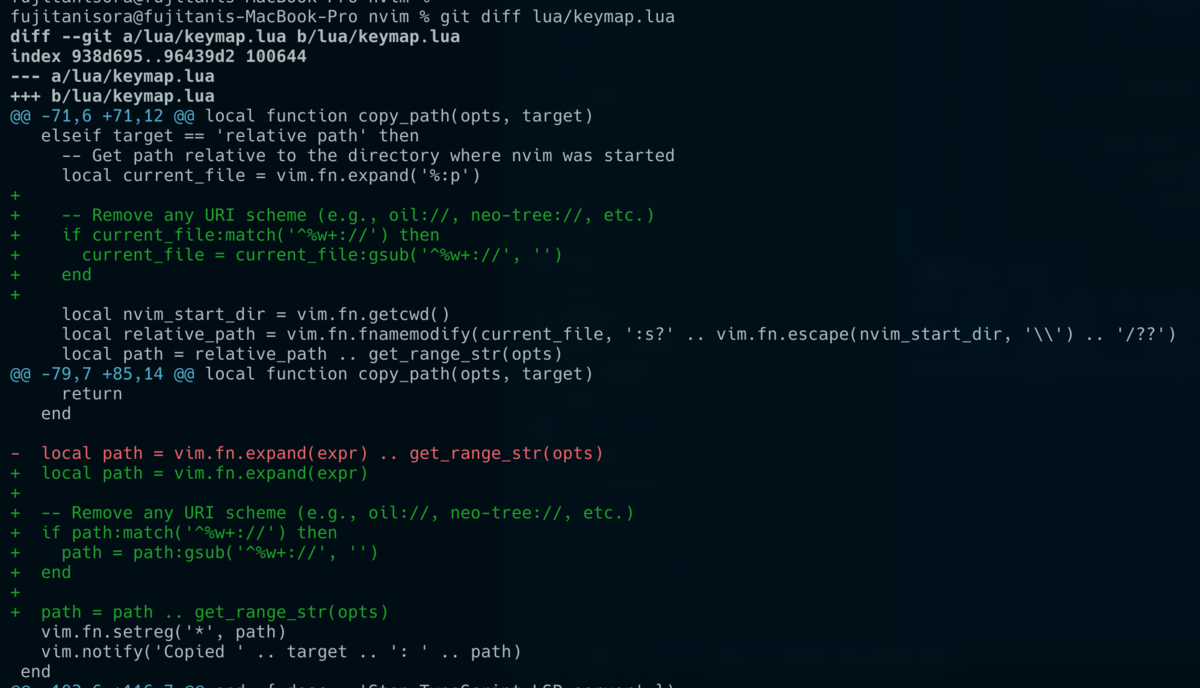
この変換によって、実行bufferに依存せずにpath copyが可能になりました。
oil.nvimで開いた lua/
:Crp

# => lua/
ちなみに、範囲選択して:Crp などを実行すると行範囲の取得も行われます。
かなり便利
:Crp

lua/keymap.lua#L76-L78
