WPFでChartグラフを表示するためのライブラリーに OxyPlot があります。View に Plot を貼りつけて XAML で作成した Chart を保存するビヘイビアについて書いてあります。ViewModel から自動で View の Plot を保存する為の仕組みも組み込んでいます。前回のものから EventAggregator を使わないものに変更しました。
OxyPlot で Chart を表示するには、PlotModel を ViewModel に作ってコードで全部作りこむ方法と、View に Plot を貼って、XAMLで作りこむ方法の2種類があります。Chart の画像保存を行いたい場合、ViewModel に PlotModel がある場合にはコードから自由に Chart を画像保存できますが、View 側に Plot を貼った時には、Viewmodel 側にはデータしかないので View 側で Chart の保存を行わなくてはなりません。 今回は、ビヘイビアを作成して、それを使用することで、右clickからのクリップボードへのコピー、ファイルへの保存、ViewModelからも画像の自動保存を可能としました。
OxyContextMenuBehavior の仕様
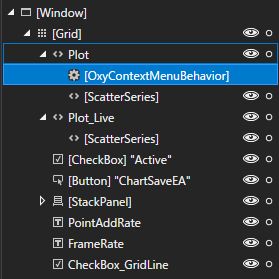
OxyContextMenuBehaviorを保存したい画像の Plot に添付します。
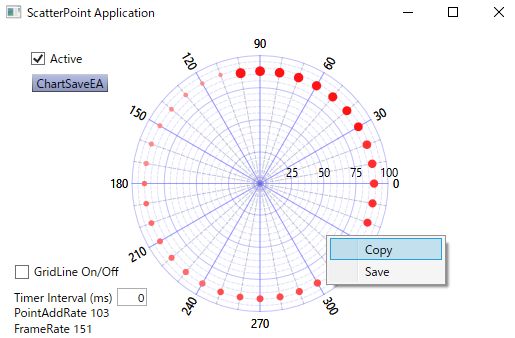
そうすることで、Plot 上で右クリックから Copy と Save ができるようになります。
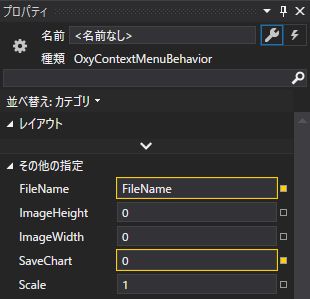
OxyContextMenuBehavior のプロパティーには次のようなものがあります。
- FileName: ViewModel とバインドして保存ファイル名を指定。空欄の時にはダイアログが開きます。
- ImageHeight: 保存画像の高さ。0の時には表示サイズ。
- ImageWidth: 保存画像の幅。0の時には表示サイズ。
- SaveChart: ViewModel とバインドして+1する時に画像が保存されます。
- Scale: 表示倍率。
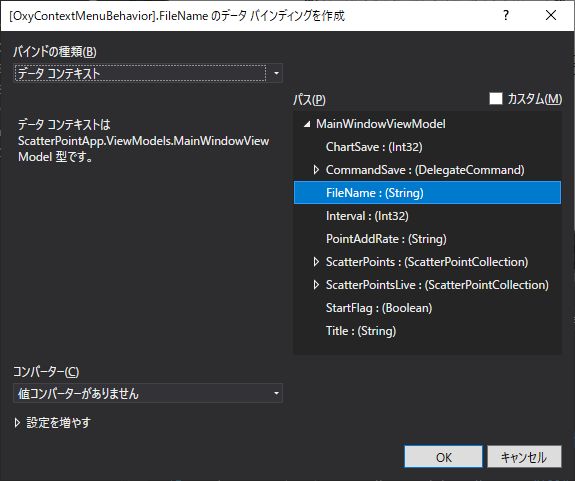
プロパティの FileNameに ViewModel に作成した FileName をバインドします。プロパティのSaveChartにViewModel のChartSaveをバインドすることで、ChartSaveの変化でChartを保存する事ができるようになります。
ビヘイビアコード
今回作成した OxyContextMenuBehavior は次のようなものです。
namespace ScatterPointApp.Behaviors
{
    [TypeConstraint(typeof(Plot))]
    public class OxyContextMenuBehavior : Behavior<Plot>
    {
        /// <summary>
        /// 要素にアタッチされた時にイベントハンドラを登録
        /// </summary>
        protected override void OnAttached()
        {
            base.OnAttached();

            menuItemCopy.Header = "Copy";
            menuItemSave.Header = "Save";
            menuListBox.Items.Add(menuItemCopy);
            menuListBox.Items.Add(menuItemSave);

            menuItemCopy.Click += OnCopyClick;
            menuItemSave.Click += OnSaveClick;
            this.AssociatedObject.ContextMenu = menuListBox;
        }

        private void OnSaveClick(object sender, RoutedEventArgs e)
        {
            double width = this.AssociatedObject.ActualWidth;
            double height = this.AssociatedObject.ActualHeight;
            if (ImageWidth > 0) width = ImageWidth;
            if (ImageHeight > 0) height = ImageHeight;
            if (Scale > 0)
            {
                width = width * Scale;
                height = height * Scale;
            }

            var dlg = new SaveFileDialog
            {
                Filter = ".png files|*.png|.pdf files|*.pdf",
                DefaultExt = ".png"
            };
            if (dlg.ShowDialog().Value) FileName = dlg.FileName;

            var ext = Path.GetExtension(FileName).ToLower();
            switch (ext)
            {
                case ".png":

                    PngExporter.Export(this.AssociatedObject.ActualModel, FileName, (int)width, (int)height, OxyColors.White);
                    break;
                case ".pdf":
                    using (var s = File.Create(FileName))
                    {
                        PdfExporter.Export(this.AssociatedObject.ActualModel, s, width, height);
                    }
                    break;
                default:
                    break;
            }
        }

        /// <summary>
        /// 画像保存(右クリック用)
        /// </summary>
        /// <param name="sender"></param>
        /// <param name="e"></param>
        private void OnCopyClick(object sender, RoutedEventArgs e)
        {
            double width = this.AssociatedObject.ActualWidth;
            double height = this.AssociatedObject.ActualHeight;
            if (ImageWidth > 0) width = ImageWidth;
            if (ImageHeight > 0) height = ImageHeight;
            if (Scale > 0)
            {
                width = width * Scale;
                height = height * Scale;
            }

            var pngExporter = new PngExporter
            { Width = (int)width, Height = (int)height, Background = OxyColors.White };
            Application.Current.Dispatcher.Invoke((Action)(() =>
            {
                var bitmap = pngExporter.ExportToBitmap(this.AssociatedObject.ActualModel);
                Clipboard.SetImage(bitmap);
            }));
        }

        /// <summary>
        /// 要素にデタッチされた時にイベントハンドラを解除
        /// </summary>
        protected override void OnDetaching()
        {
            base.OnDetaching();

            menuItemSave.Click -= OnSaveClick;
            menuItemCopy.Click -= OnCopyClick;
            this.AssociatedObject.ContextMenu = null;
        }

        ContextMenu menuListBox = new ContextMenu();
        MenuItem menuItemCopy = new MenuItem();
        MenuItem menuItemSave = new MenuItem();

        #region ******************************* ImageWidth
        public int ImageWidth
        {
            get { return (int)this.GetValue(ImageWidthProperty); }
            set { this.SetValue(ImageWidthProperty, value); }
        }

        public static readonly DependencyProperty ImageWidthProperty =
            DependencyProperty.Register("ImageWidth", typeof(int),
                typeof(OxyContextMenuBehavior),
                new FrameworkPropertyMetadata(0,
                    FrameworkPropertyMetadataOptions.BindsTwoWayByDefault,
                    ImageWidthChangeFunc,
                    ImageWidthCoerceFunc));

        static void ImageWidthChangeFunc(DependencyObject target,
            DependencyPropertyChangedEventArgs e)
        {
            var of = (int)e.OldValue;
            var nf = (int)e.NewValue;
            var obj = (OxyContextMenuBehavior)target;
        }

        static object ImageWidthCoerceFunc(DependencyObject target, object baseValue)
        {
            var obj = (OxyContextMenuBehavior)target;
            var val = (int)baseValue;
            if (val < 0) val = 0;
            return val;
        }
        #endregion

        #region ******************************* ImageHeight
        public int ImageHeight
        {
            get { return (int)this.GetValue(ImageHeightProperty); }
            set { this.SetValue(ImageHeightProperty, value); }
        }

        public static readonly DependencyProperty ImageHeightProperty =
            DependencyProperty.Register("ImageHeight", typeof(int),
                typeof(OxyContextMenuBehavior),
                new FrameworkPropertyMetadata(0,
                    FrameworkPropertyMetadataOptions.BindsTwoWayByDefault,
                    ImageHeightChangeFunc,
                    ImageHeightCoerceFunc));

        static void ImageHeightChangeFunc(DependencyObject target,
            DependencyPropertyChangedEventArgs e)
        {
            var of = (int)e.OldValue;
            var nf = (int)e.NewValue;
            var obj = (OxyContextMenuBehavior)target;
        }

        static object ImageHeightCoerceFunc(DependencyObject target, object baseValue)
        {
            var obj = (OxyContextMenuBehavior)target;
            var val = (int)baseValue;
            if (val < 0) val = 0;
            return val;
        }
        #endregion

        #region ******************************* Scale
        public double Scale
        {
            get { return (double)this.GetValue(ScaleProperty); }
            set { this.SetValue(ScaleProperty, value); }
        }

        public static readonly DependencyProperty ScaleProperty =
            DependencyProperty.Register("Scale", typeof(double),
                typeof(OxyContextMenuBehavior),
                new FrameworkPropertyMetadata(1.0,
                    FrameworkPropertyMetadataOptions.BindsTwoWayByDefault,
                    ScaleChangeFunc,
                    ScaleCoerceFunc));

        static void ScaleChangeFunc(DependencyObject target,
            DependencyPropertyChangedEventArgs e)
        {
            var of = (double)e.OldValue;
            var nf = (double)e.NewValue;
            var obj = (OxyContextMenuBehavior)target;
        }

        static object ScaleCoerceFunc(DependencyObject target, object baseValue)
        {
            var obj = (OxyContextMenuBehavior)target;
            var val = (double)baseValue;
            if (val < 0.5) val = 0.5;
            if (val > 5.0) val = 5.0;
            return val;
        }
        #endregion

        #region ******************************* FileName
        public string FileName
        {
            get { return (string)this.GetValue(FileNameProperty); }
            set { this.SetValue(FileNameProperty, value); }
        }

        public static readonly DependencyProperty FileNameProperty =
            DependencyProperty.Register("FileName", typeof(string),
                typeof(OxyContextMenuBehavior),
                new FrameworkPropertyMetadata("",
                    FrameworkPropertyMetadataOptions.BindsTwoWayByDefault));
        #endregion

        #region ******************************* SaveChart
        public int SaveChart
        {
            get { return (int)this.GetValue(SaveChartProperty); }
            set { this.SetValue(SaveChartProperty, value); }
        }

        public static readonly DependencyProperty SaveChartProperty =
            DependencyProperty.Register("SaveChart", typeof(int),
                typeof(OxyContextMenuBehavior),
                new FrameworkPropertyMetadata(0,
                    FrameworkPropertyMetadataOptions.BindsTwoWayByDefault,
                    SaveChartChangeFunc,
                    SaveChartCoerceFunc));

        static void SaveChartChangeFunc(DependencyObject target,
            DependencyPropertyChangedEventArgs e)
        {
            var of = (int)e.OldValue;
            var nf = (int)e.NewValue;
            var obj = (OxyContextMenuBehavior)target;
            obj.Save();
        }

        static object SaveChartCoerceFunc(DependencyObject target, object baseValue)
        {
            var obj = (OxyContextMenuBehavior)target;
            var val = (int)baseValue;
            return val;
        }
        #endregion

        /// <summary>
        /// 画像保存
        /// </summary>
        private void Save()
        {
            string filename = FileName;

            if (filename == "")
            {
                var dlg = new SaveFileDialog
                {
                    Filter = ".png files|*.png",
                    DefaultExt = ".png"
                };
                if (dlg.ShowDialog().Value) filename = dlg.FileName;
            }

            Plot plot = this.AssociatedObject as Plot;

            double width = plot.ActualWidth;
            double height = plot.ActualHeight;
            if (ImageWidth > 0) width = ImageWidth;
            if (ImageHeight > 0) height = ImageHeight;
            if (Scale > 0)
            {
                width = width * Scale;
                height = height * Scale;
            }

            if (filename != "")
            {
                var ext = Path.GetExtension(filename).ToLower();
                if (ext == ".png")
                {
                    PngExporter.Export(plot.ActualModel, filename, (int)width, (int)height, OxyColors.White);
                }
            }

        }
    }
}
ViewModel に次のようなコードを追加します。FileNameを空欄にするとダイアログが開くようになります。
        private string fileName = "";
        public string FileName
        {
            get { return fileName; }
            set { SetProperty(ref fileName, value); }
        }

        private int chartSave = 0;
        public int ChartSave
        {
            get { return chartSave; }
            set { SetProperty(ref chartSave, value); }
        }

        private DelegateCommand commandSave;
        public DelegateCommand CommandSave =>
            commandSave ?? (commandSave = new DelegateCommand(ExecuteCommandSave));

        async void ExecuteCommandSave()
        {
            await Task.Run(() => Save());
        }

        void Save()
        {
            Application.Current.Dispatcher.Invoke(
                new Action(() =>
                {
                    FileName = "Test_.png";
                    ChartSave++;
                }));
        }
Chartが保存されるのは、ChartSaveの値が変化するタイミングなので、ChartSaveは毎回+1するようにしています。
注意点として、UIスレッド以外から使用すると動作が不安定となるので、その時には上記の様に Dispatcher.InvokeでUIスレッドから実行するようにします。
まとめ
Plot に添付して ContextMenu を表示する Behaivior です。
ファイル保存の Save とクリップボードへのコピーの Copy が右クリックで表示されるようになります。
ファイル保存用の FileName プロパティーと、画像サイズを指定できるように ImageHeight と ImageWidth を設定してあります。
Scale プロパティーは表示画像サイズをベースにして指定倍率で画像を扱う時に使用できます。
作成したソースコードの場所
ソースコードは次の場所に置いてあります。
