WPFでChartグラフを表示するためのライブラリーに OxyPlot があります。View に Plot を貼りつけて XAML で作成した Chart を保存するビヘイビアについて書いてあります。ViewModel から自動で View の Plot を保存する為の仕組みも組み込んでいます。
OxyPlot で Chart を表示するには、PlotModel を ViewModel に作ってコードで全部作りこむ方法と、View に Plot を貼って、XAMLで作りこむ方法の2種類があります。Chart の画像保存を行いたい場合、ViewModel に PlotModel がある場合にはコードから自由に Chart を画像保存できますが、View 側に Plot を貼った時には、Viewmodel 側にはデータしかないので View 側で Chart の保存を行わなくてはなりません。 今回は、ビヘイビアを作成して、それを使用することで、右clickからのクリップボードへのコピー、ファイルへの保存、PRISMイベントアグリゲータを使用してコードからも画像の自動保存を可能としました。
OxyContextMenuBehavior の仕様
OxyContextMenuBehaviorを保存したい画像の Plot に添付します。
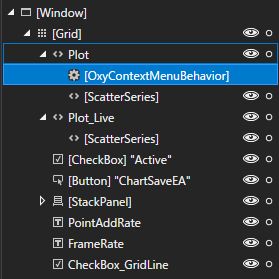
そうすることで、Plot 上で右クリックから Copy と Save ができるようになります。
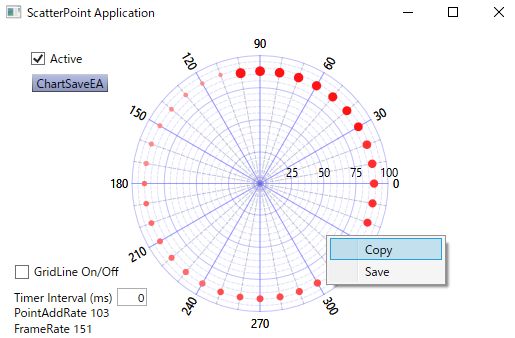
OxyContextMenuBehavior のプロパティーには次のようなものがあります。
- EventA: ViewModel からPRISM の EventAggregator をバインドで受け取ることで、ViewModel から画像の保存を可能とするプロパティ。
- FileName: 保存画像のファイル名指定。空欄の時にはダイアログが開きます。
- ImageHeight: 保存画像の高さ。0の時には表示サイズ。
- ImageWidth: 保存画像の幅。0の時には表示サイズ。
- Scale: 表示倍率。

プロパティの EventA に ViewModel に作成した Prism の EventAggregator をバインドすることで、ViewModel からのイベントを受け取って画像保存する事ができるようになります。

ビヘイビアコード
今回作成した OxyContextMenuBehavior は次のようなものです。
namespace ScatterPointApp.Behaviors
{
    [TypeConstraint(typeof(Plot))]
    public class OxyContextMenuBehavior: Behavior<Plot>
    {
        /// <summary>
        /// 要素にアタッチされた時にイベントハンドラを登録
        /// </summary>
        protected override void OnAttached()
        {
            base.OnAttached();

            menuItemCopy.Header = "Copy";
            menuItemSave.Header = "Save";
            menuListBox.Items.Add(menuItemCopy);
            menuListBox.Items.Add(menuItemSave);

            menuItemCopy.Click += OnCopyClick;
            menuItemSave.Click += OnSaveClick;
            this.AssociatedObject.ContextMenu = menuListBox;

            if(EventA != null) EventA.GetEvent<PubSubEvent<string>>().Subscribe(ChartSave);
        }

        private void OnSaveClick(object sender, RoutedEventArgs e)
        {
            this.AssociatedObject.SaveBitmap("test.png");

            double width = this.AssociatedObject.ActualWidth;
            double height = this.AssociatedObject.ActualHeight;
            if (ImageWidth > 0) width = ImageWidth;
            if (ImageHeight > 0) height = ImageHeight;
            if (Scale > 0)
            {
                width = width * Scale;
                height = height * Scale;
            }

            if (FileName == "")
            {
                var dlg = new SaveFileDialog
                {
                    Filter = ".png files|*.png|.pdf files|*.pdf",
                    DefaultExt = ".png"
                };
                if (dlg.ShowDialog().Value) FileName = dlg.FileName;
            }
            if (FileName != "")
            {
                var ext = Path.GetExtension(FileName).ToLower();
                switch (ext)
                {
                    case ".png":

                        PngExporter.Export(this.AssociatedObject.ActualModel, FileName, (int)width, (int)height, OxyColors.White);
                        break;
                    case ".pdf":
                        using (var s = File.Create(FileName))
                        {
                            PdfExporter.Export(this.AssociatedObject.ActualModel, s, width, height);
                        }
                        break;
                    default:
                        break;
                }
            }
        }

        private void OnCopyClick(object sender, RoutedEventArgs e)
        {
            double width = this.AssociatedObject.ActualWidth;
            double height = this.AssociatedObject.ActualHeight;
            if (ImageWidth > 0) width = ImageWidth;
            if (ImageHeight > 0) height = ImageHeight;
            if (Scale > 0)
            {
                width = width * Scale;
                height = height * Scale;
            }

            var pngExporter = new PngExporter
            { Width = (int)width, Height = (int)height, Background = OxyColors.White };
            Application.Current.Dispatcher.Invoke((Action)(() =>
            {
                var bitmap = pngExporter.ExportToBitmap(this.AssociatedObject.ActualModel);
                Clipboard.SetImage(bitmap);
            }));
        }


        /// <summary>
        /// 要素にデタッチされた時にイベントハンドラを解除
        /// </summary>
        protected override void OnDetaching()
        {
            base.OnDetaching();

            menuItemSave.Click -= OnSaveClick;
            menuItemCopy.Click -= OnCopyClick;
            this.AssociatedObject.ContextMenu = null;
        }

        ContextMenu menuListBox = new ContextMenu();
        MenuItem menuItemCopy = new MenuItem();
        MenuItem menuItemSave = new MenuItem();


        /// <summary>
        /// 画像幅
        /// </summary>
        public int ImageWidth
        {
            get { return (int)GetValue(MyImageWidth); }
            set { SetValue(MyImageWidth, value); }
        }

        public static readonly DependencyProperty MyImageWidth =
            DependencyProperty.Register("ImageWidth", typeof(int), typeof(OxyContextMenuBehavior), new PropertyMetadata(0));


        /// <summary>
        /// 画像高さ
        /// </summary>
        public int ImageHeight
        {
            get { return (int)GetValue(MyImageHeight); }
            set { SetValue(MyImageHeight, value); }
        }

        public static readonly DependencyProperty MyImageHeight =
            DependencyProperty.Register("ImageHeight", typeof(int), typeof(OxyContextMenuBehavior), new PropertyMetadata(0));


        /// <summary>
        /// 画像倍率
        /// </summary>
        public double Scale
        {
            get { return (double)GetValue(MyScale); }
            set { SetValue(MyScale, value); }
        }

        public static readonly DependencyProperty MyScale =
            DependencyProperty.Register("Scale", typeof(double), typeof(OxyContextMenuBehavior), new PropertyMetadata(1.0));

        /// <summary>
        /// 画像保存時のファイル名
        /// </summary>
        public string FileName
        {
            get { return (string)GetValue(MyFileName); }
            set { SetValue(MyFileName, value); }
        }

        public static readonly DependencyProperty MyFileName =
            DependencyProperty.Register("FileName", typeof(string), typeof(OxyContextMenuBehavior), new PropertyMetadata(""));

        public IEventAggregator EventA
        {
            get { return (IEventAggregator)GetValue(MyEA); }
            set { SetValue(MyEA, value); }
        }

        public static readonly DependencyProperty MyEA =
            DependencyProperty.Register("EventA", typeof(IEventAggregator), typeof(OxyContextMenuBehavior), new PropertyMetadata());

        private void ChartSave(string fn)
        {
            string filename = FileName;
            if (FileName == "") filename = fn;

            if (filename == "")
            {
                var dlg = new SaveFileDialog
                {
                    Filter = ".png files|*.png",
                    DefaultExt = ".png"
                };
                if (dlg.ShowDialog().Value) filename = dlg.FileName;
            }
            Plot plot = this.AssociatedObject as Plot;

            double width = plot.ActualWidth;
            double height = plot.ActualHeight;
            if (ImageWidth > 0) width = ImageWidth;
            if (ImageHeight > 0) height = ImageHeight;
            if (Scale > 0)
            {
                width = width * Scale;
                height = height * Scale;
            }

            if (filename != "")
            {
                var ext = Path.GetExtension(filename).ToLower();
                if (ext == ".png")
                {
                    PngExporter.Export(plot.ActualModel, filename, (int)width, (int)height, OxyColors.White);
                }
            }

        }
    }
}
ViewModel に次のようなコードを追加します。Publish の保存ファイル名を空欄にするとダイアログが開くようになります。
public IEventAggregator EventA { get; set; }

private DelegateCommand saveChartEA;
/// <summary>
/// Viewにイベント発行コマンド
/// </summary>
public DelegateCommand SaveChartEA =>
    saveChartEA ?? (saveChartEA = new DelegateCommand(ExecuteSaveChartEA));
void ExecuteSaveChartEA()
{
    //ファイル名を渡すとOxyContextMenuBehaiviorでそのまま保存
    //ファイル名無しでダイアログ表示
    EventA.GetEvent<PubSubEvent<string>>().Publish("test.png");
}
EventAggregator は PRISM がViewModel のコンストラクターの引数で与えてくれるので、それをバインドできるようにプロパティEventA に代入しておきます。
EventA は OxyContextMenuBehavior にバインディングで渡されることになります。
まとめ
Plot に添付して ContextMenu を表示する Behaivior です。
ファイル保存の Save とクリップボードへのコピーの Copy が右クリックで表示されるようになります。
ファイル保存用の FileName プロパティーと、画像サイズを指定できるように ImageHeight と ImageWidth を設定してあります。
Scale プロパティーは表示画像サイズをベースにして指定倍率で画像を扱う時に使用できます。
作成したソースコードの場所
ソースコードは次の場所に置いてあります。
