目標
RaspberryPiとDHT11を用いて、部屋の気温と湿度をiOSやiPadOSのHomeアプリで確認できるようにする。
環境
- iPhone or iPad
- DHT11
- Raspberry Pi 3 Model B
- Raspbian buster
- npm version 6.14.6
- homebridge version 1.1.2
作成
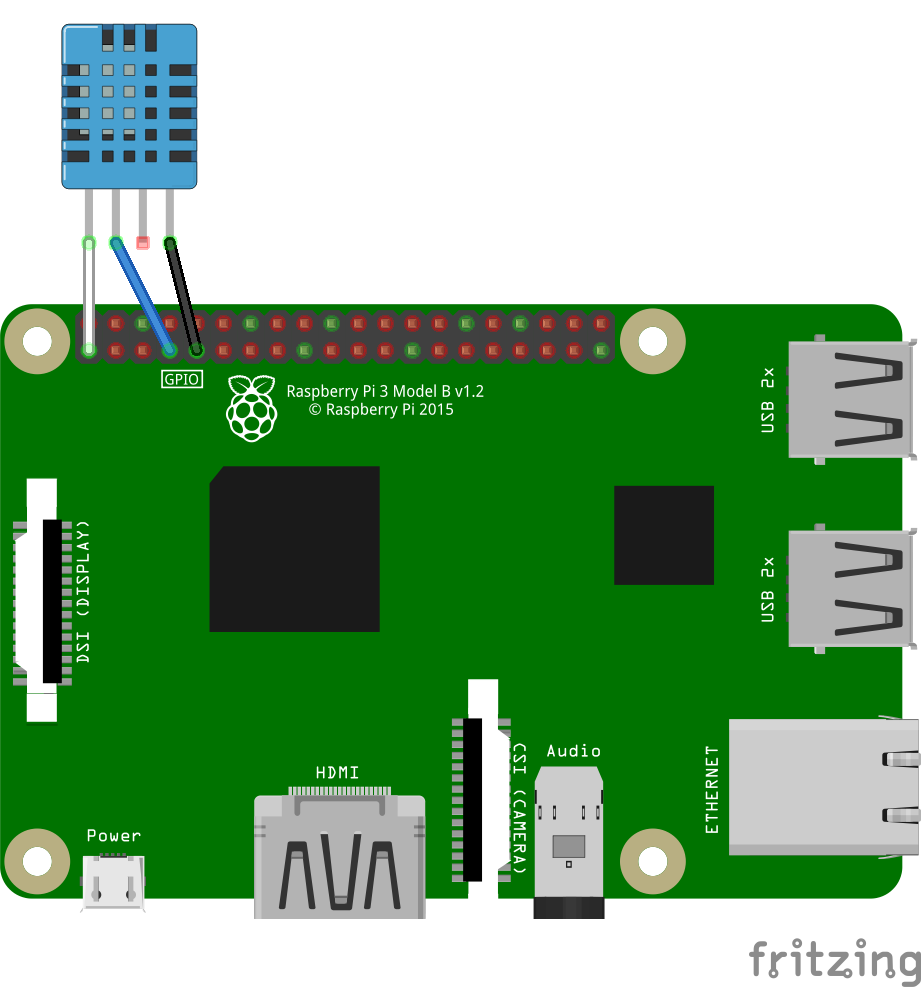
DHT11をRaspberryPiに接続する
下の表のように配線する。
| DHT11 ピン番号 | DHT11 ピン名 | RaspberryPi ピン番号 | RaspberryPi ピン名 |
|---|---|---|---|
| 1 | Vcc | 1 | 3.3v |
| 2 | Data | 7 | GPIO4 |
| 3 | NC | - | - |
| 4 | GND | 9 | GND |
RaspberryPiにBCM2835をインストールする
下のサイトから
bcm2835-1.xx.tar.gz(xxは数字)というファイルをダウンロードする。 http://www.airspayce.com/mikem/bcm2835/下のコマンドを実行する。
tar zxvf bcm2835-1.xx.tar.gz
cd bcm2835-1.xx
./configure
make
sudo make check
sudo make install
RaspberryPiにHomebridgeをインストールする
npmをインストールし、下のコマンドを実行する。
(npmのインストールの仕方は省略)
sudo npm install -g --unsafe-perm homebridge
sudo npm install -g --unsafe-perm homebridge-dht
ここで--unsafe-permを付けないで実行すると下のようなエラーが出るので注意
$ sudo npm install -g homebridge-dht

> node-dht-sensor@0.4.3 install /usr/lib/node_modules/homebridge-dht/node_modules/node-dht-sensor
> node-gyp configure

gyp WARN EACCES current user ("nobody") does not have permission to access the dev dir "/root/.cache/node-gyp/12.18.3"
gyp WARN EACCES attempting to reinstall using temporary dev dir "/usr/lib/node_modules/homebridge-dht/node_modules/node-dht-sensor/.node-gyp"
gyp WARN install got an error, rolling back install
gyp WARN install got an error, rolling back install
gyp ERR! configure error
gyp ERR! stack Error: EACCES: permission denied, mkdir '/usr/lib/node_modules/homebridge-dht/node_modules/node-dht-sensor/.node-gyp'
gyp ERR! System Linux 5.4.51-v7+
gyp ERR! command "/usr/bin/node" "/usr/lib/node_modules/npm/node_modules/node-gyp/bin/node-gyp.js" "configure"
gyp ERR! cwd /usr/lib/node_modules/homebridge-dht/node_modules/node-dht-sensor
gyp ERR! node -v v12.18.3
gyp ERR! node-gyp -v v5.1.0
gyp ERR! not ok
npm ERR! code ELIFECYCLE
npm ERR! errno 1
npm ERR! node-dht-sensor@0.4.3 install: `node-gyp configure`
npm ERR! Exit status 1
npm ERR!
npm ERR! Failed at the node-dht-sensor@0.4.3 install script.
npm ERR! This is probably not a problem with npm. There is likely additional logging output above.

npm ERR! A complete log of this run can be found in:
npm ERR!     /root/.npm/_logs/2020-08-17T04_42_12_927Z-debug.log
homebridgeの設定をする
homebridgeの設定は~/.homebridge/config.jsonを書き換えることでできる。
- デフォルトでは
.homebridge/がないので、まずこのコマンドでディレクトリを作る。
mkdir ~/.homebridge
- お好みのエディタで
~/.homebridge/config.jsonに下の内容を書き、保存する。~/.homebridge/config.jsonの内容
{    "bridge": {
     "name": "HomeBridge",
     "username": "CC:22:3D:E3:CD:33",
     "port": 51826,
     "pin": "031-45-154"
    },

"description": "HomeBridge",

"platforms": [],

"accessories": [
        { "accessory": "Dht",
        "name": "dht11",
        "name_temperature": "Temperature",
        "name_humidity": "Humidity",
        "service": "dht11" }

]}
homebridgeを起動する
下のコマンドを実行する。
homebridge
コマンドラインにQRコードが出力されるのでそれをiPhoneやiPadで読み取り、Homeアプリに機器を登録する。
参考
https://github.com/NorthernMan54/homebridge-dht/blob/master/Build.md
