サマリ
- SR-MPLS で構成されたネットワークにおいて、Per-Flow Steering を実現
- IOS XR + Junos の Multi-vendor 環境で、5-tuple と IP Precedence のそれぞれを条件とした Traffic Engineering (TE) の検証に成功
この記事は Multi-AS Segment Routing 検証連載の第 8 回です。目次は こちら
概要
イノベーションセンターの三島です。本記事では Per-Flow での SR Policy 適用手法を紹介します。 SR Policy の適用については、これまでの連載記事にて宛先 prefix ごとの TE を実現する例を紹介しました。 より多様なユースケースを実現するためには prefix 単位の経路制御に加えて、アプリケーション単位や送信元単位など、様々な経路制御の実現が必要となります。 本記事ではそのような prefix 単位以外での SR Policy の適用方法を紹介します。
SR Policy の定義と適用方法
第 4 回記事でも説明しました通り SR を用いた TE (SR-TE) の実現には SR Policy を利用します。 SR Policy は、2022 年 7 月に RFC9256 として発行されています。 この RFC では、SR Policy はどのノードへ送るかを指定する Endpoint、経路を指定する Segment List、属性である Color の 3 つの要素から構成されると定義されています。
今回のテーマである SR Policy の適用方法については、RFC9256 の 8 章にて下記が紹介されています。(一部本記事用に表現を編集)
- Local BSID Matching
- パケットへ付与された BSID に基づいて対応する SR Policy を適用する手法
- Per-Destination Steering
- 宛先の経路に基づいて SR Policy を適用する手法
- 宛先の単位としては BGP で広告された prefix 単位、VRF 単位、広告元の Endpoint 単位が使用可能
- SR Policy の自動インスタンス化が可能で、第 7 回 で紹介した On-Demand Next-Hop(ODN) を使用可能
- 宛先の経路に基づいて SR Policy を適用する手法
- Per-Flow Steering
- パケットが持つ宛先以上の情報に基づいて SR Policy を適用する手法
- ingress PE の ingress interface にて match 条件を評価、パケット識別のための Forwarding Class へ分類し、Class ごとに対応する SR Policy を選択
- 各レイヤーの条件としては次のような値が使用可能
- L2 (Ethernet): destination/source/VLAN/CoS
- L3 (IP): destination/source/ToS (Differentiated Services Code Point (DSCP) / IP Precedence)
- L4 (transport): destination/source port
- パケットが持つ宛先以上の情報に基づいて SR Policy を適用する手法
- Policy-Based Steering
- ルーティングポリシーに基づいて SR Policy を適用する手法
- Policy-Based Routing の一種として実装
- ルーティングポリシーに基づいて SR Policy を適用する手法
今回の記事では Per-Flow Steering の 実現例として、 5-tuple を基にした TE と IP Precedence を基にした TE をそれぞれ検証し紹介します。
検証
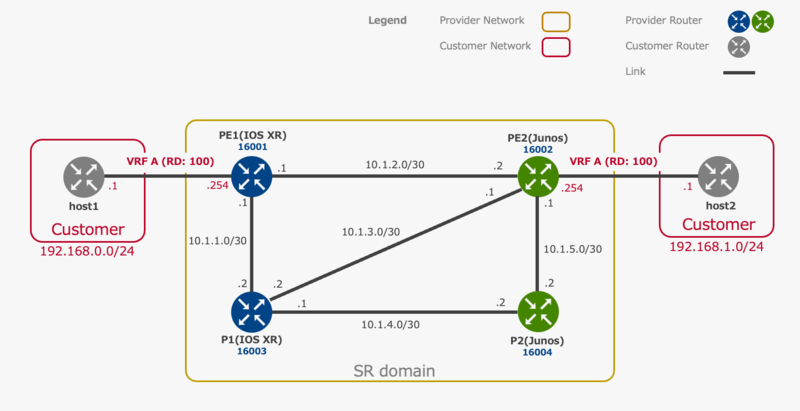
本章では、あるパケットを 5-tuple、IP Precedence のそれぞれで match させ、SR Policy を適用する例を検証します。 検証環境は下記の通りです。
事前準備
IOS XR では Per-Flow Steering を適用する BGP 経路に対して特定の Color をつける必要があります。 今回は、IBGP で対向の PE から受け取る全ての経路に color 1 を付与します。
extcommunity-set opaque COLOR-1
 1
end-set

route-policy COLOR-1-POLICY
 set extcommunity color COLOR-1
end-policy

router bgp 65001
 neighbor-group ibgp
 address-family vpnv4 unicast
  route-policy COLOR-1-POLICY in
 exit
5-tuple で match させる例
まずは、5-tuple で match したパケットのみ TE を適用する例を紹介します。 本章では以下の条件で match させ、SR Policy を適用していきます。
- host1 -> host2: 送信先アドレスが 192.168.1.1 かつ、送信先ポートが 80 番
- host2 -> host1: 送信先アドレスが 192.168.0.1 かつ、送信先ポートが 80 番
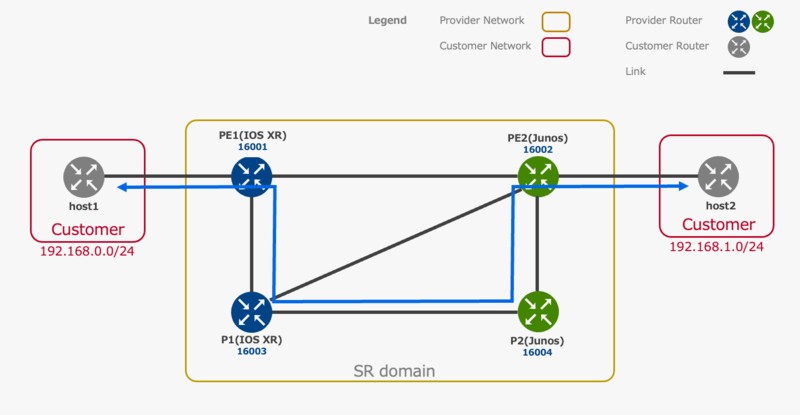
また、 match したパケットは下記の経路で転送されます。その他のパケットは IGP メトリックに従って転送されます。
パケットの分類
まず PE1、PE2 にて上記で指定した条件に一致するパケットを Forwarding Class に分類するための設定をします。
PE1(IOS XR)
5-tuple を定義した ACL を match 条件 とする class-map を定義します。
ipv4 access-list TCP-ANY-ANY-192.168.1.1-80
 1 permit tcp any host 192.168.1.1 eq 80
!
class-map type traffic match-all 5TUPLE-CLASSMAP
 match access-group ipv4 TCP-ANY-ANY-192.168.1.1-80
 end-class-map
class-map と forward-class を対応させる policy-map を定義し、customer 向けの interface に attach します。
interface TenGigE0/0/0/33.100
 service-policy type pbr input 5TUPLE-POLICYMAP
!
policy-map type pbr 5TUPLE-POLICYMAP
 class type traffic 5TUPLE-CLASSMAP
  set forward-class 1
 !
 class type traffic class-default
 !
 end-policy-map
作成した class-map と policy-map を確認します。
RP/0/RSP0/CPU0:PE1#show class-map type traffic 5TUPLE-CLASSMAP
Thu Sep  8 13:33:34.767 JST
1) ClassMap: 5TUPLE-CLASSMAP    Type: traffic
    Referenced by 1 Policymaps

RP/0/RSP0/CPU0:PE1#show policy-map type pbr pmap-name 5TUPLE-POLICYMAP detail
Thu Sep  8 14:24:51.531 JST
ipv4 access-list TCP-ANY-ANY-192.168.1.1-80
 1 permit tcp any host 192.168.1.1 eq www

class-map type traffic match-all 5TUPLE-CLASSMAP
 match access-group ipv4 TCP-ANY-ANY-192.168.1.1-80
 end-class-map
!
policy-map type pbr 5TUPLE-POLICYMAP
 class type traffic 5TUPLE-CLASSMAP
  set forward-class 1
 !
 class type traffic class-default
 !
 end-policy-map
!
PE2(Junos)
Multifield Classifier の firewall filter を設定します。
set firewall family inet filter 5TUPLE term TCP-ANY-ANY-192.168.0.1-80 from destination-address 192.168.0.1/32
set firewall family inet filter 5TUPLE term TCP-ANY-ANY-192.168.0.1-80 from protocol tcp
set firewall family inet filter 5TUPLE term TCP-ANY-ANY-192.168.0.1-80 then count 5TUPLE-COUNT
set firewall family inet filter 5TUPLE term TCP-ANY-ANY-192.168.0.1-80 then forwarding-class assured-forwarding
set firewall family inet filter 5TUPLE term TCP-ANY-ANY-192.168.0.1-80 then accept
set firewall family inet filter 5TUPLE term DEFAULT from protocol-except tcp
set firewall family inet filter 5TUPLE term DEFAULT then count DEFAULT-COUNT
set firewall family inet filter 5TUPLE term DEFAULT then forwarding-class best-effort
set firewall family inet filter 5TUPLE term DEFAULT then accept
set interfaces xe-0/1/7 unit 100 family inet filter input 5TUPLE
作成した firewall filter を確認します。
user@PE2> show firewall filter 5TUPLE

Filter: 5TUPLE
Counters:
Name                                                Bytes              Packets
5TUPLE-COUNT                                            0                    0
DEFAULT-COUNT                                           0                    0
SR Policy の定義
作成した Forwarding Class に対応する SR Policy を定義します。
PE1(IOS XR)
Explicit-Path と SR Policy を定義します。
5-tuple 条件と一致した場合の TE パスに加え、デフォルトの TE パスも定義する必要があります。
IOS XR においては、Forwarding Class ごとに分類されたパケットへの TE の適用は policy 5TUPLE-MATCH のように SR Policy を用いて行います。
segment-routing
 traffic-eng
  segment-list 5TUPLE-TE
   index 1 mpls label 16003
   index 2 mpls label 16004
   index 3 mpls label 16002
  !
  policy FC-1
   color 101 end-point ipv4 10.255.1.2
   candidate-paths
    preference 100
     explicit segment-list 5TUPLE-TE
     !
    !
   !
  !
  policy DEFAULT
   color 100 end-point ipv4 10.255.1.2
   candidate-paths
    preference 100
     dynamic
      metric
       type igp
      !
     !
    !
   !
  !
  policy 5TUPLE-MATCH
   color 1 end-point ipv4 10.255.1.2
   candidate-paths
    preference 100
     per-flow
      forward-class 0 color 100
      forward-class 1 color 101
      forward-class default 0
作成した SR Policy を確認します。
RP/0/RSP0/CPU0:PE1# show segment-routing traffic-eng policy
Thu Sep  8 14:27:40.143 JST

SR-TE policy database
---------------------

Color: 101, End-point: 10.255.1.2
  Name: srte_c_101_ep_10.255.1.2
  Status:
    Admin: up  Operational: up for 3d02h (since Sep  5 18:15:54.714)
  Candidate-paths:
    Preference: 100 (configuration) (active)
      Name: FC-1
      Requested BSID: dynamic
        Protection Type: protected-preferred
        Maximum SID Depth: 10
      Explicit: segment-list 5TUPLE-TE (valid)
        Weight: 1, Metric Type: TE
          16003 [Prefix-SID, 10.255.1.5]
          16004
          16002
  Attributes:
    Binding SID: 24023
    Forward Class: Not Configured
    Steering labeled-services disabled: no
    Steering BGP disabled: no
    IPv6 caps enable: yes
    Invalidation drop enabled: no
    Max Install Standby Candidate Paths: 0

Color: 100, End-point: 10.255.1.2
  Name: srte_c_100_ep_10.255.1.2
  Status:
    Admin: up  Operational: up for 3d01h (since Sep  5 18:49:30.081)
  Candidate-paths:
    Preference: 100 (configuration) (active)
      Name: DEFAULT
      Requested BSID: dynamic
        Protection Type: protected-preferred
        Maximum SID Depth: 10
      Dynamic (valid)
        Metric Type: IGP,   Path Accumulated Metric: 10
          16002 [Prefix-SID, 10.255.1.2]
  Attributes:
    Binding SID: 24025
    Forward Class: Not Configured
    Steering labeled-services disabled: no
    Steering BGP disabled: no
    IPv6 caps enable: yes
    Invalidation drop enabled: no
    Max Install Standby Candidate Paths: 0

Color: 1, End-point: 10.255.1.2
  Name: srte_c_1_ep_10.255.1.2
  Status:
    Admin: up  Operational: up for 00:10:21 (since Sep  8 20:17:19.421)
  Candidate-paths:
    Preference: 100 (configuration) (active)
      Name: 5TUPLE-MATCH
      Requested BSID: dynamic
      Per-flow Information:
        Forward     PDP     PDP
          Class   Color  Status
        ------- ------- -------
              0     100      Up
              1     101      Up
        Default Forward Class: 0
  Attributes:
    Binding SID: 24006
    Forward Class: Not Configured
    Steering labeled-services disabled: no
    Steering BGP disabled: no
    IPv6 caps enable: yes
    Invalidation drop enabled: no
    Max Install Standby Candidate Paths: 0
PE2(Junos)
Explicit-Path と SR Policy を定義します。
5-tuple 条件と一致した場合の TE パスに加え、デフォルトの TE パスも定義する必要があります。
Junos においては、Forwarding Class ごとに分類されたパケットへの TE の適用は 5TUPLE-FORWARDING などのように routing-options を用いて行います。
set protocols source-packet-routing segment-list 5TUPLE-TE P2 label 16004
set protocols source-packet-routing segment-list 5TUPLE-TE P1 label 16003
set protocols source-packet-routing segment-list 5TUPLE-TE PE1 label 16001
set protocols source-packet-routing source-routing-path FC-1 to 10.255.1.1
set protocols source-packet-routing source-routing-path FC-1 primary 5TUPLE-TE

set protocols source-packet-routing compute-profile DYNAMIC-IGP metric-type igp
set protocols source-packet-routing source-routing-path DEFAULT to 10.255.1.1
set protocols source-packet-routing source-routing-path DEFAULT primary odn_path compute DYNAMIC-IGP

set class-of-service forwarding-policy next-hop-map 5TUPLE-POLICYMAP forwarding-class best-effort lsp-next-hop DEFAULT
set class-of-service forwarding-policy next-hop-map 5TUPLE-POLICYMAP forwarding-class assured-forwarding lsp-next-hop FC-1

set policy-options policy-statement 5TUPLE-FORWARDING then cos-next-hop-map 5TUPLE-POLICYMAP
set routing-options forwarding-table export 5TUPLE-FORWARDING
作成した SR Policy を確認します。
user@PE2> show spring-traffic-engineering lsp detail
Name: DEFAULT
  Tunnel-source: Static configuration
  Tunnel Forward Type: SRMPLS
  To: 10.255.1.1
  State: Up
    Path: odn_path
    Path Status: NA
    Outgoing interface: NA
    Auto-translate status: Disabled Auto-translate result: N/A
    Compute Status:Enabled , Compute Result:success , Compute-Profile Name:DYNAMIC-IGP
    Total number of computed paths: 1
    Computed-path-index: 1
      BFD status: N/A BFD name: N/A
      TE metric: 10, IGP metric: 10
      Delay metrics: Min: 16777215, Max: 16777215, Avg: 16777215
      Metric optimized by type: IGP
      computed segments count: 1
        computed segment : 1 (computed-node-segment):
          node segment label: 16001
          router-id: 10.255.1.1

Name: FC-1
  Tunnel-source: Static configuration
  Tunnel Forward Type: SRMPLS
  To: 10.255.1.1
  State: Up
    Path: 5TUPLE-TE
    Path Status: NA
    Outgoing interface: NA
    Auto-translate status: Disabled Auto-translate result: N/A
    Compute Status:Disabled , Compute Result:N/A , Compute-Profile Name:N/A
    BFD status: N/A BFD name: N/A
    Segment ID : 128
    ERO Valid: true
      SR-ERO hop count: 3
        Hop 1 (Strict):
          NAI: None
          SID type: 20-bit label, Value: 16004
        Hop 2 (Strict):
          NAI: None
          SID type: 20-bit label, Value: 16003
        Hop 3 (Strict):
          NAI: None
          SID type: 20-bit label, Value: 16001
疎通確認
mtr を用いて経路を確認します。
host1
user@host1:~$ mtr -n -e 192.168.1.1

host1 (192.168.0.1)                                                                                            2022-09-08T23:33:23+0000
Keys:  Help   Display mode   Restart statistics   Order of fields   quit
                                                                                              Packets               Pings
 Host                                                                                       Loss%   Snt   Last   Avg  Best  Wrst StDev
 1. 192.168.0.254                                                                            0.0%     5    1.5   1.4   1.3   1.5   0.1
 2. 192.168.1.254                                                                            0.0%     4    0.3   0.4   0.3   0.5   0.1
 3. 192.168.1.1                                                                              0.0%     4    0.6   0.5   0.4   0.6   0.1
user@host1:~$ mtr -n -e -T -P 80 192.168.1.1

host1 (192.168.0.1)                                                                                            2022-09-08T23:30:58+0000
Keys:  Help   Display mode   Restart statistics   Order of fields   quit
                                                                                              Packets               Pings
 Host                                                                                       Loss%   Snt   Last   Avg  Best  Wrst StDev
 1. 192.168.0.254                                                                            0.0%     5    1.5   1.5   1.3   1.6   0.1
 2. 10.1.1.2                                                                                 0.0%     5    1.9   2.8   1.9   3.5   0.6
    [MPLS: Lbl 16004 TC 0 S 0 TTL 1]
    [MPLS: Lbl 16002 TC 0 S 0 TTL 1]
    [MPLS: Lbl 123 TC 0 S 1 TTL 1]
 3. (waiting for reply)
 4. 192.168.1.254                                                                            0.0%     5    0.7   2.3   0.7   8.6   3.5
 5. 192.168.1.1                                                                              0.0%     5    0.5   0.5   0.4   0.6   0.1
host2
user@host2:~$ mtr -n 192.168.0.1

host2 (192.168.1.1)                                                                                            2022-09-08T23:36:14+0000
Keys:  Help   Display mode   Restart statistics   Order of fields   quit
                                                                                              Packets               Pings
 Host                                                                                       Loss%   Snt   Last   Avg  Best  Wrst StDev
 1. 192.168.1.254                                                                            0.0%     5    0.5   0.5   0.3   0.6   0.1
 2. 10.1.2.1                                                                                 0.0%     5    1.4   1.5   1.4   1.6   0.1
 3. 192.168.0.1                                                                              0.0%     5    0.4   0.5   0.4   0.5   0.0
user@host2:~$ mtr -n -T -P 80 192.168.0.1

host2 (192.168.1.1)                                                                                            2022-09-08T23:35:22+0000
Keys:  Help   Display mode   Restart statistics   Order of fields   quit
                                                                                              Packets               Pings
 Host                                                                                       Loss%   Snt   Last   Avg  Best  Wrst StDev
 1. 192.168.1.254                                                                            0.0%     7    0.6   1.9   0.3  10.0   3.6
 2. (waiting for reply)
 3. 10.1.4.1                                                                                0.0%     7    3.1   3.1   2.0   3.9   0.6
    [MPLS: Lbl 16001 TC 0 S 0 TTL 1]
    [MPLS: Lbl 24002 TC 0 S 1 TTL 2]
 4. 10.1.1.1                                                                                 0.0%     7    1.5   1.5   1.3   1.6   0.1
 5. 192.168.0.1                                                                              0.0%     7    0.4   0.5   0.4   0.5   0.1
IP Precedence で match させる例
IP Precedence で match したパケットのみ TE を適用する例を紹介します。 本章では host1 と host2 間にていずれの方向にも IP Precedence == 1 で match させ、SR Policy を適用していきます。 match したパケットは下記の経路で転送されます。その他のパケットは IGP メトリックに従って転送されます。
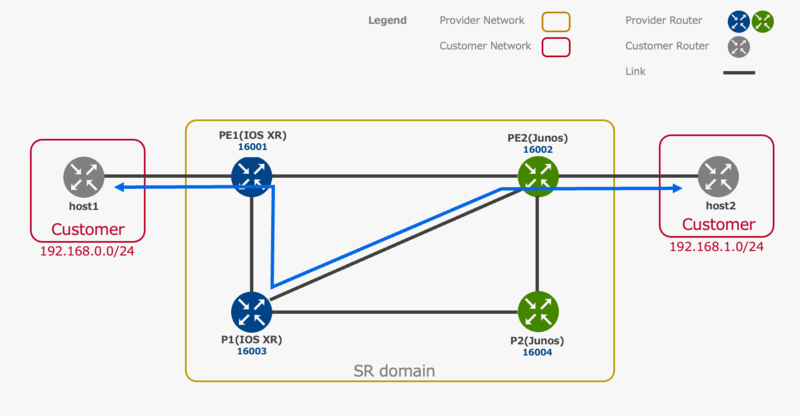
なお、一部設定は前章での 5-tupple による TE の設定と競合するため、検証をなぞる際は別環境で行うか前章での設定を削除してから行ってください。
パケットの分類
まず PE1、PE2 にて上記で指定した条件に一致するパケットを Forwarding Class に分類するための設定をします。
PE1(IOS XR)
IP Precedence を match 条件 とする class-map を定義します。
class-map type traffic match-all IP-PRECEDENCE1
 match precedence 1
 end-class-map
class-map と forward-class を対応させる policy-map を定義し、customer 向けの interface に attach します。
policy-map type pbr PRECEDENCE1-POLICYMAP
 class type traffic IP-PRECEDENCE1
  set forward-class 1
 !
 class type traffic class-default
 !
 end-policy-map

interface TenGigE0/0/0/33.100
 service-policy type pbr input PRECEDENCE1-POLICYMAP
作成した class-map と policy-map を確認します。
RP/0/RSP0/CPU0:PE1#show class-map type traffic IP-PRECEDENCE1
Thu Sep  8 14:31:23.599 JST
1) ClassMap: IP-PRECEDENCE1    Type: traffic
    Referenced by 0 Policymaps

RP/0/RSP0/CPU0:PE1#show policy-map type pbr pmap-name  PRECEDENCE1-POLICYMAP detail
Thu Sep  8 14:41:12.876 JST
class-map type traffic match-all IP-PRECEDENCE1
 match precedence 1
 end-class-map
!
policy-map type pbr PRECEDENCE1-POLICYMAP
 class type traffic IP-PRECEDENCE1
  set forward-class 1
 !
 class type traffic class-default
 !
 end-policy-map
!
PE2(Junos)
Multifield Classifier の firewall filter を設定します。
set firewall family inet filter IP-PRECEDENCE1 term 1 from precedence 1
set firewall family inet filter IP-PRECEDENCE1 term 1 then count IP-PRECEDENCE1-COUNT
set firewall family inet filter IP-PRECEDENCE1 term 1 then forwarding-class assured-forwarding
set firewall family inet filter IP-PRECEDENCE1 term 1 then accept
set firewall family inet filter IP-PRECEDENCE1 term 2 from precedence-except 1
set firewall family inet filter IP-PRECEDENCE1 term 2 then count NOT-IP-PRECEDENCE1
set firewall family inet filter IP-PRECEDENCE1 term 2 then forwarding-class best-effort
set firewall family inet filter IP-PRECEDENCE1 term 2 then accept
set interfaces xe-0/1/7 unit 100 family inet filter input IP-PRECEDENCE1
作成した firewall filter を確認します。
user@PE2> show firewall filter IP-PRECEDENCE1

Filter: IP-PRECEDENCE1
Counters:
Name                                                Bytes              Packets
IP-PRECEDENCE1-COUNT                                    0                    0
NOT-IP-PRECEDENCE1                                      0                    0
SR Policy の定義
作成した Forwarding Class に対応する SR Policy を定義します。
PE1(IOS XR)
Explicit-Path と SR Policy を定義します。
segment-routing
 traffic-eng
  segment-list IP-PRECEDENCE-TE
   index 2 mpls label 16003
   index 3 mpls label 16002
  !
  policy FC-1
   color 101 end-point ipv4 10.255.1.2
   candidate-paths
    preference 100
     explicit segment-list IP-PRECEDENCE-TE
     !
    !
   !
  !
  policy DEFAULT
   color 100 end-point ipv4 10.255.1.2
   candidate-paths
    preference 100
     dynamic
      metric
       type igp
      !
     !
    !
   !
  !
  policy IP-PRECEDENCE-MATCH
   color 1 end-point ipv4 10.255.1.2
   candidate-paths
    preference 100
     per-flow
      forward-class 0 color 100
      forward-class 1 color 101
      forward-class default 0
作成した SR Policy を確認します。
RP/0/RSP0/CPU0:PE1#show segment-routing traffic-eng policy detail
Fri Sep  9 08:44:11.638 JST

SR-TE policy database
---------------------

Color: 101, End-point: 10.255.1.2
  Name: srte_c_101_ep_10.255.1.2
  Status:
    Admin: up  Operational: up for 3d14h (since Sep  5 18:15:54.714)
  Candidate-paths:
    Preference: 100 (configuration) (active) (reoptimizing)
      Name: FC-1
      Requested BSID: dynamic
        Protection Type: protected-preferred
        Maximum SID Depth: 10
      Explicit: segment-list IP-PRECEDENCE-TE (valid)
        Weight: 1, Metric Type: TE
          16003 [Prefix-SID, 10.255.1.5]
          16002
  LSPs:
    LSP[0]:
      LSP-ID: 2 policy ID: 2 (active)
      Local label: 24022
      State: Programmed
      Binding SID: 24023
    LSP[1]:
      LSP-ID: 3 policy ID: 2 (reoptimized)
      Local label: 24004
      State: Install timer pending
  Attributes:
    Binding SID: 24023
    Forward Class: Not Configured
    Steering labeled-services disabled: no
    Steering BGP disabled: no
    IPv6 caps enable: yes
    Invalidation drop enabled: no
    Max Install Standby Candidate Paths: 0

Color: 100, End-point: 10.255.1.2
  Name: srte_c_100_ep_10.255.1.2
  Status:
    Admin: up  Operational: up for 3d13h (since Sep  5 18:49:30.081)
  Candidate-paths:
    Preference: 100 (configuration) (active)
      Name: DEFAULT
      Requested BSID: dynamic
        Protection Type: protected-preferred
        Maximum SID Depth: 10
      Dynamic (valid)
        Metric Type: IGP,   Path Accumulated Metric: 10
          16002 [Prefix-SID, 10.255.1.2]
  LSPs:
    LSP[0]:
      LSP-ID: 2 policy ID: 4 (active)
      Local label: 24024
      State: Programmed
      Binding SID: 24025
  Attributes:
    Binding SID: 24025
    Forward Class: Not Configured
    Steering labeled-services disabled: no
    Steering BGP disabled: no
    IPv6 caps enable: yes
    Invalidation drop enabled: no
    Max Install Standby Candidate Paths: 0

Color: 1, End-point: 10.255.1.2
  Name: srte_c_1_ep_10.255.1.2
  Status:
    Admin: up  Operational: up for 00:00:03 (since Sep  9 08:44:08.469)
  Candidate-paths:
    Preference: 100 (configuration) (active)
      Name: IP-PRECEDENCE-MATCH
      Requested BSID: dynamic
      Per-flow Information:
        Forward     PDP     PDP
          Class   Color  Status
        ------- ------- -------
              0     100      Up
              1     101      Up
        Default Forward Class: 0
  LSPs:
    LSP[0]:
      LSP-ID: 4 policy ID: 5 (active)
      State: Programmed
      Binding SID: 24014
  Attributes:
    Binding SID: 24014
    Forward Class: Not Configured
    Steering labeled-services disabled: no
    Steering BGP disabled: no
    IPv6 caps enable: yes
    Invalidation drop enabled: no
    Max Install Standby Candidate Paths: 0
PE2(Junos)
Explicit-Path と SR Policy を定義します。
set protocols source-packet-routing segment-list IP-PRECEDENCE-TE P1 label 16003
set protocols source-packet-routing segment-list IP-PRECEDENCE-TE PE1 label 16001
set protocols source-packet-routing source-routing-path FC-1 to 10.255.1.1
set protocols source-packet-routing source-routing-path FC-1 primary IP-PRECEDENCE-TE

set protocols source-packet-routing compute-profile DYNAMIC-IGP metric-type igp
set protocols source-packet-routing source-routing-path DEFAULT to 10.255.1.1
set protocols source-packet-routing source-routing-path DEFAULT primary odn_path compute DYNAMIC-IGP

set class-of-service forwarding-policy next-hop-map IP-PRECEDENCE-POLICYMAP forwarding-class best-effort lsp-next-hop DEFAULT
set class-of-service forwarding-policy next-hop-map IP-PRECEDENCE-POLICYMAP forwarding-class assured-forwarding lsp-next-hop FC-1

set policy-options policy-statement IP-PRECEDENCE-FORWARDING then cos-next-hop-map IP-PRECEDENCE-POLICYMAP

set routing-options forwarding-table export IP-PRECEDENCE-FORWARDING
作成した SR Policy を確認します。
user@PE2> show spring-traffic-engineering lsp detail
Name: DEFAULT
  Tunnel-source: Static configuration
  Tunnel Forward Type: SRMPLS
  To: 10.255.1.1
  State: Up
    Path: odn_path
    Path Status: NA
    Outgoing interface: NA
    Auto-translate status: Disabled Auto-translate result: N/A
    Compute Status:Enabled , Compute Result:success , Compute-Profile Name:DYNAMIC-IGP
    Total number of computed paths: 1
    Computed-path-index: 1
      BFD status: N/A BFD name: N/A
      TE metric: 10, IGP metric: 10
      Delay metrics: Min: 16777215, Max: 16777215, Avg: 16777215
      Metric optimized by type: IGP
      computed segments count: 1
        computed segment : 1 (computed-node-segment):
          node segment label: 16001
          router-id: 10.255.1.1

Name: FC-1
  Tunnel-source: Static configuration
  Tunnel Forward Type: SRMPLS
  To: 10.255.1.1
  State: Up
    Path: IP-PRECEDENCE-TE
    Path Status: NA
    Outgoing interface: NA
    Auto-translate status: Disabled Auto-translate result: N/A
    Compute Status:Disabled , Compute Result:N/A , Compute-Profile Name:N/A
    BFD status: N/A BFD name: N/A
    Segment ID : 128
    ERO Valid: true
      SR-ERO hop count: 2
        Hop 1 (Strict):
          NAI: None
          SID type: 20-bit label, Value: 16003
        Hop 2 (Strict):
          NAI: None
          SID type: 20-bit label, Value: 16001
疎通確認
mtr を用いて経路を確認します。
host1
通常の ICMP パケットは最短経路を通ります。
user@host1:~$ mtr -n -e 192.168.1.1

host1 (192.168.0.1)                                                                                            2022-09-08T23:56:49+0000
Keys:  Help   Display mode   Restart statistics   Order of fields   quit
                                                                                              Packets               Pings
 Host                                                                                       Loss%   Snt   Last   Avg  Best  Wrst StDev
 1. 192.168.0.254                                                                            0.0%     6    1.4   1.4   1.3   1.5   0.1
 2. 192.168.1.254                                                                            0.0%     5    0.5   0.5   0.3   0.6   0.1
 3. 192.168.1.1                                                                              0.0%     5    0.4   0.4   0.4   0.5   0.0
IP Precedence が 1(ToS が 32)のパケットは想定通りに TE が適用されています。
user@host1:~$ mtr -n -e -Q 32 192.168.1.1

host1 (192.168.0.1)                                                                                            2022-09-09T00:03:10+0000
Keys:  Help   Display mode   Restart statistics   Order of fields   quit
                                                                                              Packets               Pings
 Host                                                                                       Loss%   Snt   Last   Avg  Best  Wrst StDev
 1. 192.168.0.254                                                                            0.0%     5    1.5   1.5   1.4   1.6   0.1
 2. 10.1.1.2                                                                                 0.0%     4    2.7   2.8   2.0   3.7   0.7
    [MPLS: Lbl 16002 TC 1 S 0 TTL 1]
    [MPLS: Lbl 123 TC 1 S 1 TTL 1]
 3. 192.168.1.254                                                                            0.0%     4    0.4   0.5   0.4   0.6   0.1
 4. 192.168.1.1                                                                              0.0%     4    0.5   0.5   0.4   0.5   0.0
host2
通常の ICMP パケットは最短経路を通ります。
user@host2:~$ mtr -n 192.168.0.1

host2 (192.168.1.1)                                                                                            2022-09-09T00:03:41+0000
Keys:  Help   Display mode   Restart statistics   Order of fields   quit
                                                                                              Packets               Pings
 Host                                                                                       Loss%   Snt   Last   Avg  Best  Wrst StDev
 1. 192.168.1.254                                                                            0.0%     6   10.8   8.0   0.4  13.7   6.0
 2. 10.1.2.1                                                                                 0.0%     5    1.6   1.6   1.4   1.7   0.1
 3. 192.168.0.1                                                                              0.0%     5    0.4   0.5   0.4   0.5   0.0
IP Precedence が 1(ToS が 32)のパケットは想定通りに TE が適用されています。
user@host2:~$ mtr -n -T -P 80 192.168.0.1

host2 (192.168.1.1)                                                                                            2022-09-09T00:04:23+0000
Keys:  Help   Display mode   Restart statistics   Order of fields   quit
                                                                                              Packets               Pings
 Host                                                                                       Loss%   Snt   Last   Avg  Best  Wrst StDev
 1. 192.168.1.254                                                                            0.0%     9    0.5   0.4   0.4   0.5   0.1
 2. 10.1.3.2                                                                                 0.0%     9    2.8   2.9   1.9   3.5   0.5
    [MPLS: Lbl 16001 TC 1 S 0 TTL 1]
    [MPLS: Lbl 24002 TC 1 S 1 TTL 1]
 3. 10.1.1.1                                                                                 0.0%     8    1.5   1.5   1.4   1.6   0.1
 4. 192.168.0.1                                                                              0.0%     8    0.5   0.5   0.5   0.6   0.0
まとめ
本記事では、SR Policy の適用手法をまとめることで宛先 prefix よりも細かい単位での経路制御を紹介しました。 検証では例として 5-tuple と IP Precedence のそれぞれを match 条件として実装しましたが、実運用ではユースケースに応じて適切な match 条件を選択してください。
次回の記事では TI-LFA を利用した 高速迂回(FastReRoute)について紹介予定です。
(2022/10/03 追記) 公開しました:[Multi-AS Segment Routing 検証連載 #9] TI-LFA を用いた障害時の高速迂回
