目次
- step 1 - SQL Server 2025 Express & ODBCドライバ & sqlcmd.exe のインストール
- step 2 - SQL Server 2025 構成マネージャー での設定変更
- step 3 - sqlcmd.exe で接続
step 1 - SQL Server 2025 Express & ODBCドライバ & sqlcmd.exe のインストール
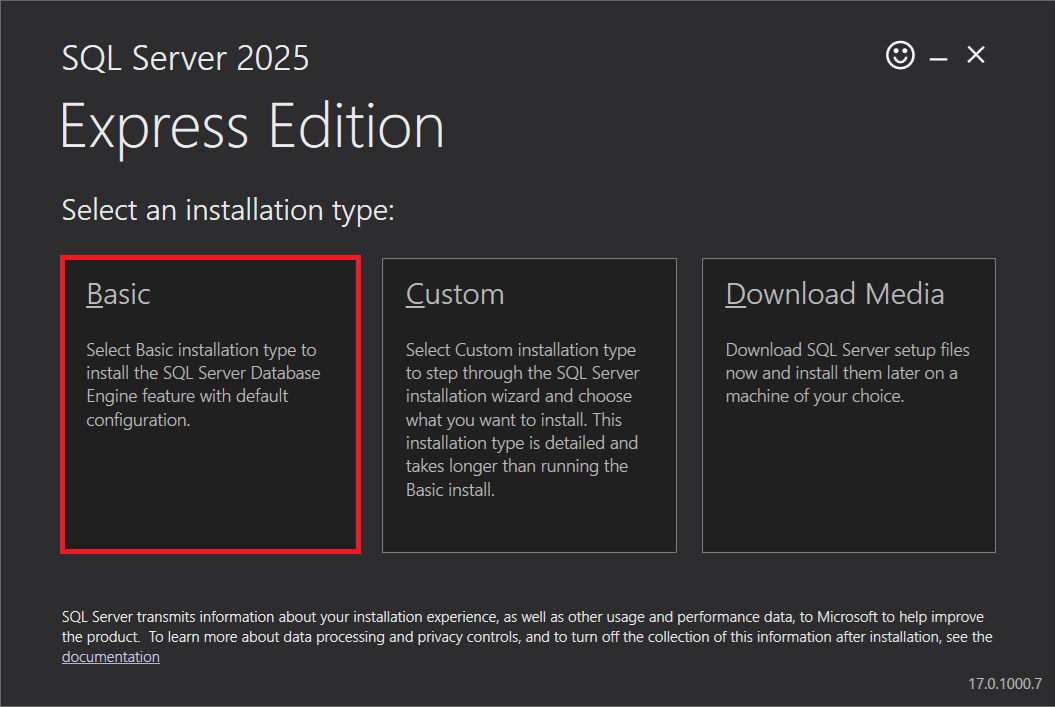
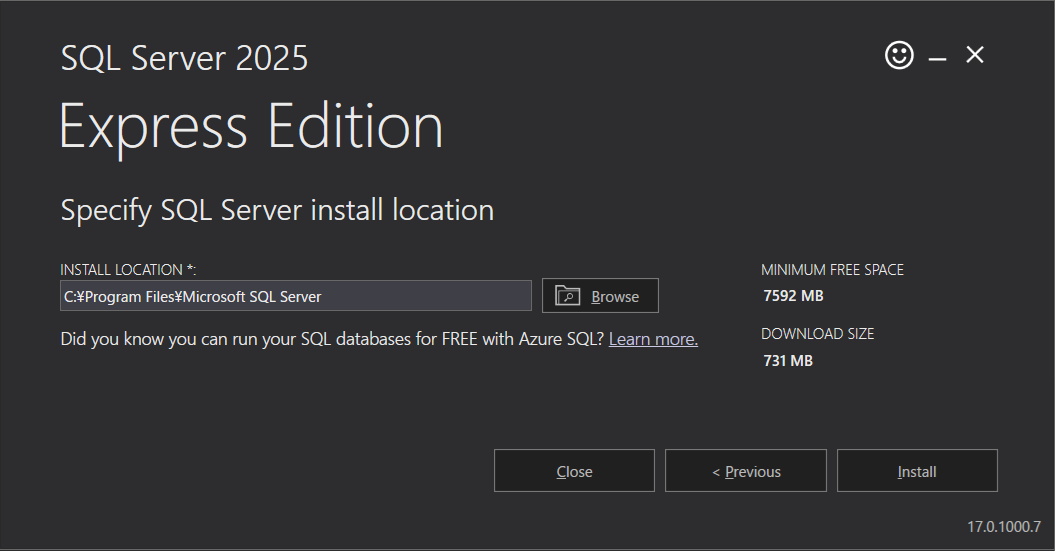
https://www.microsoft.com/ja-jp/sql-server/sql-server-downloads からインストーラの SQL2025-SSEI-Expr.exe をダウンロードし、実行。
インストール完了画面に表示される CONNECTION STRING は、 今後、利用するかもしれませんので、以下へコピーしておきます。
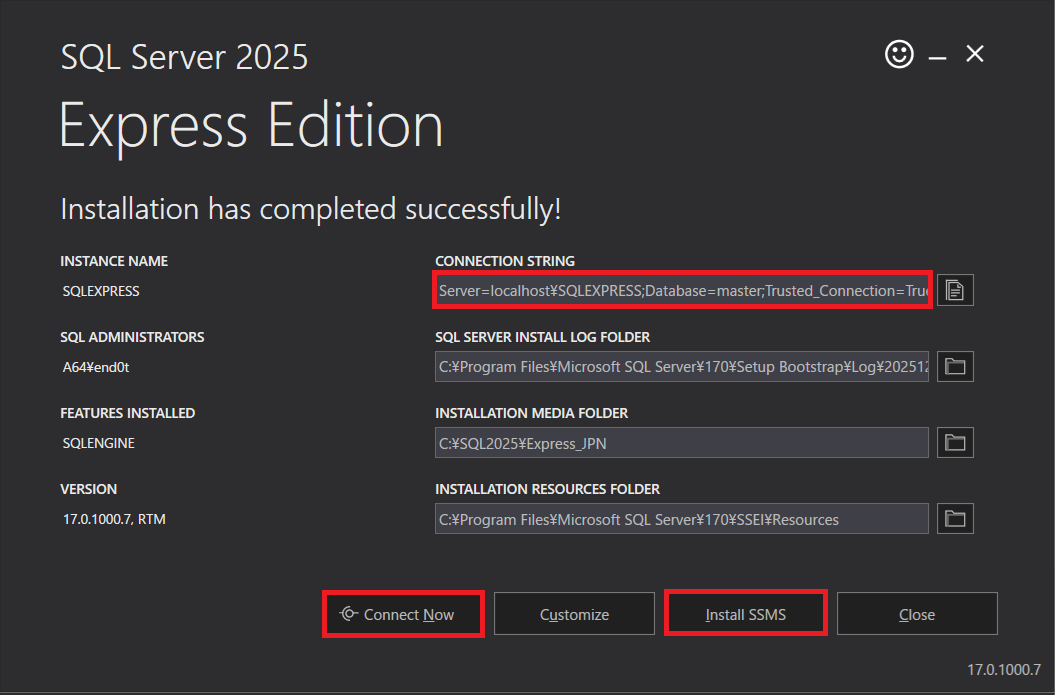
Server=localhost\SQLEXPRESS;Database=master;Trusted_Connection=True;
続けて SSMS (SQL Server Management Studio)もインストールできるようですが、 今回はインストールしません。
「Connect Now」をクリックすると、コマンドプロンプトが起動し、 「sqlcmd -S A64\SQLEXPRESS -No -E」で SQL Serverへの接続と、 select @@Version の SQLが実行されます。
--
-- run below commmand from command prompt
-- sqlcmd -S A64\SQLEXPRESS -No -E
--

select @@Version
go

-----------------------------------------------------------------------
Microsoft SQL Server 2025 (RTM) - 17.0.1000.7 (X64)
  Oct 21 2025 12:05:57
  Copyright (C) 2025 Microsoft Corporation
  Express Edition (64-bit) on Windows 10 Pro 10.0 <X64> (Build 26200: )

(1 行処理されました)
1>
ODBCドライバも併せてインストールされます
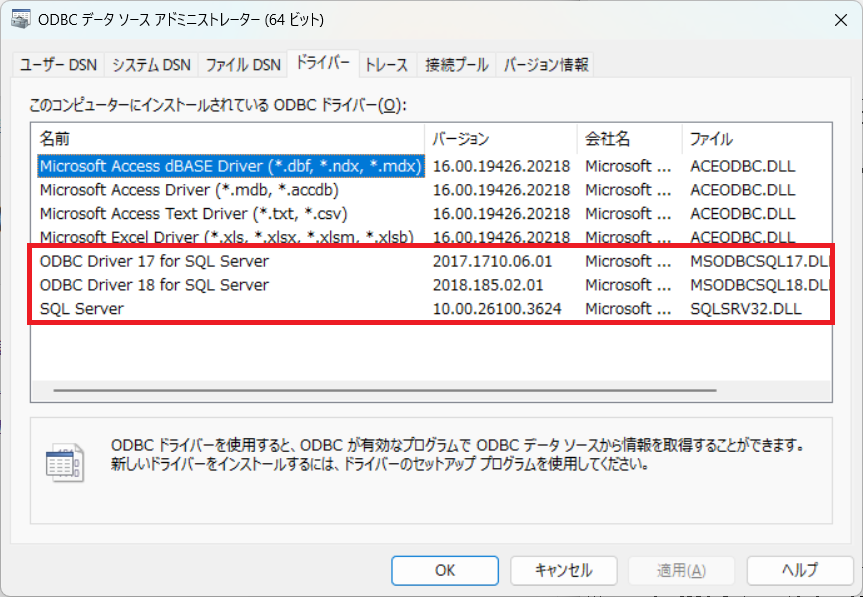
また、コマンドラインツールである sqlcmd.exe もインストールされます
DOS> where sqlcmd
C:\Program Files\Microsoft SQL Server\Client SDK\ODBC\180\Tools\Binn\SQLCMD.EXE

DOS> sqlcmd -?
sqlcmd: Install/Create/Query SQL Server, Azure SQL, and Tools

Version: v1.9.0

Flags:
-K,--application-intent
   Declares the application workload type when connecting to a
   server. The only currently supported value is ReadOnly.
   If -K is not specified, the sqlcmd utility will not
   support connectivity to a secondary replica in an Always
   On availability group

   --authentication-method
   Specifies the SQL authentication method to use to connect
   to Azure SQL Database. One of: ActiveDirectoryDefault,
   ActiveDirectoryIntegrated, ActiveDirectoryPassword,
   ActiveDirectoryInteractive,
   ActiveDirectoryManagedIdentity,
   ActiveDirectoryServicePrincipal,
   ActiveDirectoryServicePrincipalAccessToken,
   ActiveDirectoryAzCli, ActiveDirectoryDeviceCode,
   ActiveDirectoryWorkloadIdentity,
   ActiveDirectoryClientAssertion,
   ActiveDirectoryAzurePipelines,
   ActiveDirectoryEnvironment,
   ActiveDirectoryAzureDeveloperCli, SqlPassword

-c,--batch-terminator
   Specifies the batch terminator. The default value is GO

-z,--change-password
   New password

-Z,--change-password-exit
   New password and exit

-R,--client-regional-setting
   Provided for backward compatibility. Client regional
   settings are not used

-s,--column-separator
   Specifies the column separator character. Sets the
   SQLCMDCOLSEP variable.

-d,--database-name
   This option sets the sqlcmd scripting variable
   SQLCMDDBNAME. This parameter specifies the initial
   database. The default is your login's default-database
   property. If the database does not exist, an error
   message is generated and sqlcmd exits

-A,--dedicated-admin-connection
   Dedicated administrator connection

-X,--disable-cmd-and-warn
   -X[1] Disables commands that might compromise system
   security. Passing 1 tells sqlcmd to exit when disabled
   commands are run.

-x,--disable-variable-substitution
   Causes sqlcmd to ignore scripting variables. This parameter
   is useful when a script contains many INSERT statements
   that may contain strings that have the same format as
   regular variables, such as $(variable_name)

   --driver-logging-level
   Level of mssql driver messages to print

-e,--echo-input
   Echo input

-g,--enable-column-encryption
   Enable column encryption

-I,--enable-quoted-identifiers
   Provided for backward compatibility. Quoted identifiers are
   always enabled

-N,--encrypt-connection
   This switch is used by the client to request an encrypted
   connection

-m,--error-level
   Controls which error messages are sent to stdout. Messages
   that have severity level greater than or equal to this
   level are sent

-V,--error-severity-level
   Controls the severity level that is used to set the
   ERRORLEVEL variable on exit

-r,--errors-to-stderr
   -r[0 | 1] Redirects error messages with severity >= 11
   output to stderr. Pass 1 to to redirect all errors
   including PRINT.

-b,--exit-on-error
   Specifies that sqlcmd exits and returns a DOS ERRORLEVEL
   value when an error occurs

-Y,--fixed-type-width
   Sets the sqlcmd scripting variable SQLCMDMAXFIXEDTYPEWIDTH

-h,--headers
   Specifies the number of rows to print between the column
   headings. Use -h-1 to specify that headers not be
   printed

-?,--help
   -? shows this syntax summary, --help shows modern sqlcmd
   sub-command help

-F,--host-name-in-certificate
   Specifies the host name in the server certificate.

-q,--initial-query
   Executes a query when sqlcmd starts, but does not exit
   sqlcmd when the query has finished running.
   Multiple-semicolon-delimited queries can be executed

-i,--input-file
   Identifies one or more files that contain batches of SQL
   statements. If one or more files do not exist, sqlcmd
   will exit. Mutually exclusive with -Q/-q

-L,--list-servers
   -L[c] List servers. Pass c to omit 'Servers:' output.

-l,--login-timeOut
   Specifies the number of seconds before a sqlcmd login to
   the go-mssqldb driver times out when you try to connect
   to a server. This option sets the sqlcmd scripting
   variable SQLCMDLOGINTIMEOUT. The default value is 30. 0
   means infinite

-M,--multi-subnet-failover
   Provided for backward compatibility. Sqlcmd always
   optimizes detection of the active replica of a SQL
   Failover Cluster

-o,--output-file
   Identifies the file that receives output from sqlcmd

-a,--packet-size
   Requests a packet of a different size. This option sets the
   sqlcmd scripting variable SQLCMDPACKETSIZE. packet_size
   must be a value between 512 and 32767. The default =
   4096. A larger packet size can enhance performance for
   execution of scripts that have lots of SQL statements
   between GO commands. You can request a larger packet
   size. However, if the request is denied, sqlcmd uses the
   server default for packet size

-P,--password
   Password

-Q,--query
   Executes a query when sqlcmd starts and then immediately
   exits sqlcmd. Multiple-semicolon-delimited queries can
   be executed

-t,--query-timeout
   Query timeout

-k,--remove-control-characters
   -k [1|2] Remove control characters from output. Pass 1 to
   substitute a space per character, 2 for a space per
   consecutive characters

-w,--screen-width
   Specifies the screen width for output

-S,--server
   [[tcp:]|[lpc:]|[np:]]server[\instance_name][,port]
   Specifies the instance of SQL Server to which to
   connect. It sets the sqlcmd scripting variable
   SQLCMDSERVER.

   --trace-file
   Write runtime trace to the specified file. Only for
   advanced debugging.

-W,--trim-spaces
   Remove trailing spaces from a column

-C,--trust-server-certificate
   Implicitly trust the server certificate without validation

-u,--unicode-output-file
   Specifies that all output files are encoded with
   little-endian Unicode

-G,--use-aad
   Tells sqlcmd to use ActiveDirectory authentication. If no
   user name is provided, authentication method
   ActiveDirectoryDefault is used. If a password is
   provided, ActiveDirectoryPassword is used. Otherwise
   ActiveDirectoryInteractive is used

-E,--use-trusted-connection
   Uses a trusted connection instead of using a user name and
   password to sign in to SQL Server, ignoring any
   environment variables that define user name and password

-U,--user-name
   The login name or contained database user name. For
   contained database users, you must provide the database
   name option

-y,--variable-type-width
   Sets the sqlcmd scripting variable SQLCMDMAXVARTYPEWIDTH

-v,--variables
   Creates a sqlcmd scripting variable that can be used in a
   sqlcmd script. Enclose the value in quotation marks if
   the value contains spaces. You can specify multiple
   var=values values. If there are errors in any of the
   values specified, sqlcmd generates an error message and
   then exits

   --version
   Print version information and exit

   --vertical
   Prints the output in vertical format. This option sets the
   sqlcmd scripting variable SQLCMDFORMAT to 'vert'. The
   default is false

-H,--workstation-name
   This option sets the sqlcmd scripting variable
   SQLCMDWORKSTATION. The workstation name is listed in the
   hostname column of the sys.sysprocesses catalog view and
   can be returned using the stored procedure sp_who. If
   this option is not specified, the default is the current
   computer name. This name can be used to identify
   different sqlcmd sessions
step 2 - SQL Server 2025 構成マネージャー での設定変更
SQL Server の default portは 1433 のようですが、インストール直後の状態では、 tcp接続できない為、SQL Server 2025 構成マネージャー での設定変更します。
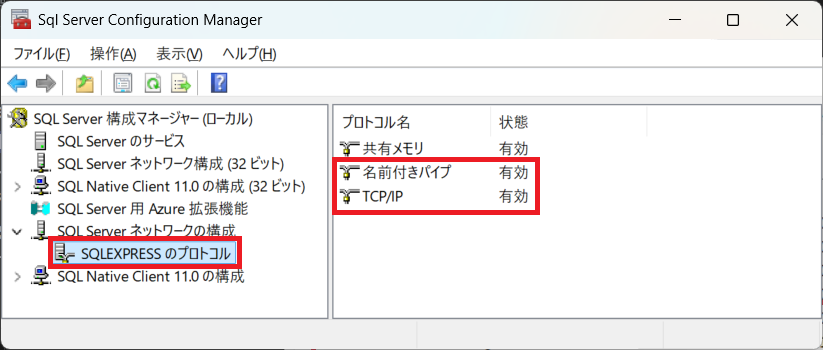
SQLEXPRESSのプロトコルで、名前付きパイプ、TCP/IPを有効化します
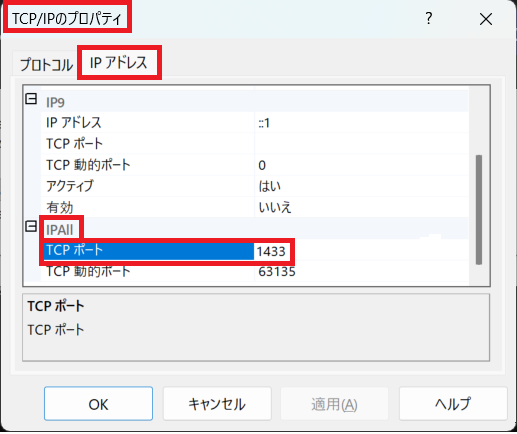
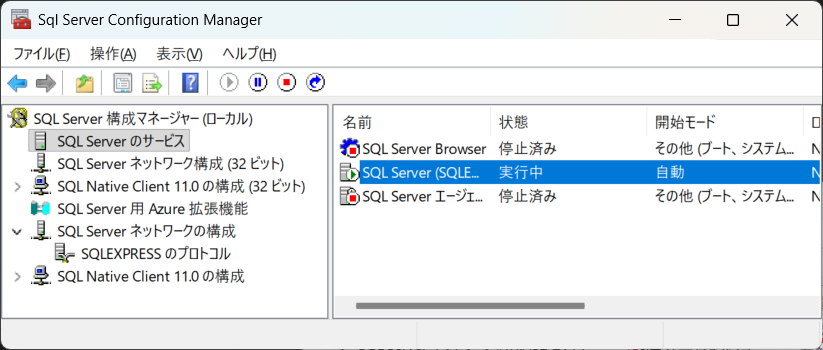
TCP/IPを右クリックし、プロパティ → IPアドレスタブから、 IPALLのTCPポートへ 1433 を入力し、SQL Serverのサービスを再起動します。
step 3 - sqlcmd.exe で接続
先程の設定で、次のように sqlcmd を用い、tcpで接続できるようになります。
DOS> sqlcmd -S tcp:localhost,1433 -E
1>
接続できていない場合、次のようなエラーとなります。
DOS> sqlcmd -S tcp:localhost,1433 -E
unable to open tcp connection with host 'localhost:1433':
    dial tcp 127.0.0.1:1433: connectex: No connection could be
    made because the target machine actively refused it.
sqlcmdでは、tcp以外での接続もできますので、その例を以下に記載します
DOS> sqlcmd -S lpc:.\SQLEXPRESS -E -C
1>
DOS> sqlcmd -S np:\\.\pipe\SQLLocal\SQLEXPRESS -E -C
1>
DOS> sqlcmd -S .\SQLEXPRESS -E -C
1>
