windows server 2016 の IIS を 有効化(インストール?) - end0tknr's kipple - web写経開発
先日の上記エントリの続き? です。
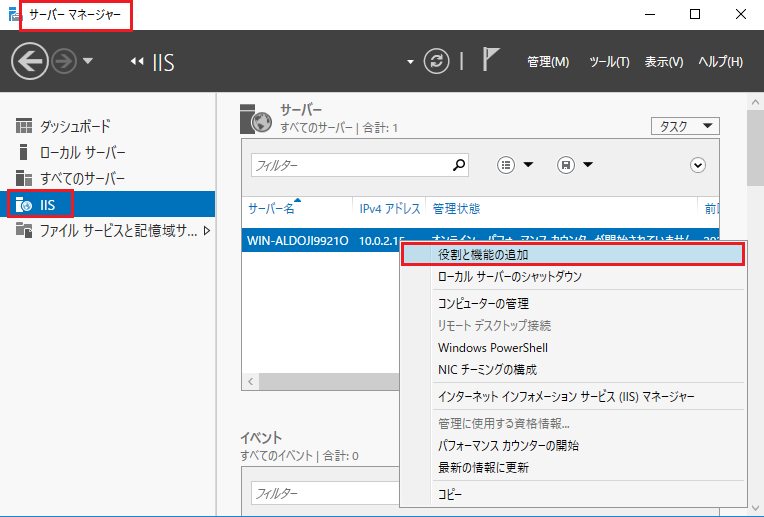
Step1 サーバーマネージャ → IIS → 「役割と機能追加」
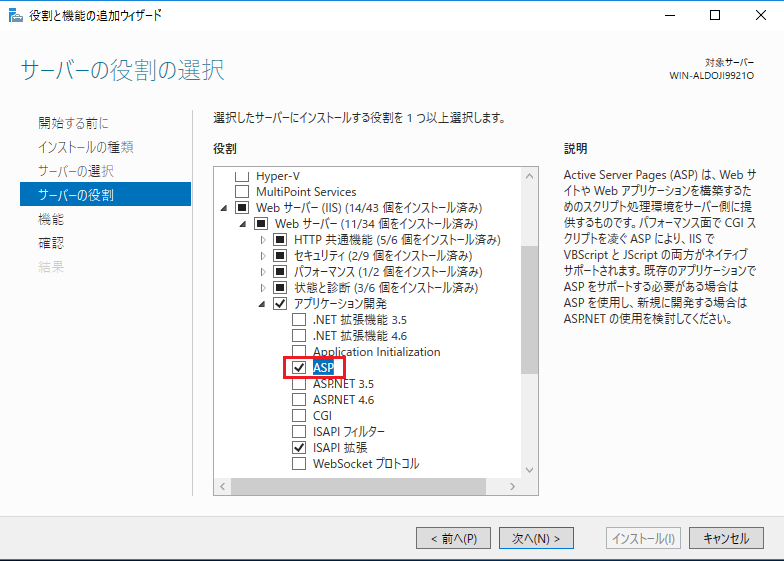
Step2 サーバーの役割の選択で「ASP」を選択
Step3 動作確認
<%@ LANGUAGE="VBSCRIPT" %>
<html>
<head>
<meta charset="utf-8">
<title>end0tknr's asp test page</title>
</head>
<body>
<h1>end0tknr's asp test page</h1>

This file exits in "C:\inetpub\wwwroot"<br/>
Log  files exits in "C:\inetpub\logs\LogFiles\ "<br/>
<br/>

<% Response.Write "Hello Classic ASP World" %><br/><br/>

現在の時刻は、<%= Now() %> です。<br/><br/>

<table border=1>
<thead>
 <tr><th>ServerVariables key</th><td></td></tr>
</thead>
<tbody>
  <% For Each name In Request.ServerVariables %>
  <tr>
    <td><%= name%></td>
    <td><%= Request.ServerVariables(name) %></td>
  </tr>
  <% Next %>
</tbody>
</table>

<br/>

</body>
</html>
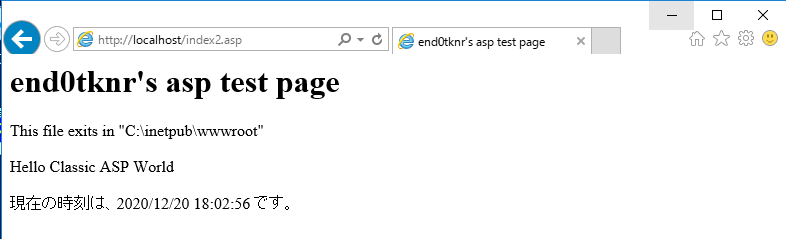
↑この内容を C:\inetpub\wwwroot\index2.asp で作成すると
↓以下のように表示されます。