Here's a guide on how to fix the issue where VSCode's F12 (Go to Definition) stops working when using Python's venv.
Introduction
VSCode's F12 (Go to Definition) is a really handy feature.
However, when you're using Python's venv, Go to Definition sometimes doesn't work properly.
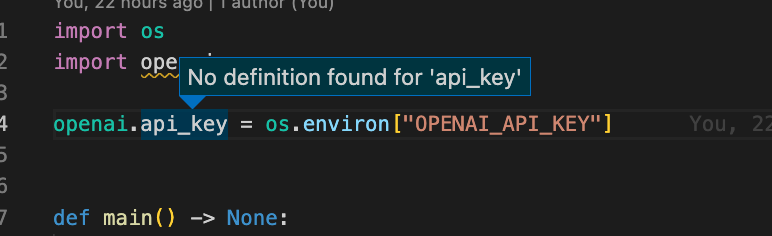
In this post, I'll walk through how to fix it.
Note: This article was translated from my original post.
How to Fix F12 (Go to Definition) Not Working with venv in VSCode
Cause
The most likely cause is that the Python interpreter selected in VSCode isn't pointing to the one inside your venv.
You can check which Python interpreter is currently selected by looking at the bottom-right corner of VSCode.

If the selected interpreter is not the one inside your venv — for example, if it's set to a globally installed Python — then F12 won't be able to jump to the source code of libraries installed in the virtual environment.
Solution
Set the Python interpreter inside your venv as the active interpreter in VSCode.
To do this, click the Python version in the bottom-right corner of VSCode (just like before), and add the path to the Python interpreter inside the venv you want to use.


You can use either an absolute path or a relative path (relative to the root directory open in VSCode).
The Python interpreter inside a venv is located at <venv-name>/bin/python.
※ On Windows, it's <venv-name>/Scripts/python.
# Example
.venv/bin/python

# On Windows
.venv/Scripts/python
Conclusion
That's how you fix the issue where VSCode's F12 doesn't work when using Python's venv.
Being able to quickly jump into a library's source code while writing your own is not only useful — it's genuinely fun.
I hope this helps someone.
[Related Articles]
