How to fix the issue where searching with grep the output of aws help doesn't work as expected?
Introduction
When you try to grep or use sed on the output of aws help, like aws help | grep 'XXX', it doesn’t work as you’d expect.
The same problem occurs with service-level commands like aws ec2 help.
This post notes the cause and how to fix it.
# AWS CLI version
$ aws --version
aws-cli/2.11.2 Python/3.11.2 Darwin/23.6.0 exe/x86_64 prompt/off
Note: This article was translated from my original post.
Why You Can't Grep AWS CLI Help Output
Cause
The reason you can't grep the help output is because AWS CLI help pages include special characters (specifically backspaces) between characters.
For example, if you redirect the help output to a file using aws help > log.txt and open it in a text editor like VSCode, you’ll see backspaces inserted between characters.
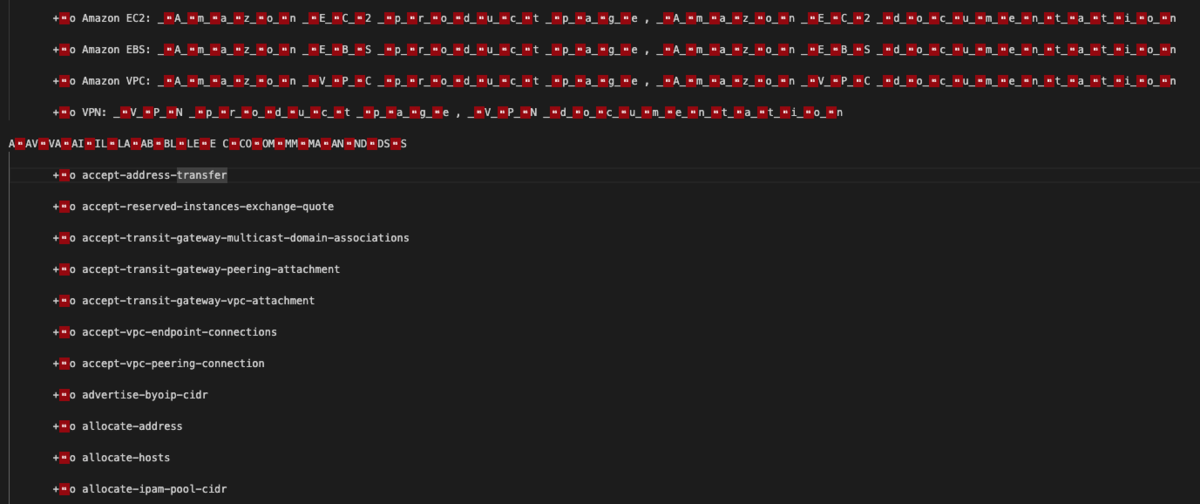
Because of these backspaces, text processing commands like grep and sed don’t work properly.
Solution
You can use the col -b command to remove backspace before applying grep or other text processing tools. This allows them to work correctly.
# Example of grepping aws help output
aws help | col -b | grep 'XXX'
Example
Trying to grep without using col -b:
$ aws help | grep 'AVA'
# No output
If you grep for the string 'AVA' without any preprocessing, no results are found.
Now try using col -b:
$ aws help | col -b | grep 'AVA'
AVAILABLE SERVICES
Now grep returns a match. This works thanks to col -b removing the backspace characters.
Conclusion
This was a quick note on the cause and fix for the issue where aws help output can't be grepped.
Hope this helps someone.
[Related Post]
