text/v2 uses the text’s upper-left corner as (0, 0), while text/v1 uses the baseline origin on the left.
- Introduction
- Relationship Between Ebitengine Text Rendering Position and Specified Coordinates
- Conclusion
- References
Introduction
When I rewrote text rendering in Ebitengine from text/v1 to text/v2, the rendering position changed.
I checked how each version determines the text position relative to the given coordinates and summarized the result.
Note: This article was translated from my original post.
Relationship Between Ebitengine Text Rendering Position and Specified Coordinates
First, I looked at the docs, then confirmed the behavior by running actual code.
Check the documentation
By default, if the face's primary direction is left-to-right, the rendering region's upper-left position is (0, 0). Note that this is different from text v1. In text v1, (0, 0) is always the origin position.
Ref. text package - github.com/hajimehoshi/ebiten/v2/text/v2 - Go Packages
According to the documentation:
- text/v2 uses the text’s upper-left corner
- text/v1 uses the text's origin position (baseline left origin)
as the specified coordinate.
The baseline is the alignment line for letters in languages like English.

Try it out
Next, I checked how text/v2 and text/v1 actually render text when given the same coordinates.
Here is the code. It draws text at the center of the screen to compare the difference between text/v1 and text/v2.
package main

import (
    "image/color"
    "log"

    "github.com/hajimehoshi/ebiten/v2"
    testv1 "github.com/hajimehoshi/ebiten/v2/text"
    textv2 "github.com/hajimehoshi/ebiten/v2/text/v2"
    "github.com/hajimehoshi/ebiten/v2/vector"
    "golang.org/x/image/font/basicfont"
)

const (
    screenWidth  = 200
    screenHeight = 200
    centerX      = screenWidth / 2
    centerY      = screenHeight / 2
)

type Game struct {
    faceV2 *textv2.GoXFace
}

func (g *Game) Update() error {
    return nil
}

func (g *Game) Draw(screen *ebiten.Image) {
    // Center lines
    vector.StrokeLine(screen, centerX, 0, centerX, screenHeight, 1, color.White, false)
    vector.StrokeLine(screen, 0, centerY, screenWidth, centerY, 1, color.White, false)
    vector.DrawFilledCircle(screen, centerX, centerY, 3, color.White, false)

    // text v1 drawing at the center
    testv1.Draw(screen, "Text v1", basicfont.Face7x13, centerX, centerY, color.White)

    // text v2 drawing at the center
    op := &textv2.DrawOptions{}
    op.GeoM.Translate(centerX, centerY)
    op.ColorScale.ScaleWithColor(color.White)
    textv2.Draw(screen, "Text v2", g.faceV2, op)
}

func (g *Game) Layout(outsideWidth, outsideHeight int) (int, int) {
    return screenWidth, screenHeight
}

func main() {
    // Font face for text v2
    faceV2 := textv2.NewGoXFace(basicfont.Face7x13)

    game := &Game{
        faceV2: faceV2,
    }

    ebiten.SetWindowSize(screenWidth*2, screenHeight*2)
    ebiten.SetWindowTitle("Text v1 vs v2 Behavior Test")

    if err := ebiten.RunGame(game); err != nil {
        log.Fatal(err)
    }
}
The full code is here:
And here is the result:
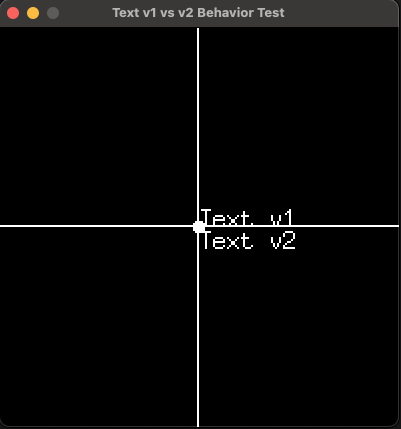
As shown, text/v2 uses the upper-left corner of the text as the reference point, while text/v1 uses the baseline left origin.
Conclusion
I summarized how Ebitengine determines the rendered position relative to the specified coordinates when using text/v1 and text/v2.
Hope this helps someone!
[Related Articles]
