今回もAIの量子化について学んでいきます。論文を読むことは継続しつつ、今回は、実際に量子化モデルを動かして、推論の高速化を実感したいと思います。
まずは、VirtualBox の Ubuntu 22.04 で動かしていきますが、TensorFlow Lite は、ARM CPU に最適化されていると思うので、性能が出ないかもしれません。その後、Raspberry Pi 4(Raspberry Pi OS)でも動かしていきます。
それでは、やっていきます!
はじめに
「AIモデルの量子化」の記事一覧です。良かったら参考にしてください。
・TensorFlow Lite Python で量子化モデルをRaspberry Pi 4で動かす ← 今回
・TensorFlow Lite C++ で量子化モデルをRaspberry Pi 4で動かす
・Raspberry Pi 4 の TensorFlow Lite C++ を VSCode でリモートデバッグする
エンジニアグループのランキングに参加中です。

気楽にポチッとよろしくお願いいたします🙇
それではやっていきます!
TensorFlow Lite の環境構築
TensorFlow Lite の公式サイトです。
最終的には、Raspberry Pi で動かしますが、まずは、手軽に Ubuntu の環境で動かしていきます。
また、Raspberry Pi を含む Linuxプラットフォームで動作させる場合、Python と C++ の選択肢があるようです。まずは、簡単な Python で動かしていきます。
公式サイトの手順です。
いろいろ書いてますが、とりあえず動かしたい人は、tflite-runtime を入れて試してね、ということでした。ちゃんと動かすには、TensorFlow のパッケージが必要と書かれています。
また、Pythonスクリプト「label_image.py」を実行してね、と書かれていますので、ダウンロードしておきます(分かりにくかったので、リンク貼っておきました)。
あと、書かれてないですが、画像ファイルも必要なので、「grace_hopper.bmp」もダウンロードしておきます(こちらもリンク貼っておきました)。
あと、ラベルファイル(正解ラベルが書かれたファイル)も必要で、こちらも書かれてませんが、下記のようにしてダウンロードしておきます。/tmp/mobilenet_v1_1.0_224/labels.txt に出力されるので、カレントディレクトリにコピーしておきます(直接ダウンロードできるところを見つけられませんでした)。
$ curl https://storage.googleapis.com/download.tensorflow.org/models/mobilenet_v1_1.0_224_frozen.tgz | tar xzv -C /tmp mobilenet_v1_1.0_224/labels.txt
では、早速 tflite-runtime をインストールします(tfliteディレクトリを作成して、そこに仮想環境を作って作業します)。
パッケージが足りないと言われたので、指示通りに入れておきました。
$ mkdir tflite
$ cd tflite
$ python3 -m venv venv
The virtual environment was not created successfully because ensurepip is not
available.  On Debian/Ubuntu systems, you need to install the python3-venv
package using the following command.

    apt install python3.10-venv

You may need to use sudo with that command.  After installing the python3-venv
package, recreate your virtual environment.

Failing command: /home/daisuke/svn_/tflite/venv/bin/python3
$ rm -rf ./*
$ sudo apt install python3.10-venv
$ source venv/bin/activate
(venv) $ pip install tflite-runtime
Successfully installed numpy-1.26.4 tflite-runtime-2.14.0
これで実行環境の準備は完了です!
TensorFlow Lite モデルの入手
公式サイトに学習済みのtfliteモデルがいくつか公開されています。
今回は、画像分類のモデルを使います。具体的には、Mobilenet V1の量子化してないモデルと量子化してるモデルを使います。
- Mobilenet_V1_1.0_224_quant:量子化モデル(mobilenet_v1_1.0_224_quant.tgz)
- Mobilenet_V1_1.0_224:量子化してないモデル(mobilenet_v1_1.0_224.tgz)
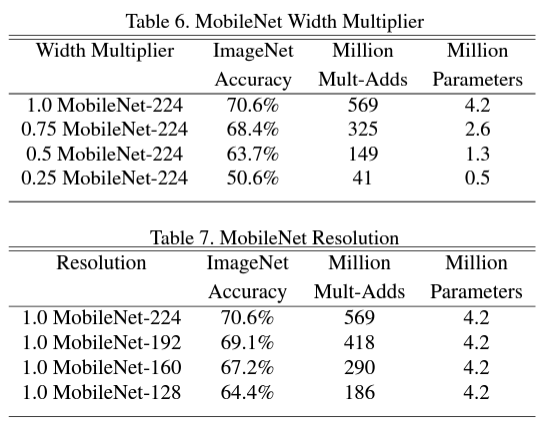
ファイル名について説明しておきます。「mobilenet」はモデルの名前で、「v1」は、MobileNetの最初のバージョンという意味です。最近、MobileNetV4が発表されてましたね。「1.0」は、ネットワークのシュリンク(削減)のパラメータαの値で、0.25、0.5、0.75、1.0の4つから選べて、数字が小さいほど、シュリンクされたモデルとなります。「224」は入力画像サイズ(224x224)です。
MobileNetV1の論文に当時のそれぞれの精度が書かれてましたので、貼っておきます。
では、先ほどの「label_image.py」を置いて、ダウンロードしたファイルを解凍します。
(venv) $ mkdir -p models/mobilenet_v1_1.0_224
(venv) $ mv mobilenet_v1_1.0_224.tgz models/mobilenet_v1_1.0_224/
(venv) $ mkdir -p models/mobilenet_v1_1.0_224_quant
(venv) $ mv mobilenet_v1_1.0_224_quant.tgz models/mobilenet_v1_1.0_224_quant/
(venv) $ cd models/mobilenet_v1_1.0_224
(venv) $ tar zxvf mobilenet_v1_1.0_224.tgz
(venv) $ cd ../mobilenet_v1_1.0_224_quant/
(venv) $ tar zxvf mobilenet_v1_1.0_224_quant.tgz
(venv) $ cd ../../
(venv) $ tree -I venv/
.
|-- grace_hopper.bmp
|-- label_image.py
|-- labels.txt
`-- models
    |-- mobilenet_v1_1.0_224
    |   |-- mobilenet_v1_1.0_224.ckpt.data-00000-of-00001
    |   |-- mobilenet_v1_1.0_224.ckpt.index
    |   |-- mobilenet_v1_1.0_224.ckpt.meta
    |   |-- mobilenet_v1_1.0_224.tflite
    |   |-- mobilenet_v1_1.0_224.tgz
    |   |-- mobilenet_v1_1.0_224_eval.pbtxt
    |   |-- mobilenet_v1_1.0_224_frozen.pb
    |   `-- mobilenet_v1_1.0_224_info.txt
    `-- mobilenet_v1_1.0_224_quant
        |-- mobilenet_v1_1.0_224_quant.ckpt.data-00000-of-00001
        |-- mobilenet_v1_1.0_224_quant.ckpt.index
        |-- mobilenet_v1_1.0_224_quant.ckpt.meta
        |-- mobilenet_v1_1.0_224_quant.tflite
        |-- mobilenet_v1_1.0_224_quant.tgz
        |-- mobilenet_v1_1.0_224_quant_eval.pbtxt
        |-- mobilenet_v1_1.0_224_quant_frozen.pb
        `-- mobilenet_v1_1.0_224_quant_info.txt

3 directories, 19 files
TensorFlow Lite でモデルを動かす
まずは、VirtualBox の Ubuntu 22.04 で動かしていきます。その後、Raspberry Pi 4(Raspberry Pi OS)でも動かします。
VirtualBox の Ubuntu 22.04 で実行する
早速実行したいところですが、tflite-runtime の場合、label_image.py を2か所変更しなければならないようです。
1か所目です。TensorFlowをインストールした場合を想定しているようです。
#import tensorflow as tf
import tflite_runtime.interpreter as tflite
2か所目です。こちらも、TensorFlowを想定したソースコードになっていますね。
#  interpreter = tf.lite.Interpreter(
  interpreter = tflite.Interpreter(
実行する前に、入力する画像ファイルを貼っておきます。グレース・ホッパーさんという、COBOL言語を開発した学者さんです。女性だったんですね、それは初めて知りました。

やっと実行できます。PILが無いと言われたので、pillowをインストールしておきます。
(venv) $ python label_image.py --model_file models/mobilenet_v1_1.0_224/mobilenet_v1_1.0_224.tflite --label_file ./labels.txt --image grace_hopper.bmp
Traceback (most recent call last):
  File "/home/daisuke/svn_/tflite/label_image.py", line 21, in <module>
    from PIL import Image
ModuleNotFoundError: No module named 'PIL'
(venv) $ pip install pillow
Successfully installed pillow-10.3.0
(venv) $ python label_image.py --model_file models/mobilenet_v1_1.0_224/mobilenet_v1_1.0_224.tflite --label_file ./labels.txt --image grace_hopper.bmp
INFO: Created TensorFlow Lite XNNPACK delegate for CPU.
0.919721: 653:military uniform
0.017762: 907:Windsor tie
0.007507: 668:mortarboard
0.005419: 466:bulletproof vest
0.003828: 458:bow tie, bow-tie, bowtie
time: 152.961ms
実行できました。152ms だったようです。軍服と 92.0% で判定している結果なので、正しく動いてそうです。続いて、量子化モデルを実行します。
(venv) $ python label_image.py --model_file models/mobilenet_v1_1.0_224_quant/mobilenet_v1_1.0_224_quant.tflite --label_file ./labels.txt --image grace_hopper.bmp
0.874510: 653:military uniform
0.031373: 907:Windsor tie
0.015686: 668:mortarboard
0.011765: 466:bulletproof vest
0.007843: 458:bow tie, bow-tie, bowtie
time: 873.819ms
量子化モデルの方が、だいぶ遅いですね。軍服という判定は、87.5%でした。
Raspberry Pi 4 の Raspberry Pi OS で実行する
Raspberry Pi 4 でもやってみます。
$ uname -a
Linux raspberrypi 6.6.20+rpt-rpi-v8 #1 SMP PREEMPT Debian 1:6.6.20-1+rpt1 (2024-03-07) aarch64 GNU/Linux
まず、量子化していないモデルです。
$ python label_image.py --model_file models/mobilenet_v1_1.0_224/mobilenet_v1_1.0_224.tflite --label_file ./labels.txt --image grace_hopper.bmp
INFO: Created TensorFlow Lite XNNPACK delegate for CPU.
0.919721: 653:military uniform
0.017762: 907:Windsor tie
0.007507: 668:mortarboard
0.005419: 466:bulletproof vest
0.003828: 458:bow tie, bow-tie, bowtie
time: 144.901ms
VirtualBox の Ubuntu22.04 と同じような感じですね。同じく、92.0% です。続いて、量子化モデルです。
$ python label_image.py --model_file models/mobilenet_v1_1.0_224_quant/mobilenet_v1_1.0_224_quant.tflite --label_file ./labels.txt --image grace_hopper.bmp
0.874510: 653:military uniform
0.031373: 907:Windsor tie
0.015686: 668:mortarboard
0.011765: 466:bulletproof vest
0.007843: 458:bow tie, bow-tie, bowtie
time: 99.783ms
だいぶ早くなりました。Intel CPU では、効果が無かった、というか悪化しましたが、ARM CPUで実行すると早くなりました。精度は、VirtualBox の Ubuntu22.04 と同じく87.5%でした。
おわりに
今回は、TensorFlow Lite の実行をやってみました。
tflite-runtime を使ってみましたが、おそらく、マルチスレッドで動いてないのではないかと思います。あと、Python より C++ の方が速いかもしれないです。
そのあたりを次回(TensorFlow Lite C++で量子化モデルをRaspberry Pi 4で動かす - daisukeの技術ブログ)はやっていきたいと思います。
今回は以上です。
最後までお読みいただき、ありがとうございました。

