前回 は、CodeQL の挙動を理解するための対象のソースコードとして、Tinyhttpd を調査しました。
今回は、これを使って、CodeQL のクエリの挙動をいろいろ調べてみたいと思います。
それでは、やっていきます。
- はじめに
- Tinyhttpdに対してCodeQLを実行する
- OverflowStatic.qlのwrongBufferSizeメソッドでいろいろやってみる
- OverflowStatic.qlのoverflowOffsetInLoopメソッドでいろいろやってみる
- おわりに
はじめに
「セキュリティ」の記事一覧です。良かったら参考にしてください。
・第2回:Ghidraで始めるリバースエンジニアリング(使い方編)
・第3回:VirtualBoxにParrotOS(OVA)をインストールする
・第4回:tcpdumpを理解して出力を正しく見れるようにする
・第5回:nginx(エンジンエックス)を理解する
・第6回:Python+Flask(WSGI+Werkzeug+Jinja2)を動かしてみる
・第7回:Python+FlaskのファイルをCython化してみる
・第8回:shadowファイルを理解してパスワードを解読してみる
・第9回:安全なWebアプリケーションの作り方(徳丸本)の環境構築
・第10回:Vue.jsの2.xと3.xをVue CLIを使って動かしてみる(ビルドも行う)
・第11回:Vue.jsのソースコードを確認する(ビルド後のソースも見てみる)
・第12回:徳丸本:OWASP ZAPの自動脆弱性スキャンをやってみる
・第13回:徳丸本:セッション管理を理解してセッションID漏洩で成りすましを試す
・第14回:OWASP ZAPの自動スキャン結果の分析と対策:パストラバーサル
・第15回:OWASP ZAPの自動スキャン結果の分析と対策:クロスサイトスクリプティング(XSS)
・第16回:OWASP ZAPの自動スキャン結果の分析と対策:SQLインジェクション
・第17回:OWASP ZAPの自動スキャン結果の分析と対策:オープンリダイレクト
・第18回:OWASP ZAPの自動スキャン結果の分析と対策:リスク中すべて
・第19回:CTF初心者向けのCpawCTFをやってみた
・第20回:hashcatの使い方(GPU実行時間の見積りとパスワード付きZIPファイル)
・第21回:Scapyの環境構築とネットワークプログラミング
・第22回:CpawCTF2にチャレンジします(クリア状況は随時更新します)
・第23回:K&Rのmalloc関数とfree関数を理解する
・第24回:C言語、アセンブラでシェルを起動するプログラムを作る(ARM64)
・第25回:機械語でシェルを起動するプログラムを作る(ARM64)
・第26回:入門セキュリhttps://github.com/SECCON/SECCON2017_online_CTF.gitティコンテスト(CTFを解きながら学ぶ実践技術)を読んだ
・第27回:x86-64 ELF(Linux)のアセンブラをGDBでデバッグしながら理解する(GDBコマンド、関連ツールもまとめておく)
・第28回:入門セキュリティコンテスト(CTFを解きながら学ぶ実践技術)のPwnable問題をやってみる
・第29回:実行ファイルのセキュリティ機構を調べるツール「checksec」のまとめ
・第30回:setodaNote CTF Exhibitionにチャレンジします(クリア状況は随時更新します)
・第31回:常設CTFのksnctfにチャレンジします(クリア状況は随時更新します)
・第32回:セキュリティコンテストチャレンジブックの「Part2 pwn」を読んだ
・第33回:セキュリティコンテストチャレンジブックの「付録」を読んでx86とx64のシェルコードを作った
・第34回:TryHackMeを始めてみたけどハードルが高かった話
・第35回:picoCTFを始めてみた(Beginner picoMini 2022:全13問完了)
・第36回:picoCTF 2024:Binary Exploitationの全10問をやってみた(Hardの1問は後日やります)
・第37回:picoCTF 2024:Reverse Engineeringの全7問をやってみた(Windowsプログラムの3問は後日やります)
・第38回:picoCTF 2024:General Skillsの全10問をやってみた
・第39回:picoCTF 2024:Web Exploitationの全6問をやってみた(最後の2問は解けず)
・第40回:picoCTF 2024:Forensicsの全8問をやってみた(最後の2問は解けず)
・第41回:picoCTF 2024:Cryptographyの全5問をやってみた(最後の2問は手つかず)
・第42回:picoCTF 2023:General Skillsの全6問をやってみた
・第43回:picoCTF 2023:Reverse Engineeringの全9問をやってみた
・第44回:picoCTF 2023:Binary Exploitationの全7問をやってみた(最後の1問は後日やります)
・第45回:書籍「セキュリティコンテストのためのCTF問題集」を読んだ
・第46回:書籍「詳解セキュリティコンテスト」のReversingを読んだ
・第47回:書籍「詳解セキュリティコンテスト」のPwnableのシェルコードを読んだ
・第48回:書籍「バイナリファイル解析 実践ガイド」を読んだ
・第49回:書籍「詳解セキュリティコンテスト」Pwnableのスタックベースエクスプロイトを読んだ
・第50回:書籍「詳解セキュリティコンテスト」Pwnableの共有ライブラリと関数呼び出しを読んだ
・第51回:picoCTF 2025:General Skillsの全5問をやってみた
・第52回:picoCTF 2025:Reverse Engineeringの全7問をやってみた
・第53回:picoCTF 2025:Binary Exploitationの全6問をやってみた
・第54回:書籍「詳解セキュリティコンテスト」Pwnableの仕様に起因する脆弱性を読んだ
・第55回:システムにインストールされたものと異なるバージョンのglibcを使う方法
・第56回:書籍「詳解セキュリティコンテスト」Pwnableのヒープベースエクスプロイトを読んだ
・第57回:書籍「解題pwnable」の第1章「準備」を読んだ
・第58回:書籍「解題pwnable」の第2章「login1(スタックバッファオーバーフロー1)」を読んだ
・第59回:書籍「解題pwnable」の第3章「login2(スタックバッファオーバーフロー2)」を読んだ
・第60回:書籍「解題pwnable」の第4章「login3(スタックバッファオーバーフロー3)」を読んだ
・第61回:書籍「解題pwnable」の第5章「rot13(書式文字列攻撃)」を読んだ
・第62回:GitHubが開発した静的解析ツール(脆弱性検出ツール)のCodeQLを使ってみる
・第63回:CodeQL(静的解析ツール)で使われるクエリの選ばれ方を調べた
・第64回:CodeQL(静的解析ツール)のクエリの書き方を調べた
・第65回:CodeQL(静的解析ツール)で使われているアラートクエリの中身を調べる
・第66回:CodeQL(静的解析ツール)で使われているパスクエリの中身を調べる
・第67回:CodeQL(静的解析ツール)をVSCodeで使う方法を理解する
・第68回:CodeQL(静的解析ツール)の挙動を確認するための対象ソースコードとしてTinyhttpdを調査する
・第69回:Tinyhttpdを使用してCodeQL(静的解析ツール)のクエリの挙動を確認する ← 今回
以下は、Tinyhttpd の GitHub です。
なお、現在の実行環境は、Windows11 に、WSL2 で、Ubuntu 24.04 を入れた環境です。
Tinyhttpdに対してCodeQLを実行する
まずは、標準で用意されているクエリスイートを実行してみます。
デフォルトのクエリスイート「cpp-code-scanning.qls」は、あまり指摘が出ないため、「cpp-security-and-quality.qls」を使います。
CodeQL を実行すると、ビルドが走ります。よって、あらかじめ、make clean などをしておいた方がいいと思います。
データベースの作成と、解析を実行します。解析時に指定している「-M 6000」は、メモリが不足しないようにするためです。以前、メモリ不足のエラーが出たときに対策したもので、エラーが出ないならつけなくていいです。
$ codeql/codeql database create tinyhttpd_db -l c-cpp -s Tinyhttpd

$ codeql/codeql database analyze tinyhttpd_db cpp-security-and-quality.qls --format csv --output tinyhttpd_cppsq.csv -M 6000
10件の指摘がありました。そのうち、2件はクライアント(simpleclient.c)です。残りの 8件の指摘は、recommendation が 4件、warning が 2件、error が 2件でした。recommendation は、{} のように、意味のないブロックがあるという内容が 1件と、コメントアウトした行の中に、有効な実装がある、という内容が 3件だったので、問題ありません。以下に、warning が 2件、error が 2件を貼り付けます。この中に、OverflowStatic.ql クエリの指摘はありませんでした。
| 検出したクエリ名 | クエリの説明 | 重要度 | 警告メッセージ | パス | 開始行 | 開始列 | 終了行 | 終了列 |
|---|---|---|---|---|---|---|---|---|
| Uncontrolled process operation | Using externally controlled strings in a process operation can allow an attacker to execute malicious commands. | warning | The value of this argument may come from "buffer read by recv"|"relative:///httpd.c:322:24:322:25" and is being passed to execl. The value of this argument may come from "buffer read by recv"|"relative:///httpd.c:328:32:328:33" and is being passed to execl. The value of this argument may come from "buffer read by recv"|"relative:///httpd.c:331:32:331:33" and is being passed to execl. | /httpd.c | 282 | 15 | 282 | 18 |
| Unbounded write | Buffer write operations that do not control the length of data written may overflow. | error | This 'call to sprintf' with input from "buffer read by recv"|"relative:///httpd.c:322:24:322:25" may overflow the destination. This 'call to sprintf' with input from "buffer read by recv"|"relative:///httpd.c:331:32:331:33" may overflow the destination. | /httpd.c | 272 | 9 | 272 | 15 |
| Unbounded write | Buffer write operations that do not control the length of data written may overflow. | error | This 'call to sprintf' with input from "buffer read by recv"|"relative:///httpd.c:322:24:322:25" may overflow the destination. This 'call to sprintf' with input from "buffer read by recv"|"relative:///httpd.c:331:32:331:33" may overflow the destination. | /httpd.c | 111 | 5 | 111 | 11 |
| Uncontrolled data used in path expression | Accessing paths influenced by users can allow an attacker to access unexpected resources. | warning | This argument to a file access function is derived from "user input (buffer read by recv)"|"relative:///httpd.c:322:24:322:25" and then passed to serve_file(filename) | which calls fopen(__filename). This argument to a file access function is derived from "user input (buffer read by recv)"|"relative:///httpd.c:328:32:328:33" and then passed to serve_file(filename) | which calls fopen(__filename). This argument to a file access function is derived from "user input (buffer read by recv)"|"relative:///httpd.c:331:32:331:33" and then passed to serve_file(filename) | which calls fopen(__filename). | /httpd.c | 128 | 32 | 128 | 35 |
1件目は、外部から与えられた文字列(path)を、そのまま execl関数に渡して実行してるという内容です。CGIプログラムを実装するという実装をするので、こういう実装になるわけです。ただ、sprintf(path, "htdocs%s", url); としているので、少なくとも、htdocsディレクトリ以下に制限されているので問題ないと思います。ただし、../ をたくさん入れられて、自由に実行できるディレクトリトラバーサルの危険があるようにも思えます。../ を禁止するコードは必要かもしれません。
2件目は、sprintf関数でバッファオーバーフローが懸念されています。対象の変数は method ですが、これは、前回説明したように、GET か POST 以外の場合はエラーになるように実装されていました。よって、問題ないと思います。
3件目も、2件目と同じで、sprintf関数でバッファオーバーフローが懸念されています。path が 512byte、url が 256byte で、url に格納するときにサイズのチェックしてるので問題なさそうです。
4件目も、1件目と同じく、外部から与えられた文字列を、そのまま open関数に渡しているという内容です。こちらも、ディレクトリトラバーサル攻撃が懸念されます。shadowファイルなど、重要なファイルを出力してしまう可能性があります。これも対策は同じで、../ を禁止するコードを入れた方がよさそうです。
OverflowStatic.qlのwrongBufferSizeメソッドでいろいろやってみる
OverflowStatic.ql を使って、いろいろやってみます。OverflowStatic.ql については、以下の記事で解析しました。
daisuke20240310.hatenablog.com
なぜ、OverflowStatic.ql を使うのかというと、このクエリは分類としてはアラートクエリです(@kind が problem ならアラートクエリ、path-problem ならパスクエリ)が、OverflowStatic.ql を見てみると、ローカルデータフロー解析の機能を使っていたためです。パスクエリのコードは、かなり難解なので、OverflowStatic.ql を詳しく見て、データフロー解析を理解したいと思ったことが理由です。
まず、分かりやすくするために、OverflowStatic.ql の必要なところだけ残して、それ以外を削除します。上の記事で見たように、OverflowStatic.ql は、3つの条件で検出しています。このうち、今回注目するのは、wrongBufferSizeメソッドの条件です。この条件で使用するクラスやメソッド以外は削除しておきます。
オリジナルの from句、where句、select句は以下でした。
from Element error, string msg
where
  (
    overflowOffsetInLoop(error, msg) or
    wrongBufferSize(error, msg) or
    outOfBounds(error, msg)
  ) and
  not error.getFile() instanceof ConfigurationTestFile // elements in files generated during configuration are likely false positives
select error, msg
これを以下のように、wrongBufferSizeメソッドだけが動作するように変更して、使用してないメソッドも削除しました。
/**
 * @name Static array access may cause overflow
 * @description Exceeding the size of a static array during write or access operations
 *              may result in a buffer overflow.
 * @kind problem
 * @problem.severity warning
 * @security-severity 9.3
 * @precision high
 * @id cpp/static-buffer-overflow
 * @tags reliability
 *       security
 *       external/cwe/cwe-119
 *       external/cwe/cwe-131
 */

import cpp
import semmle.code.cpp.commons.Buffer
import semmle.code.cpp.ir.dataflow.DataFlow
import semmle.code.cpp.rangeanalysis.SimpleRangeAnalysis
import semmle.code.cpp.ConfigurationTestFile

private predicate staticBufferBase(VariableAccess access, Variable v) {
  v.getType().(ArrayType).getBaseType() instanceof CharType and
  access = v.getAnAccess() and
  not memberMayBeVarSize(_, v) and
  not access.isUnevaluated()
}

predicate staticBuffer(VariableAccess access, Variable v, int size) {
  staticBufferBase(access, v) and
  size = getBufferSize(access, _)
}

predicate bufferAndSizeFunction(Function f, int buf, int size) {
  f.hasGlobalName("read") and buf = 1 and size = 2
  or
  f.hasGlobalOrStdName("fgets") and buf = 0 and size = 1
  or
  f.hasGlobalOrStdName("strncpy") and buf = 0 and size = 2
  or
  f.hasGlobalOrStdName("strncat") and buf = 0 and size = 2
  or
  f.hasGlobalOrStdName("memcpy") and buf = 0 and size = 2
  or
  f.hasGlobalOrStdName("memmove") and buf = 0 and size = 2
  or
  f.hasGlobalOrStdName("snprintf") and buf = 0 and size = 1
  or
  f.hasGlobalOrStdName("vsnprintf") and buf = 0 and size = 1
}

class CallWithBufferSize extends FunctionCall {
  CallWithBufferSize() { bufferAndSizeFunction(this.getTarget(), _, _) }

  Expr buffer() {
    exists(int i |
      bufferAndSizeFunction(this.getTarget(), i, _) and
      result = this.getArgument(i)
    )
  }

  Expr statedSizeExpr() {
    exists(int i |
      bufferAndSizeFunction(this.getTarget(), _, i) and
      result = this.getArgument(i)
    )
  }

  int statedSizeValue() {
    // `upperBound(e)` defaults to `exprMaxVal(e)` when `e` isn't analyzable. So to get a meaningful
    // result in this case we pick the minimum value obtainable from dataflow and range analysis.
    result =
      upperBound(this.statedSizeExpr())
          .minimum(min(Expr statedSizeSrc |
              DataFlow::localExprFlow(statedSizeSrc, this.statedSizeExpr())
            |
              statedSizeSrc.getValue().toInt()
            ))
  }
}

predicate wrongBufferSize(Expr error, string msg) {
  exists(CallWithBufferSize call, int bufsize, Variable buf, int statedSize |
    staticBuffer(call.buffer(), buf, bufsize) and
    statedSize = call.statedSizeValue() and
    statedSize > bufsize and
    error = call.statedSizeExpr() and
    msg =
      "Potential buffer-overflow: '" + buf.getName() + "' has size " + bufsize.toString() + " not " +
        statedSize + "."
  )
}

from Element error, string msg
where wrongBufferSize(error, msg)
select error, msg
cat関数のfgets関数に注目する
Tinyhttpd には、cat関数で、fgets関数が 2回使われています。cat関数は以下です。
void cat(int client, FILE *resource)
{
    char buf[1024];

    fgets(buf, sizeof(buf), resource);
    while (!feof(resource))
    {
        send(client, buf, strlen(buf), 0);
        fgets(buf, sizeof(buf), resource);
    }
}
fgets関数が検出されるように変更してみる
fgets関数の書き込み先のバッファは、char buf[1024]; なので、staticBuffer の条件を満たしています。しかし、fgets関数の書き込みサイズ(の上限)は、sizeof(buf) となっているため、wrongBufferSizeメソッドの statedSize > bufsize という条件により、現状は指摘は出ない状況になっていると思います。
では、statedSize > bufsize という条件を削除すれば、指摘が出ることを確認してみます。以下のように、単純に 1行をコメントアウトしただけです。
predicate wrongBufferSize(Expr error, string msg) {
  exists(CallWithBufferSize call, int bufsize, Variable buf, int statedSize |
    staticBuffer(call.buffer(), buf, bufsize) and
    statedSize = call.statedSizeValue() and
    //statedSize > bufsize and
    error = call.statedSizeExpr() and
    msg =
      "Potential buffer-overflow: '" + buf.getName() + "' has size " + bufsize.toString() + " not " +
        statedSize + "."
  )
}
結果は、以下の通りで、想定通り、2つの fgets関数が指摘されました。
Message の部分は、wrongBufferSizeメソッドの msg が表示されています。末尾の方の数値(2件とも 1024)は、statedSize を表示しています。

upperBoundメソッドの挙動を確認する
徐々に、ローカルデータフロー解析に近づいていきたいと思います。
以下は、CallWithBufferSizeクラスの定義のうち、statedSizeValueメソッドのみ表示します。
class CallWithBufferSize extends FunctionCall {
  int statedSizeValue() {
    // `upperBound(e)` defaults to `exprMaxVal(e)` when `e` isn't analyzable. So to get a meaningful
    // result in this case we pick the minimum value obtainable from dataflow and range analysis.
    result =
      upperBound(this.statedSizeExpr())
          .minimum(min(Expr statedSizeSrc |
              DataFlow::localExprFlow(statedSizeSrc, this.statedSizeExpr())
            |
              statedSizeSrc.getValue().toInt()
            ))
  }
statedSizeValueメソッドの結果は、statedSize に設定されるので、statedSizeValueメソッドの結果は、2件とも 1024 だということになります。なぜ、1024 になるかを 1つずつ見ていきます。
まず、upperBoundメソッドを見ていきます。
upperBoundメソッドは 公式のヘルプ(upperBound) には以下のように書かれています。
Predicate upperBound
式の上限を取得します。
注意:C/C++ の式は、暗黙的または明示的に異なる結果型にキャストされることがよくあります。このようなキャストにより、式の値がオーバーフローしたり、切り捨てられたりする可能性があります。このメソッドは、キャストの影響を考慮せずに式の上限を計算します。すべてのキャストを適用した後に式の上限を計算するには、upperBound を次のように呼び出します。
upperBound(expr.getFullyConverted())
つまり、引数に与えた式の上限値(float型)を返す、ということのようです。ただし、解析ができない場合は理論上の上限値とのことなので、解析できない場合は、引数の型の上限値になると思います。
this.statedSizeExpr() は、書き込みサイズの引数の式を取得しています。つまり、今回のケースでは、2件とも sizeof(buf) となります。これは解析可能なので、1024 となります。これを実際に確認してみます。
まず、CallWithBufferSizeクラスに、upperBoundメソッドの結果を出力するメンバメソッドを追加します。
CallWithBufferSizeクラスの他のメンバメソッドは割愛しています。
class CallWithBufferSize extends FunctionCall {
  int upperBoundValue() {
    result = upperBound(this.statedSizeExpr())
  }
}
続いて、wrongBufferSizeメソッドに、上で追加したメンバメソッドの結果を、追加で出力させます。
msg の末尾に、括弧付きで upperBoundメソッドの結果を出力しているだけです。
predicate wrongBufferSize_test1(Expr error, string msg) {
  exists(CallWithBufferSize call, int bufsize, Variable buf, int statedSize |
    staticBuffer(call.buffer(), buf, bufsize) and
    statedSize = call.statedSizeValue() and
    //statedSize > bufsize and
    error = call.statedSizeExpr() and
    msg =
      "Potential buffer-overflow: '" + buf.getName() + "' has size " + bufsize.toString() + " not " +
        statedSize + "." + " (" + call.upperBoundValue().toString() + ")"
  )
}
実行した結果は以下です。
upperBound(this.statedSizeExpr()) は、1024 になることが確認できました。

minimumメソッド
先ほどの upperBoundメソッドは、ヘルプによると、float の数値を返すと記載されてました。よって、minimumメソッドは、floatクラスのメンバメソッドとなります。floatクラスの minimumメソッドの 公式のヘルプ(float::minimum) は以下となってます。
float::minimum
レシーバと引数の小さい方を返す
float minimum(float other)
つまり、レシーバ(upperBoundメソッドの戻り値)と引数の小さい方を返すということなので、upperBoundメソッドの戻り値と、minメソッドの戻り値の小さい方を返す、ということになります。
minメソッド
minメソッドについては、以前の記事 で説明しました。
以下は追記です。
localExprFlowメソッドのところで実施したように、CallWithBufferSizeクラスに、minValue というメンバメソッドを追加します。
class CallWithBufferSize extends FunctionCall {
  int minValue() {
    result = min(Expr statedSizeSrc |
              DataFlow::localExprFlow(statedSizeSrc, this.statedSizeExpr())
            |
              statedSizeSrc.getValue().toInt()
            )
  }
}
Quick Evaluation: minVlaue を実行します。
結果は、anyValueメソッドと同じでした。ちょっとスッキリしません。ChatGPT に聞いてみると、minメソッドは、それぞれのインスタンスごとの最小値を出力するそうです。一方、anyメソッドは、どれか 1つを出力するらしく、最小、最大とかではないようです。
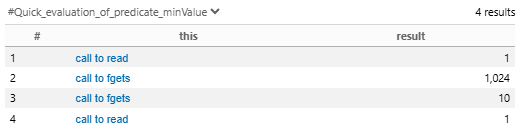
集約関数(min など)を使わないでやってみます。
class CallWithBufferSize extends FunctionCall {
  int allValue() {
    result = Expr statedSizeSrc |
              DataFlow::localExprFlow(statedSizeSrc, this.statedSizeExpr())
            |
              statedSizeSrc.getValue().toInt()
  }
}
エラーが出て、結果は出ませんでした。
localExprFlowメソッド(ローカルデータフロー解析)
ローカルデータフロー解析は、公式のヘルプ(DataFlow::localExprFlow) を見ると、以下となってます。
Predicate DataFlow::localExprFlow
データが 0 個以上のローカル(プロシージャ内)ステップで e1 から e2 に流れることができる場合に保持されます。
import semmle.code.java.dataflow.DataFlow
predicate localExprFlow(Expr e1, Expr e2)
e2 は、sizeof(buf) になりそうです。e1 は、char buf[1024] になると思います。
ローカルデータフロー解析について、具体的に見ていきます。
CallWithBufferSizeクラスに、anyValue というメンバメソッドを追加しました。
これは、CallWithBufferSizeクラスの条件を満たし、ローカルデータフロー解析が成立するもの全てを列挙するメソッドです。
class CallWithBufferSize extends FunctionCall {
  int anyValue() {
    result = any(Expr statedSizeSrc |
              DataFlow::localExprFlow(statedSizeSrc, this.statedSizeExpr())
            |
              statedSizeSrc.getValue().toInt()
            )
  }
}
以下のように、VSCode の機能の Quick Evaluation: anyVlaue をクリックします。
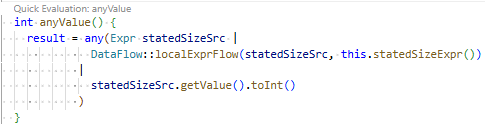
結果は以下のようになりました。
いちいち select句を作るより、メンバメソッドを追加して確認する方が楽ですね。
この結果は、CallWithBufferSizeクラスの条件(8つの標準関数)を満たすもの全てを列挙してくれていると思います。

次に、少し httpd.c を変更して、どう変わるかを見てみます。
バッファサイズは、1024byte から変えずに、fgets関数のサイズ指定を sizeof(buf) から、変更してみます。
変更後の cat関数は以下です。
ローカル変数 size を追加し、初期値に 512 を与えました。1つ目の fgets関数のサイズ指定を sizeof(buf) から size に変更しました。
void cat(int client, FILE *resource)
{
    char buf[1024];
    int size = 512;

    fgets(buf, size/*sizeof(buf)*/, resource);
    while (!feof(resource))
    {
        send(client, buf, strlen(buf), 0);
        fgets(buf, sizeof(buf), resource);
    }
}
上記と同じように、Quick Evaluation: anyVlaue を実行してみます。
結果は以下です。
1つ目の fgets関数の結果が 1024 から 512 に変化しました。予想できる結果ですね。
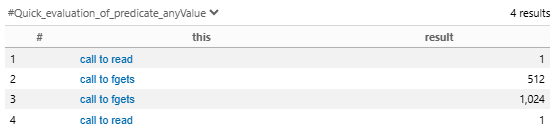
では、さらに、cat関数を変更します。
2つ目の fgets関数のサイズ指定を、少し複雑にしてみます。
変更後の cat関数は以下です。
512byte から、1行読み取るごとに、サイズを 1ずつ減らしていきます(最小で 256byte)。
void cat(int client, FILE *resource)
{
    char buf[1024];
    int size = 512;

    fgets(buf, size/*sizeof(buf)*/, resource);
    while (!feof(resource))
    {
        send(client, buf, strlen(buf), 0);
        if( size >= 256 ){ size--; }
        fgets(buf, size/*sizeof(buf)*/, resource);
    }
}
結果は以下です。
1つ目の fgets関数の結果が 1024 から 512 に変化しました。予想できる結果ですね。
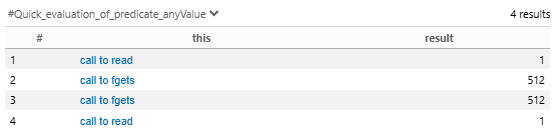
同じ結果になりそうですが、増やす方もやってみます。
void cat(int client, FILE *resource)
{
    char buf[1024];
    int size = 512;

    fgets(buf, size/*sizeof(buf)*/, resource);
    while (!feof(resource))
    {
        send(client, buf, strlen(buf), 0);
        //if( size >= 256 ){ size--; }
        if( size < 1024 ){ size++; }
        fgets(buf, size/*sizeof(buf)*/, resource);
    }
}
結果は上と同じでした。
次は、size が静的に決まらないようにしてみます。
1つ目の fgets関数で受信したデータの先頭 1byte に入ってる値を使います。0 が入ってたら無限ループになってしまいそうですが、実際に動かすわけではないので、よしとします。
void cat(int client, FILE *resource)
{
    char buf[1024];
    int size;

    fgets(buf, sizeof(buf), resource);
    size = buf[0];
    while (!feof(resource))
    {
        send(client, buf, strlen(buf), 0);
        fgets(buf, size/*sizeof(buf)*/, resource);
    }
}
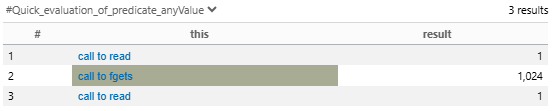
結果は以下です。
2つ目の fgets関数が検知されなくなりました。型の上限値の 127 とかになるのかと思いましたが、予想外でした。
ちょっと、一般的ではないコードになったので、少し修正します。
0 とか、負の値は避けるようにしました。
void cat(int client, FILE *resource)
{
    char buf[1024];
    int size;

    fgets(buf, sizeof(buf), resource);
    size = buf[0] > 0 ? buf[0] : 10;
    while (!feof(resource))
    {
        send(client, buf, strlen(buf), 0);
        fgets(buf, size/*sizeof(buf)*/, resource);
    }
}
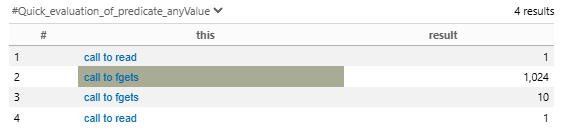
結果は以下です。
うーん、面白くない結果になりました(笑)。
OverflowStatic.qlのoverflowOffsetInLoopメソッドでいろいろやってみる
次は、OverflowStatic.ql は、3つの条件のうち、overflowOffsetInLoopメソッドに注目します。上の wrongBufferSizeメソッドの場合と同様 に、この条件で使用するクラスやメソッド以外は削除したものが以下です。
/**
 * @name Static array access may cause overflow
 * @description Exceeding the size of a static array during write or access operations
 *              may result in a buffer overflow.
 * @kind problem
 * @problem.severity warning
 * @security-severity 9.3
 * @precision high
 * @id cpp/static-buffer-overflow
 * @tags reliability
 *       security
 *       external/cwe/cwe-119
 *       external/cwe/cwe-131
 */

import cpp
import semmle.code.cpp.commons.Buffer
import semmle.code.cpp.ir.dataflow.DataFlow
import semmle.code.cpp.rangeanalysis.SimpleRangeAnalysis
import semmle.code.cpp.ConfigurationTestFile
import LoopBounds

private predicate staticBufferBase(VariableAccess access, Variable v) {
  v.getType().(ArrayType).getBaseType() instanceof CharType and
  access = v.getAnAccess() and
  not memberMayBeVarSize(_, v) and
  not access.isUnevaluated()
}

predicate staticBuffer(VariableAccess access, Variable v, int size) {
  staticBufferBase(access, v) and
  size = getBufferSize(access, _)
}

class BufferAccess extends ArrayExpr {
  BufferAccess() {
    exists(int size |
      staticBuffer(this.getArrayBase(), _, size) and
      size != 0
    ) and
    // exclude accesses in macro implementation of `strcmp`,
    // which are carefully controlled but can look dangerous.
    not exists(Macro m |
      m.getName() = "strcmp" and
      m.getAnInvocation().getAnExpandedElement() = this
    ) and
    //A buffer access must be reachable (not in dead code)
    reachable(this)
  }

  int bufferSize() { staticBuffer(this.getArrayBase(), _, result) }

  Variable buffer() { result.getAnAccess() = this.getArrayBase() }
}

predicate overflowOffsetInLoop(BufferAccess bufaccess, string msg) {
  exists(ClassicForLoop loop |
    loop.getStmt().getAChild*() = bufaccess.getEnclosingStmt() and
    loop.limit() >= bufaccess.bufferSize() and
    loop.counter().getAnAccess() = bufaccess.getArrayOffset() and
    // Ensure that we don't have an upper bound on the array index that's less than the buffer size.
    not upperBound(bufaccess.getArrayOffset().getFullyConverted()) < bufaccess.bufferSize() and
    // The upper bounds analysis must not have been widended
    not upperBoundMayBeWidened(bufaccess.getArrayOffset().getFullyConverted()) and
    msg =
      "Potential buffer-overflow: counter '" + loop.counter().toString() + "' <= " +
        loop.limit().toString() + " but '" + bufaccess.buffer().getName() + "' has " +
        bufaccess.bufferSize().toString() + " elements."
  )
}

from Element error, string msg
where overflowOffsetInLoop(error, msg)
select error, msg
staticBufferBaseメソッドの最初の条件に注目する
staticBufferBaseメソッドは、4つの条件が設定されています。最初の条件の v.getType().(ArrayType).getBaseType() instanceof CharType は、変数 v が、静的な配列(malloc などで確保されていない、最初から存在している配列)を条件としていると思います。ちなみに、(ArrayType) はキャストをしています。公式ヘルプの ArrayType を見ると、配列のことですね。公式ヘルプの getType を見ると、Type を返すようになっています。ArrayType、CharType の親クラスをたどっていくと Type に行きつきます。instanceof は、戻り値の式が、CharType のサブクラスかどうかを判定します。ちなみに、CharType のサブクラスは、先ほど見た CharType の公式ヘルプ に書かれてますが、PlainCharType、SignedCharType、UnsignedCharType の 3つとなっています。
ここで抽出されている静的な配列を可視化したいと思います。そこで、以下のクエリを実行します。
最初のメタデータが無いとエラーになったので、適当な内容を書きました。また、select句は、2つの列の場合、最初が entity(変数)で、2列目が文字列でなければならないので、それらしく書きました。
/**
 * @name LoopBounds.qll debug
 * @description LoopBounds.qll for debug
 * @kind problem
 * @problem.severity warning
 * @security-severity 9.3
 * @precision high
 * @id cpp/loop-bounds
 * @tags reliability
 *       security
 *       external/cwe/cwe-119
 *       external/cwe/cwe-131
 */

import cpp

from Variable v
where v.getType().(ArrayType).getBaseType() instanceof CharType
select v, "v.getType(): " + v.getType().toString()
これを実行したところ、15件が抽出されました。抽出された行番号は、467、404、371、353、213、264、265、266、181、165、142、58、60、61、62 でした。httpd.c を上から見ていって、この抽出が正しいのかどうかを見ていきました。
58行目とは、以下です。
char buf[1024];
検出結果は、以下です。
LoopBounds.qll debug,LoopBounds.qll for debug,warning,v.getType(): char[1024],/httpd.c,58,10,58,12
結果としては、char型の配列は全て抽出されていました。検出しなかったのは、int cgi_output[2]、int cgi_input[2] の 2つでした。これらは、char型ではないので、抽出されなかったんだと思います。
CharType の公式ヘルプ を見ると、CharType は、char型、singed char型、unsigned char型を含んでいるとのことです。
Tinyhttpd には、char型しかなかったので、あとの 2つが抽出されるかどうかは、確認できませんでした。さらに、uint8_t も抽出されるのか、なども見たかったです。
もう少し大きな規模の OSS を使った方がいい気がしてきました。。
後日、別の OSS で、同じクエリを実行したところ、unsigned char型は検出されましたが、uint8_t は検出されませんでした。uint8_t は unsigned char で typedef されてると思うので、これは意外でした。
staticBufferBaseメソッドの2番目の条件に注目する
2番目の条件は、access = v.getAnAccess() です。これも可視化してみます。
以下のようなクエリを実行します。
/**
 * @name LoopBounds.qll debug
 * @description LoopBounds.qll for debug
 * @kind problem
 * @problem.severity warning
 * @security-severity 9.3
 * @precision high
 * @id cpp/loop-bounds
 * @tags reliability
 *       security
 *       external/cwe/cwe-119
 *       external/cwe/cwe-131
 */

import cpp

from Variable v
where v.getType().(ArrayType).getBaseType() instanceof CharType
select v.getAnAccess(), "v.getAnAccess(): " + v.getAnAccess().toString()
where句を変えていないので、対象は 15個のままのはずですが、ここで出力されるのは、アクセスしてる箇所で、検出したのは 154件です。
同じく、58行目の以下を対象にして、見てみます。58行目とは、以下です。
char buf[1024];
ローカル変数なので、この変数が定義されている accept_request関数内で、検出されているのは、10件で、以下です。
LoopBounds.qll debug,LoopBounds.qll for debug,warning,v.getAnAccess(): buf,/httpd.c,69,33,69,35
LoopBounds.qll debug,LoopBounds.qll for debug,warning,v.getAnAccess(): buf,/httpd.c,69,45,69,47
LoopBounds.qll debug,LoopBounds.qll for debug,warning,v.getAnAccess(): buf,/httpd.c,71,21,71,23
LoopBounds.qll debug,LoopBounds.qll for debug,warning,v.getAnAccess(): buf,/httpd.c,73,21,73,23
LoopBounds.qll debug,LoopBounds.qll for debug,warning,v.getAnAccess(): buf,/httpd.c,89,20,89,22
LoopBounds.qll debug,LoopBounds.qll for debug,warning,v.getAnAccess(): buf,/httpd.c,91,21,91,23
LoopBounds.qll debug,LoopBounds.qll for debug,warning,v.getAnAccess(): buf,/httpd.c,93,18,93,20
LoopBounds.qll debug,LoopBounds.qll for debug,warning,v.getAnAccess(): buf,/httpd.c,115,47,115,49
LoopBounds.qll debug,LoopBounds.qll for debug,warning,v.getAnAccess(): buf,/httpd.c,116,41,116,43
LoopBounds.qll debug,LoopBounds.qll for debug,warning,v.getAnAccess(): buf,/httpd.c,116,53,116,55
getType() の出力が、 char[1024] だったのに対して、getAnAccess() の出力は、buf で、アクセスしている箇所が検出されていました。
公式ヘルプの getAnAccess を見ると、変数のアクセスを取得する、とのことです。
例えば、最初の 69行目が 2回検出されている箇所は以下のソースコードです。確かに、2回アクセスされています。
numchars = get_line(client, buf, sizeof(buf));
よく理解できました。
staticBufferBaseメソッド
staticBufferBaseメソッドの 2つの条件について見てきたので、staticBufferBaseメソッド全体の結果を見てみます。
以下のクエリを実行します。
import Buffer について説明しておきます。もともとは、import semmle.code.cpp.commons.Buffer と書かれていたものですが、この Bufferライブラリが、CodeQL の v2.20.5 から v2.20.6 に更新されたときに、仕様が変わりました。少し調べたところ(変更内容は、別記事で整理中)、新しい仕様は、あまりうまくいってない感じがしています。そこで、v2.20.5 の Bufferライブラリ(qlpacks/codeql/cpp-queries/1.3.5/.codeql/libraries/codeql/cpp-all/4.0.2/semmle/code/cpp/commons/Buffer.qll)を以下のクエリと同じディレクトリに置いて、以前の仕様で動作するようにしています。
/**
 * @name LoopBounds.qll debug
 * @description LoopBounds.qll for debug
 * @kind problem
 * @problem.severity warning
 * @security-severity 9.3
 * @precision high
 * @id cpp/loop-bounds
 * @tags reliability
 *       security
 *       external/cwe/cwe-119
 *       external/cwe/cwe-131
 */

import cpp
import Buffer

private predicate staticBufferBase(VariableAccess access, Variable v) {
  v.getType().(ArrayType).getBaseType() instanceof CharType and
  access = v.getAnAccess() and
  not memberMayBeVarSize(_, v) and
  not access.isUnevaluated()
}

from VariableAccess access, Variable v
where staticBufferBase(access, v)
select access, "access: " + access.toString() + "v.getName(): " + v.getName()
結果は、139件でした。154件から、15件減りました。
memberMayBeVarSizeメソッドか、isUnevaluatedメソッドの影響だと思われます。
そこで、片方をコメントアウトして確認したところ、15件とも、isUnevaluatedメソッドの影響で減っていました。
isUnevaluatedメソッドの公式ヘルプ を見ると、sizeof内の式などで、式が評価されない場合にマッチするとのことでした。
以下の表で、15件を整理します。
| 位置 | ソースコード | 理由 |
|---|---|---|
| 408行目の2番目のbuf | numchars = get_line(client, buf, sizeof(buf)); |
sizeof() |
| 226行目の2番目のbuf | numchars = get_line(client, buf, sizeof(buf)); |
sizeof() |
| 229行目の2番目のbuf | numchars = get_line(client, buf, sizeof(buf)); |
sizeof() |
| 235行目の2番目のbuf | numchars = get_line(client, buf, sizeof(buf)); |
sizeof() |
| 167行目の2番目のbuf | fgets(buf, sizeof(buf), resource); |
sizeof() |
| 171行目の2番目のbuf | fgets(buf, sizeof(buf), resource); |
sizeof() |
| 145行目の2番目のbuf | send(client, buf, sizeof(buf), 0); |
sizeof() |
| 147行目の2番目のbuf | send(client, buf, sizeof(buf), 0); |
sizeof() |
| 149行目の2番目のbuf | send(client, buf, sizeof(buf), 0); |
sizeof() |
| 151行目の2番目のbuf | send(client, buf, sizeof(buf), 0); |
sizeof() |
| 153行目の2番目のbuf | send(client, buf, sizeof(buf), 0); |
sizeof() |
| 69行目の2番目のbuf | numchars = get_line(client, buf, sizeof(buf)); |
sizeof() |
| 71行目のmethod | while (!ISspace(buf[i]) && (i < sizeof(method) - 1)) |
sizeof() |
| 91行目のurl | while (!ISspace(buf[j]) && (i < sizeof(url) - 1) && (j < numchars)) |
sizeof() |
| 116行目の2番目のbuf | numchars = get_line(client, buf, sizeof(buf)); |
sizeof() |
全て、sizeof で評価されなかったということのようです。
staticBufferメソッド
staticBufferBaseメソッドと、ほとんど同じですが、staticBufferメソッドも見ていきます。
以下のクエリで確認します。
/**
 * @name LoopBounds.qll debug
 * @description LoopBounds.qll for debug
 * @kind problem
 * @problem.severity warning
 * @security-severity 9.3
 * @precision high
 * @id cpp/loop-bounds
 * @tags reliability
 *       security
 *       external/cwe/cwe-119
 *       external/cwe/cwe-131
 */

import cpp
import Buffer

private predicate staticBufferBase(VariableAccess access, Variable v) {
  v.getType().(ArrayType).getBaseType() instanceof CharType and
  access = v.getAnAccess() and
  not memberMayBeVarSize(_, v) and
  not access.isUnevaluated()
}

predicate staticBuffer(VariableAccess access, Variable v, int size) {
  staticBufferBase(access, v) and
  size = getBufferSize(access, _)
}

from VariableAccess access, int size
where staticBuffer(access, _, size)
select access, "access: " + access.toString()
結果は、139件で同じでした。
BufferAccessクラス
staticBufferBaseメソッド、staticBufferメソッドが分かってきたので、それを使っている BufferAccessクラスを可視化します。
以下のクエリを実行します。
/**
 * @name LoopBounds.qll debug
 * @description LoopBounds.qll for debug
 * @kind problem
 * @problem.severity warning
 * @security-severity 9.3
 * @precision high
 * @id cpp/loop-bounds
 * @tags reliability
 *       security
 *       external/cwe/cwe-119
 *       external/cwe/cwe-131
 */

import cpp
import Buffer

private predicate staticBufferBase(VariableAccess access, Variable v) {
  v.getType().(ArrayType).getBaseType() instanceof CharType and
  access = v.getAnAccess() and
  not memberMayBeVarSize(_, v) and
  not access.isUnevaluated()
}

predicate staticBuffer(VariableAccess access, Variable v, int size) {
  staticBufferBase(access, v) and
  size = getBufferSize(access, _)
}

class BufferAccess extends ArrayExpr {
  BufferAccess() {
    exists(int size |
      staticBuffer(this.getArrayBase(), _, size) and
      size != 0
    ) and
    // exclude accesses in macro implementation of `strcmp`,
    // which are carefully controlled but can look dangerous.
    not exists(Macro m |
      m.getName() = "strcmp" and
      m.getAnInvocation().getAnExpandedElement() = this
    ) and
    //A buffer access must be reachable (not in dead code)
    reachable(this)
  }

  int bufferSize() { staticBuffer(this.getArrayBase(), _, result) }

  Variable buffer() { result.getAnAccess() = this.getArrayBase() }
}

from BufferAccess bufaccess
select bufaccess, "bufaccess: " + bufaccess.toString()
       + ", buffer: " + bufaccess.buffer().toString()
       + ", bufferSize: " + bufaccess.bufferSize().toString()
16件が検出されました。
LoopBounds.qll debug,LoopBounds.qll for debug,warning,bufaccess: access to array, buffer: buf, bufferSize: 1024,/httpd.c,406,5,406,10
LoopBounds.qll debug,LoopBounds.qll for debug,warning,bufaccess: access to array, buffer: buf, bufferSize: 1024,/httpd.c,406,19,406,24
LoopBounds.qll debug,LoopBounds.qll for debug,warning,bufaccess: access to array, buffer: buf, bufferSize: 1024,/httpd.c,223,5,223,10
LoopBounds.qll debug,LoopBounds.qll for debug,warning,bufaccess: access to array, buffer: buf, bufferSize: 1024,/httpd.c,223,19,223,24
LoopBounds.qll debug,LoopBounds.qll for debug,warning,bufaccess: access to array, buffer: buf, bufferSize: 1024,/httpd.c,232,13,232,19
LoopBounds.qll debug,LoopBounds.qll for debug,warning,bufaccess: access to array, buffer: buf, bufferSize: 1024,/httpd.c,234,41,234,47
LoopBounds.qll debug,LoopBounds.qll for debug,warning,bufaccess: access to array, buffer: buf, bufferSize: 1024,/httpd.c,71,21,71,26
LoopBounds.qll debug,LoopBounds.qll for debug,warning,bufaccess: access to array, buffer: method, bufferSize: 255,/httpd.c,73,9,73,17
LoopBounds.qll debug,LoopBounds.qll for debug,warning,bufaccess: access to array, buffer: buf, bufferSize: 1024,/httpd.c,73,21,73,26
LoopBounds.qll debug,LoopBounds.qll for debug,warning,bufaccess: access to array, buffer: method, bufferSize: 255,/httpd.c,77,5,77,13
LoopBounds.qll debug,LoopBounds.qll for debug,warning,bufaccess: access to array, buffer: buf, bufferSize: 1024,/httpd.c,89,20,89,25
LoopBounds.qll debug,LoopBounds.qll for debug,warning,bufaccess: access to array, buffer: buf, bufferSize: 1024,/httpd.c,91,21,91,26
LoopBounds.qll debug,LoopBounds.qll for debug,warning,bufaccess: access to array, buffer: url, bufferSize: 255,/httpd.c,93,9,93,14
LoopBounds.qll debug,LoopBounds.qll for debug,warning,bufaccess: access to array, buffer: buf, bufferSize: 1024,/httpd.c,93,18,93,23
LoopBounds.qll debug,LoopBounds.qll for debug,warning,bufaccess: access to array, buffer: url, bufferSize: 255,/httpd.c,96,5,96,10
LoopBounds.qll debug,LoopBounds.qll for debug,warning,bufaccess: access to array, buffer: path, bufferSize: 512,/httpd.c,112,9,112,30
BufferAccess は、ArrayExpr を継承しています。ArrayExpr の公式ヘルプ を見ると、配列アクセス式が対象のようです。
httpd.c を上から見ていったところ、確かに、char型の配列アクセス式は、この 16件でした。
ちなみに、BufferAccessクラスの特性メソッドの最初の条件の exists(int size | staticBuffer(this.getArrayBase(), _, size) and size != 0) だけを残して、特性メソッドの後ろの難しそうな条件を削除しても結果は同じでした。
ClassicForLoopクラス
ようやく overflowOffsetInLoopメソッドです。以前 はスルーしましたが、今回は、ClassicForLoopクラスを見ていきます。ClassicForLoopクラスは、OverflowStatic.ql と同じディレクトリの codeql/qlpacks/codeql/cpp-queries/1.4.2/Critical/LoopBounds.qll にあります。
ソースは以下です。
ClassicForLoopクラスは、ForStmtクラスを継承しています。ForStmtクラスの公式ヘルプ を見ると、通常の for文(C++11以降の for in は含まれない)を検出するようです。ソース先頭のコメントを見ると、x はインクリメントされる以外で、変更されないことが条件で検出されるようです。普通の for文だけが検出対象ということですね。
/**
 * A `for` loop of the form `for (x = 0; x < limit; x++)` with no modification
 * of `x` in the body. Variations with `<=` and `++x` are allowed.
 * `for (x = 0; x < limit; x++)` という形式の `for` ループ。ループ本体の `x` は変更されないことが条件です。
 * `<=` および `++x` によるバリエーションは許可されます。
 */
class ClassicForLoop extends ForStmt {
  ClassicForLoop() {
    exists(LocalVariable v |
      this.getInitialization().getAChild() instanceof ZeroAssignment and
      staticLimit(this.getCondition(), v, _) and
      simpleInc(this.getUpdate(), v) and
      not exists(VariableAccess access |
        access.isUsedAsLValue() and
        v.getAnAccess() = access and
        this.getStmt().getAChild*() = access.getEnclosingStmt()
      )
    )
  }

  /** Gets the loop variable. */
  LocalVariable counter() { simpleInc(this.getUpdate(), result) }

  /**
   * Gets the maximum value that the loop variable may have inside the loop
   * body. The minimum is 0.
   */
  int limit() { staticLimit(this.getCondition(), _, result) }
}
Tinyhttpd に、普通の for文は、以下の 288行目の 1カ所しかありません。
for (i = 0; i < content_length; i++) {
    recv(client, &c, 1, 0);
    write(cgi_input[1], &c, 1);
}
ForStmtクラス
以下のクエリで、ClassicForLoopクラスで実行してみると、その 1カ所は検出しませんでした。一方、from句のコメントアウトしている ForStmt を有効にして、ClassicForLoop をコメントアウトして、ForStmt で実行すると、288行目を検出しました。普通の for文だと思いましたが、何かの条件を満たしていないようです。
/**
 * @name LoopBounds.qll debug
 * @description LoopBounds.qll for debug
 * @kind problem
 * @problem.severity warning
 * @security-severity 9.3
 * @precision high
 * @id cpp/loop-bounds
 * @tags reliability
 *       security
 *       external/cwe/cwe-119
 *       external/cwe/cwe-131
 */

import cpp

/**
 * An assignment to a variable with the value `0`. For example:
 * ```
 * int x;
 * x = 0;
 * ```
 * but not:
 * ```
 * int x = 0;
 * ```
 */
class ZeroAssignment extends AssignExpr {
  ZeroAssignment() {
    this.getAnOperand() instanceof VariableAccess and
    this.getAnOperand() instanceof Zero
  }

  /** Gets a variable that is assigned the value `0`. */
  Variable assignedVariable() { result.getAnAccess() = this.getAnOperand() }
}

private predicate staticLimit(RelationalOperation op, Variable v, int limit) {
  op instanceof LTExpr and
  op.getLeftOperand() = v.getAnAccess() and
  op.getRightOperand().getValue().toInt() - 1 = limit
  or
  op instanceof LEExpr and
  op.getLeftOperand() = v.getAnAccess() and
  op.getRightOperand().getValue().toInt() = limit
}

private predicate simpleInc(IncrementOperation inc, Variable v) {
  inc.getAChild() = v.getAnAccess()
}

/**
 * A `for` loop of the form `for (x = 0; x < limit; x++)` with no modification
 * of `x` in the body. Variations with `<=` and `++x` are allowed.
 */
class ClassicForLoop extends ForStmt {
  ClassicForLoop() {
    exists(LocalVariable v |
      this.getInitialization().getAChild() instanceof ZeroAssignment and
      staticLimit(this.getCondition(), v, _) and
      simpleInc(this.getUpdate(), v) and
      not exists(VariableAccess access |
        access.isUsedAsLValue() and
        v.getAnAccess() = access and
        this.getStmt().getAChild*() = access.getEnclosingStmt()
      )
    )
  }

  /** Gets the loop variable. */
  LocalVariable counter() { simpleInc(this.getUpdate(), result) }

  /**
   * Gets the maximum value that the loop variable may have inside the loop
   * body. The minimum is 0.
   */
  int limit() { staticLimit(this.getCondition(), _, result) }
}

from ClassicForLoop/*ForStmt*/ loop
select loop, "loop: " + loop.toString()
検出結果は以下です。
for文の構造を表したような出力でした。
LoopBounds.qll debug,LoopBounds.qll for debug,warning,loop: for(...;...;...) ...,/httpd.c,288,13,291,13
ForStmtクラスのgetInitializationメソッド
特性メソッドの中を見ていきます。最初の条件の this.getInitialization().getAChild() instanceof ZeroAssignment は、インクリメント変数(今回の場合は i)が、0 で初期化されているか、という条件のようです。これは満たしていそうです。
getInitializationメソッドは、ForStmtクラスのメンバメソッドで、getInitializationメソッドの公式ヘルプ を見ると、for文の括弧内の 3つ要素のうち、先頭の部分を取得できるようです。Stmt型の戻り値を返します。
上の ForStmtクラスのクエリの from/where/select句の部分だけ以下のように変更したクエリを実行します。
from ForStmt loop
select loop, "loop: " + loop.toString() +
             ", loop.getInitialization(): " + loop.getInitialization().toString()
検出結果は以下です。
ExprStmt とだけ出力されました。
LoopBounds.qll debug,LoopBounds.qll for debug,warning,loop: for(...;...;...) ..., loop.getInitialization(): ExprStmt,/httpd.c,288,13,291,13
StmtクラスのgetAChildメソッド
次は、getAChildメソッドで、これは、Stmtクラスのメンバメソッドで、getAChildメソッドの公式ヘルプ を見ると、この式の子要素を取得できると書いています。例が書かれてないので、分かりにくいですね。実際にやってみます。
上の ForStmtクラスのクエリの from/where/select句の部分だけ以下のように変更したクエリを実行します。
from ForStmt loop
select loop, "loop: " + loop.toString() +
             ", loop.getInitialization(): " + loop.getInitialization().toString() +
             ", loop.getInitialization().getAChild(): " + loop.getInitialization().getAChild().toString()
検出結果は以下です。
代入文の構造を表したような出力でした。
LoopBounds.qll debug,LoopBounds.qll for debug,warning,loop: for(...;...;...) ..., loop.getInitialization(): ExprStmt, loop.getInitialization().getAChild(): ... = ...,/httpd.c,288,13,291,13
ZeroAssignmentクラス
ClassicForLoopクラスの特性メソッドの先頭の条件では、先ほどの StmtクラスのgetAChildメソッドの結果が、ZeroAssignmentクラスの条件を満たしていることが条件になっています。
ZeroAssignmentクラスを以下のクエリで確認します。
上の ForStmtクラスのクエリの from/where/select句の部分だけ以下のように変更したクエリを実行します。
from ZeroAssignment za
select za,
  "L=" + za.getLocation().getStartLine().toString() +
  ", C=" + za.getLocation().getStartColumn().toString() +
  ", za: " + za.toString()
検出結果は以下です。
LoopBounds.qll debug,LoopBounds.qll for debug,warning,L=288, C=18, za: ... = ...,/httpd.c,288,18,288,22
LoopBounds.qll debug,LoopBounds.qll for debug,warning,L=70, C=5, za: ... = ...,/httpd.c,70,5,70,9
LoopBounds.qll debug,LoopBounds.qll for debug,warning,L=70, C=12, za: ... = ...,/httpd.c,70,12,70,16
LoopBounds.qll debug,LoopBounds.qll for debug,warning,L=88, C=5, za: ... = ...,/httpd.c,88,5,88,9
httpd.c を上から見ていきます。
以下の 3行は検出していません。変数定義は対象外になるようで、C++ の場合は、for文でインクリメント変数を定義する場合があるので、微妙な気がします。
Zeroクラスの公式ヘルプ を見ると、親クラスが NullValueクラスでした。NullValueクラスの 公式ヘルプ を見ると、値が null とみなされる式とあります。NULL と 0 は区別されているようです。
int cgi = 0; // L65
char *query_string = NULL; // L67
method[i] = '\0'; // L77
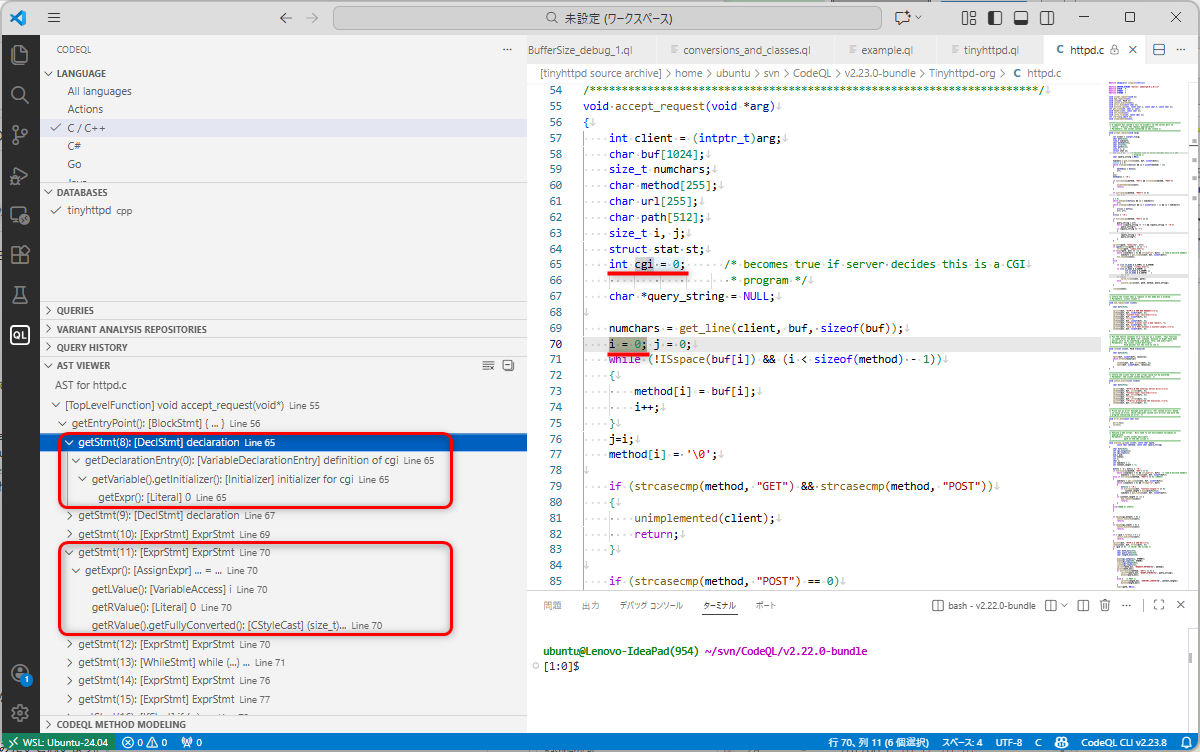
以下は、AST Viewer で確認した結果です。L70 は今回検出されたもので、L65 は検出されなかった行です。L65 などは、そもそも、ExprStmtクラスを継承した AssignExprクラスではなく、DeclStmtクラスと認識されて、代入ではなく、初期化と認識されているので、検出されなかったようです。DeclStmtクラスの公式ヘルプ を見ましたが、特にこのあたりの解説はありませんでした。
ClassicForLoopクラスの先頭の条件以外は削除
ようやく、ClassicForLoopクラスの特性メソッドの先頭行の解析が完了しました。この先頭行の条件だけなら、Tinyhttpd の 288行目は、満たしていそうですので、確認してみます。
上の ForStmtクラスのクエリの ForStmtクラスの特性メソッドだけを以下のように、先頭行の条件だけを残した状態にして、クエリを実行します。
ClassicForLoop() {
  exists(LocalVariable v |
    this.getInitialization().getAChild() instanceof ZeroAssignment /*and
    staticLimit(this.getCondition(), v, _) and
    simpleInc(this.getUpdate(), v) and
    not exists(VariableAccess access |
      access.isUsedAsLValue() and
      v.getAnAccess() = access and
      this.getStmt().getAChild*() = access.getEnclosingStmt()
    )*/
  )
}
検出結果は以下です。
Tinyhttpd の for文を検出するようになりました。ということは、Tinyhttpd の for文が満たさない条件が他のどこかにある、ということです。
LoopBounds.qll debug,LoopBounds.qll for debug,warning,loop: for(...;...;...) ...,/httpd.c,288,13,291,13
staticLimitメソッド
2番目の行を見ていきます。以下です。
staticLimitメソッドを満たしているかどうか、となっています。staticLimitメソッドの呼び出しの第1引数は、getConditionメソッドが実行されています。getInitializationメソッドと同じように、今度は、for文の条件の要素を取得すると予想がつきます。一応、getConditionメソッドの公式ヘルプ を見ると、予想通りでした。戻り値の型は Expr です。
staticLimit(this.getCondition(), v, _)
staticLimitメソッドは以下です。
引数で与えた getConditionメソッド戻り値は、RelationalOperationクラスになっています。RelationalOperationクラスの公式ヘルプ を見ると、<=, <, >, or >= の比較演算子ということです。
staticLimitメソッドは、or で結ばれているので、大きく 2つに分かれています。順番に見ていきます。
前半の最初の条件が、op instanceof LTExpr となっています。LTExprクラスの公式ヘルプ を見ると、< であることが条件です。
前半の 2番目の条件は、op.getLeftOperand() = v.getAnAccess() で、上で出てきたように、左オペランドが変数アクセスであることが条件です。
前半の 3番目の条件は、op.getRightOperand().getValue().toInt() - 1 = limit で、右オペランドの値から 1 を引いた値と第3引数が一致していることが条件です。
後半の最初の条件は、op instanceof LEExpr で、LEExpr の公式ヘルプ を見ると、<= であることが条件になっています。あとは、前半とほぼ同じで、小なりイコールなので、-1 が無いだけです。
まとめると、staticLimitメソッドは、for文のインクリメント変数と、インクリメント変数の上限値を取得するメソッドになると思います。
private predicate staticLimit(RelationalOperation op, Variable v, int limit) {
  op instanceof LTExpr and
  op.getLeftOperand() = v.getAnAccess() and
  op.getRightOperand().getValue().toInt() - 1 = limit
  or
  op instanceof LEExpr and
  op.getLeftOperand() = v.getAnAccess() and
  op.getRightOperand().getValue().toInt() = limit
}
Tinyhttpd の 288行目を見ると、ループ条件の右オペランドは変数となっていて、これは、HTML の CONTENT_LENGTH から読み取る値であり、具体的な値は取得できません。この場合、staticLimitメソッドの条件は満たされるでしょうか。static という名前がついてるので、静的であることが意識されてるので、満たされない気がします。
ClassicForLoopクラスの先頭と2番目の条件以外は削除
それでは、2番目の条件を追加した以下のクエリで、staticLimitメソッドの条件が成立しているかどうかを確認します。
上の ForStmtクラスのクエリの ForStmtクラスの特性メソッドだけを以下のように、先頭行と 2番目の条件だけを残した状態にして、クエリを実行します。
ClassicForLoop() {
  exists(LocalVariable v |
    this.getInitialization().getAChild() instanceof ZeroAssignment and
    staticLimit(this.getCondition(), v, _) /*and
    simpleInc(this.getUpdate(), v) and
    not exists(VariableAccess access |
      access.isUsedAsLValue() and
      v.getAnAccess() = access and
      this.getStmt().getAChild*() = access.getEnclosingStmt()
    )*/
  )
}
実行した結果、検出されませんでした。やはり、静的ではない(インクリメント変数のループ条件の最大値を取得できない)ことが原因だと思います。
simpleIncメソッド
3番目の行の以下を見ていきます。
simpleIncメソッドを満たしているかどうか、となっています。simpleIncメソッドの呼び出しの第1引数は、getUpdateメソッドが実行されています。getInitializationメソッド、getConditionメソッドと同じように、今度は、for文の更新の要素を取得すると予想がつきます。一応、getUpdateメソッドの公式ヘルプ を見ると、予想通りでした。戻り値の型は Expr です。
simpleInc(this.getUpdate(), v)
simpleIncメソッドは以下です。
private predicate simpleInc(IncrementOperation inc, Variable v) {
  inc.getAChild() = v.getAnAccess()
}
引数で与えた getUpdateメソッド戻り値は、IncrementOperationクラスになっています。IncrementOperationクラスの公式ヘルプ を見ると、++演算子 をともなった式ということです。
inc.getAChild() = v.getAnAccess() は、引数で与えた v(インクリメント変数)が、++演算子 の対象の変数と一致していることが条件のようです。
Tinyhttpd の 288行目を見ると、これは満たしていそうです。
ClassicForLoopクラスの先頭と3番目の条件以外は削除
それでは、2番目の条件は削除された状態に戻し、先頭の条件に、3番目の条件を追加した以下のクエリで、simpleIncメソッドの条件が成立しているかどうかを確認します。
上の ForStmtクラスのクエリの ForStmtクラスの特性メソッドだけを以下のように、先頭行と 3番目の条件だけを残した状態にして、クエリを実行します。
ClassicForLoop() {
  exists(LocalVariable v |
    this.getInitialization().getAChild() instanceof ZeroAssignment and
    /*staticLimit(this.getCondition(), v, _) and*/
    simpleInc(this.getUpdate(), v) /*and
    not exists(VariableAccess access |
      access.isUsedAsLValue() and
      v.getAnAccess() = access and
      this.getStmt().getAChild*() = access.getEnclosingStmt()
    )*/
  )
}
実行した結果、検出されました。
ClassicForLoopクラスの4番目の条件
最後の条件は、以下で、まとめて見ていきます。
全体としては、インクリメント変数が左オペランドとしてアクセスされていないことを確認しているようです。
先頭の条件は、VariableAccessクラスの isUsedAsLValueメソッドが使われています。isUsedAsLValueメソッドの公式ヘルプ を見ると、変数アクセスが左オペランドとして使われていることが条件になっています。
2番目の条件は、この変数アクセスが、インクリメント変数と一致しているという条件です。
最後の条件は少し難しいです。この for文の要素を再帰的に見ていき、この変数アクセスが for文に含まれていることを確認していると思います。ForStmtクラスの getStmtメソッドの公式ヘルプ を見ると、for文のボディ(for文の中身)を取得しています。また、getEnclosingStmtメソッドの公式ヘルプ を見ると、最小のステートメントを取得する、とあります。つまり、上の 2つの条件を満たした access は、今回の対象の for文のボディの要素の 1つであることを確認しています。
not exists(VariableAccess access |
  access.isUsedAsLValue() and
  v.getAnAccess() = access and
  this.getStmt().getAChild*() = access.getEnclosingStmt()
)
それでは、4番目の条件を追加した以下のクエリで、今回の条件が成立しているかどうかを確認します。
上の ForStmtクラスのクエリの ForStmtクラスの特性メソッドだけを以下のように、2番目の条件以外を残した状態にして、クエリを実行します。
ClassicForLoop() {
  exists(LocalVariable v |
    this.getInitialization().getAChild() instanceof ZeroAssignment and
    /*staticLimit(this.getCondition(), v, _) and*/
    simpleInc(this.getUpdate(), v) and
    not exists(VariableAccess access |
      access.isUsedAsLValue() and
      v.getAnAccess() = access and
      this.getStmt().getAChild*() = access.getEnclosingStmt()
    )
  )
}
実行した結果、検出されました。
ClassicForLoopクラスが理解できました。
overflowOffsetInLoopメソッド
最後は、overflowOffsetInLoopメソッドの中身を見ていきます。
まずは、Tinyhttpd の 288行目の forループを検出させておき、条件を追加したときに、検出したままなのか、検出しなくなるのか、という進め方をしたいです。そのためには、Tinyhttpd の 288行目の forループを検出させる必要がありますが、上でやったように、ClassicForLoopクラスの特性メソッドの 2番目の条件(staticLimit(this.getCondition(), v, _))が有効なままだと、この forループを検出しなくなります。limitメソッドも、staticLimitメソッドを読んでるので、limitメソッドも無効にする必要があります。2番目の条件と limitメソッドを無効化した ClassicForLoopクラスを使うには、そう変更した LoopBounds.qll を、同じディレクトリに置いておくか、ファイル内に、変更した LoopBounds.qll を貼り付けるかのどちらかです。今回は後者の方法とします。
以下のクエリとなりました。
overflowOffsetInLoopメソッドの条件は、とりあえず、最初の条件だけ残して、あとは無効化しておきました。最初の条件は、左辺は、ループの中の要素を再帰的に取得し、右辺は、BufferAccessクラスを満たす文を取得します。この両辺が成り立つものが検出されます。
/**
 * @name Static array access may cause overflow
 * @description Exceeding the size of a static array during write or access operations
 *              may result in a buffer overflow.
 * @kind problem
 * @problem.severity warning
 * @security-severity 9.3
 * @precision high
 * @id cpp/static-buffer-overflow
 * @tags reliability
 *       security
 *       external/cwe/cwe-119
 *       external/cwe/cwe-131
 */

import cpp
import Buffer
import semmle.code.cpp.ir.dataflow.DataFlow
import semmle.code.cpp.rangeanalysis.SimpleRangeAnalysis

/**
 * An assignment to a variable with the value `0`. For example:
 * ```
 * int x;
 * x = 0;
 * ```
 * but not:
 * ```
 * int x = 0;
 * ```
 */
class ZeroAssignment extends AssignExpr {
  ZeroAssignment() {
    this.getAnOperand() instanceof VariableAccess and
    this.getAnOperand() instanceof Zero
  }

  /** Gets a variable that is assigned the value `0`. */
  Variable assignedVariable() { result.getAnAccess() = this.getAnOperand() }
}

private predicate staticLimit(RelationalOperation op, Variable v, int limit) {
  op instanceof LTExpr and
  op.getLeftOperand() = v.getAnAccess() and
  op.getRightOperand().getValue().toInt() - 1 = limit
  or
  op instanceof LEExpr and
  op.getLeftOperand() = v.getAnAccess() and
  op.getRightOperand().getValue().toInt() = limit
}

private predicate simpleInc(IncrementOperation inc, Variable v) {
  inc.getAChild() = v.getAnAccess()
}

/**
 * A `for` loop of the form `for (x = 0; x < limit; x++)` with no modification
 * of `x` in the body. Variations with `<=` and `++x` are allowed.
 */
class ClassicForLoop extends ForStmt {
  ClassicForLoop() {
    exists(LocalVariable v |
      this.getInitialization().getAChild() instanceof ZeroAssignment and
      //staticLimit(this.getCondition(), v, _) and
      simpleInc(this.getUpdate(), v) and
      not exists(VariableAccess access |
        access.isUsedAsLValue() and
        v.getAnAccess() = access and
        this.getStmt().getAChild*() = access.getEnclosingStmt()
      )
    )
  }

  /** Gets the loop variable. */
  LocalVariable counter() { simpleInc(this.getUpdate(), result) }

  /**
   * Gets the maximum value that the loop variable may have inside the loop
   * body. The minimum is 0.
   */
  //int limit() { staticLimit(this.getCondition(), _, result) }
}

private predicate staticBufferBase(VariableAccess access, Variable v) {
  v.getType().(ArrayType).getBaseType() instanceof CharType and
  access = v.getAnAccess() and
  not memberMayBeVarSize(_, v) and
  not access.isUnevaluated()
}

predicate staticBuffer(VariableAccess access, Variable v, int size) {
  staticBufferBase(access, v) and
  size = getBufferSize(access, _)
}

class BufferAccess extends ArrayExpr {
  BufferAccess() {
    exists(int size |
      staticBuffer(this.getArrayBase(), _, size) and
      size != 0
    ) and
    // exclude accesses in macro implementation of `strcmp`,
    // which are carefully controlled but can look dangerous.
    not exists(Macro m |
      m.getName() = "strcmp" and
      m.getAnInvocation().getAnExpandedElement() = this
    )
  }

  int bufferSize() { staticBuffer(this.getArrayBase(), _, result) }

  Variable buffer() { result.getAnAccess() = this.getArrayBase() }
}

predicate overflowOffsetInLoop(BufferAccess bufaccess, string msg) {
  exists(ClassicForLoop loop |
    loop.getStmt().getAChild*() = bufaccess.getEnclosingStmt() and
    //loop.limit() >= bufaccess.bufferSize() and
    //loop.counter().getAnAccess() = bufaccess.getArrayOffset() and
    // Ensure that we don't have an upper bound on the array index that's less than the buffer size.
    //not upperBound(bufaccess.getArrayOffset().getFullyConverted()) < bufaccess.bufferSize() and
    // The upper bounds analysis must not have been widended
    //not upperBoundMayBeWidened(bufaccess.getArrayOffset().getFullyConverted()) and
    msg =
      "Potential buffer-overflow: counter '" + loop.counter().toString() + "' <= " +
        /*loop.limit().toString() +*/ " but '" + bufaccess.buffer().getName() + "' has " +
        bufaccess.bufferSize().toString() + " elements."
  )
}

from Element error, string msg
where overflowOffsetInLoop(error, msg)
select error, msg
overflowOffsetInLoopメソッドでは、BufferAccessクラスの条件も満たす必要があります。上の BufferAccessクラス で可視化した通り、char型の静的配列へのアクセスであり、また、先頭の条件から、288行目の forループ内に存在する条件も満たす必要があります。もう一度、288行目の forループを貼ります。write関数の cgi_input は配列ですが、int型なので、BufferAccessクラスの条件を満たしません。
for (i = 0; i < content_length; i++) {
    recv(client, &c, 1, 0);
    write(cgi_input[1], &c, 1);
}
read関数と write関数で使われている c を見ると、char c と宣言されています。これを char c[1] とすれば、BufferAccessクラスの条件を満たしそうです。Tinyhttpd の httpd.c を変更した差分は以下です。c を配列にしたので、他の行も変更が必要になりました。
$ diff -upr httpd.org.c httpd.c
--- httpd.org.c 2026-01-12 22:41:58.849027348 +0900
+++ httpd.c     2026-01-12 22:44:29.833929718 +0900
@@ -216,7 +216,7 @@ void execute_cgi(int client, const char
     pid_t pid;
     int status;
     int i;
-    char c;
+    char c[1];
     int numchars = 1;
     int content_length = -1;

@@ -286,11 +286,11 @@ void execute_cgi(int client, const char
         close(cgi_input[0]);
         if (strcasecmp(method, "POST") == 0)
             for (i = 0; i < content_length; i++) {
-                recv(client, &c, 1, 0);
-                write(cgi_input[1], &c, 1);
+                recv(client, &c[0], 1, 0);
+                write(cgi_input[1], &c[0], 1);
             }
-        while (read(cgi_output[0], &c, 1) > 0)
-            send(client, &c, 1, 0);
+        while (read(cgi_output[0], &c[0], 1) > 0)
+            send(client, &c[0], 1, 0);

         close(cgi_output[0]);
         close(cgi_input[1]);
Tinyhttpd を変更したので、CodeQL のデータベースを作り直す必要があります。その後、クエリを実行した結果が以下です。
read関数と write関数で使われている c へのアクセスを検出するようになりました。
Static array access may cause overflow,Exceeding the size of a static array during write or access operations may result in a buffer overflow.,warning,Potential buffer-overflow: counter 'i' <=  but 'c' has 1 elements.,/httpd.c,289,31,289,34
Static array access may cause overflow,Exceeding the size of a static array during write or access operations may result in a buffer overflow.,warning,Potential buffer-overflow: counter 'i' <=  but 'c' has 1 elements.,/httpd.c,290,38,290,41
おわりに
今回は、GitHub に公開されている OSS の Tinyhttpd を使って、CodeQL のクエリの挙動を確認しました。CodeQL のクエリは、普通の手続き方のプログラムと違って、内部でどのように動いているのかが分からないところが難しいです。今回のような試行錯誤を繰り返して、理解していくしかないのかもしれません。
次回は、別の CodeQL のクエリを題材にして、挙動を確認してみたいと思います。
最後になりましたが、エンジニアグループのランキングに参加中です。

気楽にポチッとよろしくお願いいたします🙇
今回は以上です!
最後までお読みいただき、ありがとうございました。
