AWSの基礎を学ぼう Gateway Load Balancerに参加しました
AWSの亀田さんが、ほぼ毎週開催されている
いろんなサービスを触ってみる勉強会です。
今週はGateway Load Balancer でした。
awsbasics.connpass.com
作成した環境
こんな感じの構成をハンズオンで構築できました。
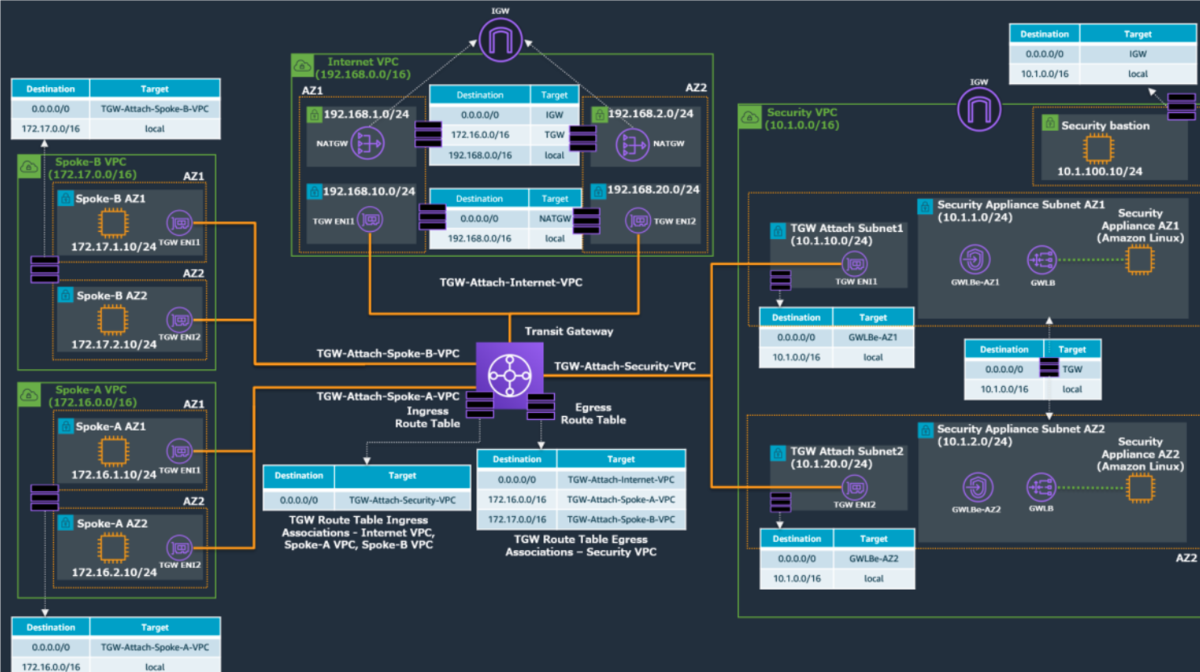
VPCが4つ存在し若干細々しているので、コメントを付けてみます
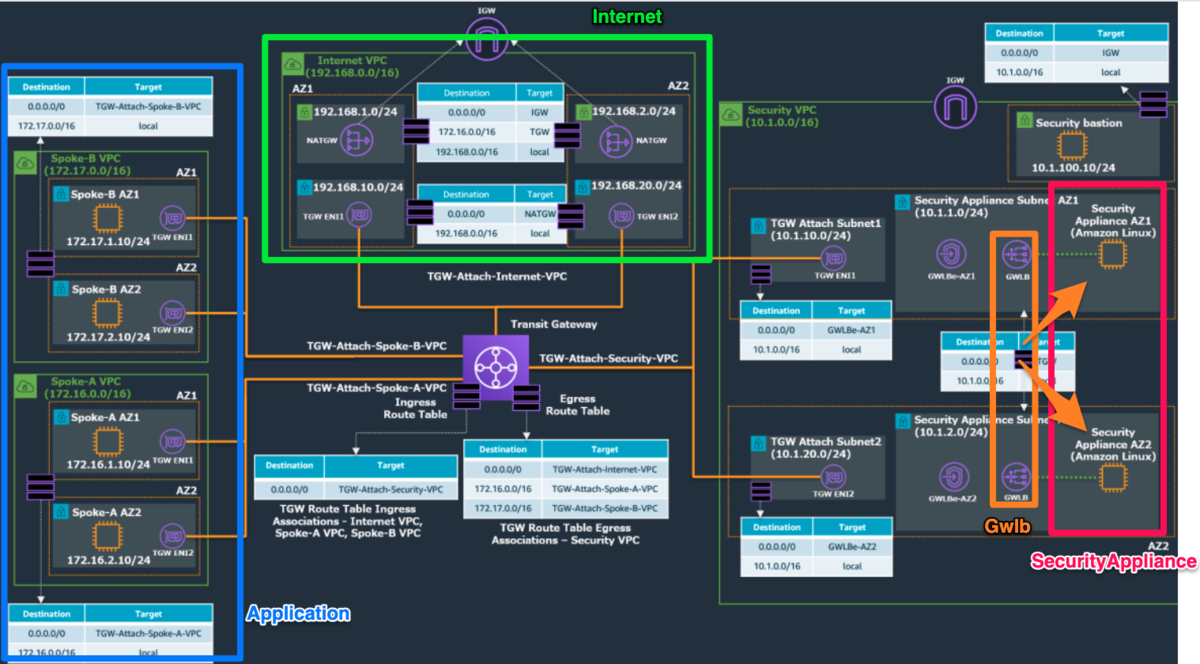
- 左側のApplicationのVPCから通信がスタートするとします
- Internet Out時にTransit Gatewayを経由し、右側のVPC(security用)に通信します
- 右側のVPCでsecurityのcheckをします。このcheckをsecurity applianceのEC2が実施しており、
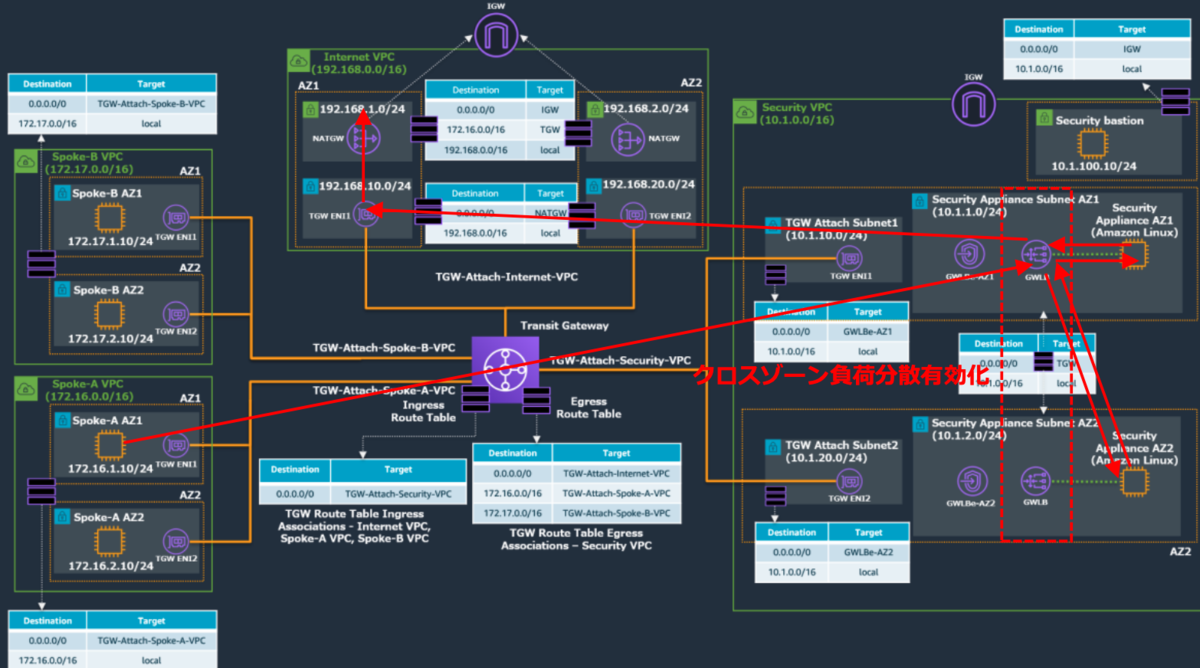
そこへの負荷分散でGateway Load Balancerが登場します - securityのcheckを通過したら上のVPCを通じてinternet outします
最終的な通信のイメージは下記のような流れです。
cloudformationを見てみる
実際のハンズオンではcloudformation templateをご提供頂きました。
Gateway Load Balancerや内部のネットワーク構成を
どう構築されているかcfnを見てみました。
※実際のハンズオンでは手順とcloudformation templateをご提供頂いたのですが、
全部公開はNGで、部分的には載せて良いですよ言って頂けたので一部だけ載せさせて頂きます。
Gateway Load Balancer
ALBとほぼ同じでした
  GWLB:
    Type: AWS::ElasticLoadBalancingV2::LoadBalancer
    Properties:
      Name: gwlb-lab
      Type: gateway
      Subnets:
        - !Ref SecurityApplianceSubnet1
        - !Ref SecurityApplianceSubnet2
      Tags:
      - Key: Name
        Value: gwlb-lab
ターゲットグループでEC2を登録しています
  GWLBTargetGroup:
    Type: AWS::ElasticLoadBalancingV2::TargetGroup
    Properties:
      Name: gwlb-target
      Port: 6081
      Protocol: GENEVE
      TargetGroupAttributes:
      - Key: deregistration_delay.timeout_seconds
        Value: 20
      VpcId: !Ref SecurityVPC
      HealthCheckPort: 22
      HealthCheckProtocol: TCP
      TargetType: instance
      Targets:
        - Id: !Ref ApplianceAZ1EC2Instance
        - Id: !Ref ApplianceAZ2EC2Instance
      Tags:
      - Key: Name
        Value: gwlb-target
VPC Endpoint
VPC Endpointを作成しています
ただ、VPC Endpointには直接loadbalancerの紐付けがされていませんでした。
  GWLBEAZ1:
    Type: AWS::EC2::VPCEndpoint
    Properties:
      VpcId: !Ref SecurityVPC
      ServiceName: !GetAtt GWLBESerivceName.Data
      VpcEndpointType: GatewayLoadBalancer
      SubnetIds:
       - !Ref SecurityApplianceSubnet1

  GWLBEAZ2:
    Type: AWS::EC2::VPCEndpoint
    Properties:
      VpcId: !Ref SecurityVPC
      ServiceName: !GetAtt GWLBESerivceName.Data
      VpcEndpointType: GatewayLoadBalancer
      SubnetIds:
       - !Ref SecurityApplianceSubnet2
代わりにVPC endpointサービスでGatewayLoadBalancerと紐付けをしていました。
  GWLBEService:
    Type: AWS::EC2::VPCEndpointService
    Properties:
      GatewayLoadBalancerArns:
        - !Ref GWLB
      AcceptanceRequired: false
そして、VPC endpointサービスと
VPC endopointを紐づけているようでした。
こちらにカスタムリソースが利用されておりました
  GWLBESerivceName:
    DependsOn: GWLBEService
    Type: Custom::DescribeVpcEndpointServiceConfigurations
    Properties:
      ServiceToken: !GetAtt DescribeGWLBEService.Arn
      Input: !Ref GWLBEService
customリソースを利用してvpc endpoitのサービス名を取得しているようです
そして、取得したサービス名でVPC endpointとendpoint serviceを
紐づけているようです。
こうすることで2つのAZに存在するVPC endpointを1つのendpoint serviceに
まとめているようでした。
こんな作り方できるのかととても勉強になりました。
 DescribeGWLBEService:
    Type: AWS::Lambda::Function
    Properties:
      Handler: "index.handler"
      Role: !GetAtt
        - DescribeGWLBEServiceLambdaExecutionRole
        - Arn
      Code:
        ZipFile: |
          import boto3
          import cfnresponse
          import json
          import logging
          import time
          def handler(event, context):
            time.sleep(600)
            logger = logging.getLogger()
            logger.setLevel(logging.INFO)
            responseData = {}
            responseStatus = cfnresponse.FAILED
            logger.info('Received event: {}'.format(json.dumps(event)))
            if event["RequestType"] == "Delete":
              responseStatus = cfnresponse.SUCCESS
              cfnresponse.send(event, context, responseStatus, responseData)
            if event["RequestType"] == "Create":
              try:
                VpceServiceId = event["ResourceProperties"]["Input"]
              except Exception as e:
                logger.info('VPC Endpoint Service Id retrival failure: {}'.format(e))
              try:
                ec2 = boto3.client('ec2')
              except Exception as e:
                logger.info('boto3.client failure: {}'.format(e))
              try:
                response = ec2.describe_vpc_endpoint_service_configurations(
                  Filters=[
                    {
                      'Name': 'service-id',
                      'Values': [VpceServiceId]
                    }
                  ]
                )
              except Exception as e:
                logger.info('ec2.describe_vpc_endpoint_service_configurations fa: {}'.format(e))
              ServiceName = response['ServiceConfigurations'][0]['ServiceName']
              logger.info('service name: {}'.format(ServiceName))
              responseData['Data'] = ServiceName
              responseStatus = cfnresponse.SUCCESS
              cfnresponse.send(event, context, responseStatus, responseData)
      Runtime: python3.7
      Timeout: 900
ありがとうございました!
Gateway load balanerは初めて触ったのですが、
それ以外にも上記のように普段触ることないNW構成を触ることができ
とても勉強になりました
ありがとうございました!
