はじめに
環境 unity 2021.3
コード
InputTestFixtureの中身をunity test frameworkを使用しない形に置き換えたものです
入力実行の流れとしてはInputEventPtr作成→InputSystem.Queueに積む→ InputSystem.Update()で入力実行になります
using System; using System.Collections.Generic; using System.Linq; using System.Reflection; using UnityEngine.InputSystem.Controls; using Unity.Collections; using UnityEngine.InputSystem.LowLevel; using UnityEngine.InputSystem.Utilities; using UnityEngine.InputSystem; using UnityEngine; using TouchPhase = UnityEngine.InputSystem.TouchPhase; /// <summary> /// テスト入力を行うクラス /// </summary> public class InputTester { /// <summary> /// InputAction実行 /// Perform the input action without having to know what it is bound to. /// </summary> /// <param name="action">An input action that is currently enabled and has controls it is bound to.</param> /// <remarks> /// Blindly triggering an action requires making a few assumptions. Actions are not built to be able to trigger /// without any input. This means that this method has to generate input on a control that the action is bound to. /// Note that this method has no understanding of the interactions that may be present on the action and thus /// does not know how they may affect the triggering of the action. /// </summary> /// <param name="action"></param> public void PressTrigger(InputAction action, bool queueEventOnly = false) { if (!CanTrigger(action)) { return; } var controls = action.controls; // See if we have a button we can trigger. for (var i = 0; i < controls.Count; ++i) { if (!(controls[i] is ButtonControl button)) continue; Set(button, 1, queueEventOnly: queueEventOnly); return; } // See if we have an axis we can slide a bit. for (var i = 0; i < controls.Count; ++i) { if (!(controls[i] is AxisControl axis)) continue; Set(axis, axis.ReadValue() + 0.01f, queueEventOnly: queueEventOnly); return; } } public void ReleaseTrigger(InputAction action, bool queueEventOnly = false) { if (!CanTrigger(action)) { return; } var controls = action.controls; // See if we have a button we can trigger. for (var i = 0; i < controls.Count; ++i) { if (!(controls[i] is ButtonControl button)) continue; Set(button, 0, queueEventOnly: queueEventOnly); return; } // See if we have an axis we can slide a bit. for (var i = 0; i < controls.Count; ++i) { if (!(controls[i] is AxisControl axis)) continue; Set(axis, 0, queueEventOnly: queueEventOnly); return; } } /// <summary> /// ボタンを押す /// </summary> /// <param name="button"></param> /// <param name="time"></param> /// <param name="timeOffset"></param> /// <param name="queueEventOnly"></param> public void Press(ButtonControl button, double time = -1, double timeOffset = 0, bool queueEventOnly = false) { Set(button, 1, time, timeOffset, queueEventOnly: queueEventOnly); } /// <summary> /// ボタンを離す /// </summary> /// <param name="button"></param> /// <param name="time"></param> /// <param name="timeOffset"></param> /// <param name="queueEventOnly"></param> public void Release(ButtonControl button, double time = -1, double timeOffset = 0, bool queueEventOnly = false) { Set(button, 0, time, timeOffset, queueEventOnly: queueEventOnly); } public void PressAndRelease(ButtonControl button, double time = -1, double timeOffset = 0, bool queueEventOnly = false) { Press(button, time, timeOffset, queueEventOnly: true); // This one is always just a queue. Release(button, time, timeOffset, queueEventOnly: queueEventOnly); } public void Click(ButtonControl button, double time = -1, double timeOffset = 0, bool queueEventOnly = false) { PressAndRelease(button, time, timeOffset, queueEventOnly: queueEventOnly); } /// <summary> /// Set the control with the given <paramref name="path"/> on <paramref name="device"/> to the given <paramref name="state"/> /// by sending a state event with the value to the device. /// </summary> /// <param name="device">Device on which to find a control.</param> /// <param name="path">Path of the control on the device.</param> /// <param name="state">New state for the control.</param> /// <param name="time">Timestamp to use for the state event. If -1 (default), current time is used (see <see cref="InputTestFixture.currentTime"/>).</param> /// <param name="timeOffset">Offset to apply to the current time. This is an alternative to <paramref name="time"/>. By default, no offset is applied.</param> /// <param name="queueEventOnly">If true, no <see cref="InputSystem.Update"/> will be performed after queueing the event. This will only put /// the state event on the event queue and not do anything else. The default is to call <see cref="InputSystem.Update"/> after queuing the event. /// Note that not issuing an update means the state of the device will not change yet. This may affect subsequent Set/Press/Release/etc calls /// as they will not yet see the state change. /// /// Note that this parameter will be ignored if the test is a <c>[UnityTest]</c>. Multi-frame /// playmode tests will automatically process input as part of the Unity player loop.</param> /// <typeparam name="TValue">Value type of the control.</typeparam> /// <example> /// <code> /// var device = InputSystem.AddDevice("TestDevice"); /// Set<ButtonControl>(device, "button", 1); /// Set<AxisControl>(device, "{Primary2DMotion}/x", 123.456f); /// </code> /// </example> public void Set<TValue>(InputDevice device, string path, TValue state, double time = -1, double timeOffset = 0, bool queueEventOnly = false) where TValue : struct { if (device == null) throw new ArgumentNullException(nameof(device)); if (string.IsNullOrEmpty(path)) throw new ArgumentNullException(nameof(path)); var control = (InputControl<TValue>)device[path]; Set(control, state, time, timeOffset, queueEventOnly); } /// <summary> /// Set the control to the given value by sending a state event with the value to the /// control's device. /// </summary> /// <param name="control">An input control on a device that has been added to the system.</param> /// <param name="state">New value for the input control.</param> /// <param name="time">Timestamp to use for the state event. If -1 (default), current time is used (see <see cref="InputTestFixture.currentTime"/>).</param> /// <param name="timeOffset">Offset to apply to the current time. This is an alternative to <paramref name="time"/>. By default, no offset is applied.</param> /// <param name="queueEventOnly">If true, no <see cref="InputSystem.Update"/> will be performed after queueing the event. This will only put /// the state event on the event queue and not do anything else. The default is to call <see cref="InputSystem.Update"/> after queuing the event. /// Note that not issuing an update means the state of the device will not change yet. This may affect subsequent Set/Press/Release/etc calls /// as they will not yet see the state change. /// /// Note that this parameter will be ignored if the test is a <c>[UnityTest]</c>. Multi-frame /// playmode tests will automatically process input as part of the Unity player loop.</param> /// <typeparam name="TValue">Value type of the given control.</typeparam> /// <example> /// <code> /// var gamepad = InputSystem.AddDevice<Gamepad>(); /// Set(gamepad.leftButton, 1); /// </code> /// </example> public void Set<TValue>(InputControl<TValue> control, TValue state, double time = -1, double timeOffset = 0, bool queueEventOnly = false) where TValue : struct { if (control == null) throw new ArgumentNullException(nameof(control)); if (!control.device.added) throw new ArgumentException( $"Device of control '{control}' has not been added to the system", nameof(control)); void SetUpAndQueueEvent(InputEventPtr eventPtr) { eventPtr.time = (time >= 0 ? time : InputState.currentTime) + timeOffset; control.WriteValueIntoEvent(state, eventPtr); InputSystem.QueueEvent(eventPtr); } // Touchscreen does not support delta events involving TouchState. if (control is TouchControl) { using (StateEvent.From(control.device, out var eventPtr)) SetUpAndQueueEvent(eventPtr); } else { // We use delta state events rather than full state events here to mitigate the following problem: // Grabbing state from the device will preserve the current values of controls covered in the state. // However, running an update may alter the value of one or more of those controls. So with a full // state event, we may be writing outdated data back into the device. For example, in the case of delta // controls which will reset in OnBeforeUpdate(). // // Using delta events, we may still grab state outside of just the one control in case we're looking at // bit-addressed controls but at least we can avoid the problem for the majority of controls. using (DeltaStateEvent.From(control, out var eventPtr)) SetUpAndQueueEvent(eventPtr); } if (!queueEventOnly) InputSystem.Update(); } public void Move(InputControl<Vector2> positionControl, Vector2 position, Vector2? delta = null, double time = -1, double timeOffset = 0, bool queueEventOnly = false) { Set(positionControl, position, time: time, timeOffset: timeOffset, queueEventOnly: true); var deltaControl = (Vector2Control)positionControl.device.TryGetChildControl("delta"); if (deltaControl != null) Set(deltaControl, delta ?? position - positionControl.ReadValue(), time: time, timeOffset: timeOffset, queueEventOnly: true); if (!queueEventOnly) InputSystem.Update(); } public void BeginTouch(int touchId, Vector2 position, bool queueEventOnly = false, Touchscreen screen = null, double time = -1, double timeOffset = 0, byte displayIndex = 0) { SetTouch(touchId, TouchPhase.Began, position, 1, queueEventOnly: queueEventOnly, screen: screen, time: time, timeOffset: timeOffset, displayIndex: displayIndex); } public void BeginTouch(int touchId, Vector2 position, float pressure, bool queueEventOnly = false, Touchscreen screen = null, double time = -1, double timeOffset = 0) { SetTouch(touchId, TouchPhase.Began, position, pressure, queueEventOnly: queueEventOnly, screen: screen, time: time, timeOffset: timeOffset); } public void MoveTouch(int touchId, Vector2 position, Vector2 delta = default, bool queueEventOnly = false, Touchscreen screen = null, double time = -1, double timeOffset = 0) { SetTouch(touchId, TouchPhase.Moved, position, 1, delta, queueEventOnly: queueEventOnly, screen: screen, time: time, timeOffset: timeOffset); } public void MoveTouch(int touchId, Vector2 position, float pressure, Vector2 delta = default, bool queueEventOnly = false, Touchscreen screen = null, double time = -1, double timeOffset = 0) { SetTouch(touchId, TouchPhase.Moved, position, pressure, delta, queueEventOnly, screen: screen, time: time, timeOffset: timeOffset); } public void EndTouch(int touchId, Vector2 position, Vector2 delta = default, bool queueEventOnly = false, Touchscreen screen = null, double time = -1, double timeOffset = 0, byte displayIndex = 0) { SetTouch(touchId, TouchPhase.Ended, position, 1, delta, queueEventOnly: queueEventOnly, screen: screen, time: time, timeOffset: timeOffset, displayIndex: displayIndex); } public void EndTouch(int touchId, Vector2 position, float pressure, Vector2 delta = default, bool queueEventOnly = false, Touchscreen screen = null, double time = -1, double timeOffset = 0) { SetTouch(touchId, TouchPhase.Ended, position, pressure, delta, queueEventOnly, screen: screen, time: time, timeOffset: timeOffset); } public void CancelTouch(int touchId, Vector2 position, Vector2 delta = default, bool queueEventOnly = false, Touchscreen screen = null, double time = -1, double timeOffset = 0) { SetTouch(touchId, TouchPhase.Canceled, position, delta, queueEventOnly: queueEventOnly, screen: screen, time: time, timeOffset: timeOffset); } public void CancelTouch(int touchId, Vector2 position, float pressure, Vector2 delta = default, bool queueEventOnly = false, Touchscreen screen = null, double time = -1, double timeOffset = 0) { SetTouch(touchId, TouchPhase.Canceled, position, pressure, delta, queueEventOnly, screen: screen, time: time, timeOffset: timeOffset); } public void SetTouch(int touchId, TouchPhase phase, Vector2 position, Vector2 delta = default, bool queueEventOnly = true, Touchscreen screen = null, double time = -1, double timeOffset = 0) { SetTouch(touchId, phase, position, 1, delta: delta, queueEventOnly: queueEventOnly, screen: screen, time: time, timeOffset: timeOffset); } public void SetTouch(int touchId, TouchPhase phase, Vector2 position, float pressure, Vector2 delta = default, bool queueEventOnly = true, Touchscreen screen = null, double time = -1, double timeOffset = 0, byte displayIndex = 0) { if (screen == null) { screen = Touchscreen.current; if (screen == null) screen = InputSystem.AddDevice<Touchscreen>(); } InputSystem.QueueStateEvent(screen, new TouchState { touchId = touchId, phase = phase, position = position, delta = delta, pressure = pressure, displayIndex = displayIndex, }, (time >= 0 ? time : InputState.currentTime) + timeOffset); if (!queueEventOnly) InputSystem.Update(); } public static bool CanTrigger(InputAction action) { if (action == null) { return false; } if (!action.enabled) { Debug.Log($"Action '{action}' must be enabled in order to be able to trigger it"); return false; } var controls = action.controls; if (controls.Count == 0) { Debug.Log($"Action '{action}' must be bound to controls in order to be able to trigger it"); return false; } return true; } }
使用例
using UnityEngine;
using UnityEngine.InputSystem;

public class InputTest : MonoBehaviour
{
    //とりあえずInspectorから設定
    public PlayerInput input;
    public InputTester InputTester = new InputTester();
    private InputAction preInputAction = null;

    public void Start()
    {
        //バックグラウンドで自動入力受付できるようにする
        InputSystem.settings.backgroundBehavior = InputSettings.BackgroundBehavior.IgnoreFocus;
        InputSystem.settings.editorInputBehaviorInPlayMode = InputSettings.EditorInputBehaviorInPlayMode.AllDeviceInputAlwaysGoesToGameView;
    }

    void Update()
    {
        //ランダム再生
        var r = Random.Range(0, input.currentActionMap.actions.Count);
        //適当なInputAction実行
        InputTester.PressTrigger(input.currentActionMap.actions[r],true);
        preInputAction = input.currentActionMap.actions[r];

        //前フレームで押したInputActionを離す
        if (preInputAction != null)
        {
            InputTester.ReleaseTrigger(preInputAction,true);
        }
        //入力更新はプロジェクトの更新処理を使用するので呼ぶ必要なし
        //InputSystem.Update();
        //ログ出力
        for (var i = 0; i < input.currentActionMap.actions.Count; i++)
        {
            if (input.currentActionMap.actions[i].WasPressedThisFrame())
            {
                Debug.Log($"押された {input.currentActionMap.actions[i].name}");
            }
            if (preInputAction != null && preInputAction.WasReleasedThisFrame())
            {
                Debug.Log($"離された {preInputAction.name}");
            }
        }

        /*
        InputTester.PressTrigger(input.currentActionMap.actions[r])[f:id:Brave345:20241124014513g:plain];
        preInputAction = input.currentActionMap.actions[r];

        //前フレームで押したInputActionを離す
        if (preInputAction != null)
        {
            InputTester.ReleaseTrigger(preInputAction);
        }


        //ログ出力
        for (var i = 0; i < input.currentActionMap.actions.Count; i++)
        {
          //InputSystem.Update();が複数回実行されてこの判定を通らなくなってしまう
            if (input.currentActionMap.actions[i].WasPressedThisFrame())
            {
                Debug.Log($"押された {input.currentActionMap.actions[i].name}");
            }
            if (preInputAction != null && preInputAction.WasReleasedThisFrame())
            {
                Debug.Log($"離された {preInputAction.name}");
            }
        }

         * */
    }
}
毎フレーム適当にInputAction が実行できました
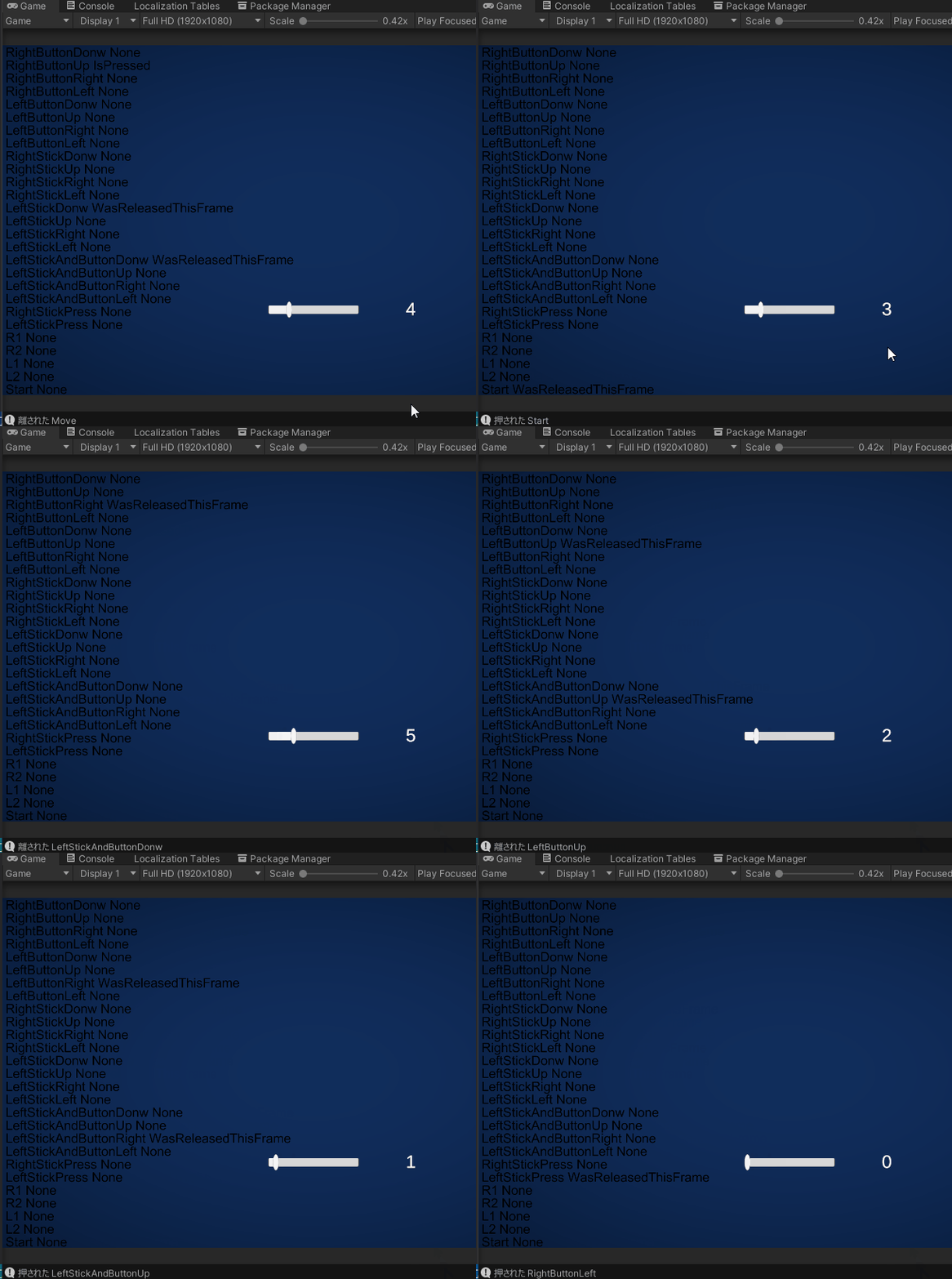 ;
;

