本日は Unity の小ネタ枠です。
UnityでスクリプトからHumanoidリグの参照を取得する方法を記事にします。
Humanoidリグ
Humanoid リグは Unity で人型のアニメーションを共通化するための Rig の定義です。
docs.unity3d.com
Humanoidリグをスクリプトから参照する
Humanoid リグをスクリプトから参照するには Animator コンポーネントを利用します。
docs.unity3d.com
GetBoneTransform 関数を介して Humanoid リグに対応する各関節のトランスフォームを取得可能です。
対応する関節が設定されていない場合は null が返ります。
docs.unity3d.com
また対象のモデルに Humanoid リグが設定されているかは isHuman 変数で確認することも可能です。
docs.unity3d.com
サンプルスクリプト
Humanoid リグを設定したホロモンモデルの Head, UpperArm, Hand リグの情報をデバッグ表示するサンプルスクリプトを作成しました。
・ShowLogHumanoidRigSample.cs
using System.Collections;
using System.Collections.Generic;
using UnityEngine;

public class ShowLogHumanoidRigSample : MonoBehaviour
{
    [SerializeField]
    private Animator HumanoidAnimator;

    void Update()
    {
        ShowLogHumanoidRig(HumanBodyBones.Head);
        ShowLogHumanoidRig(HumanBodyBones.LeftUpperArm);
        ShowLogHumanoidRig(HumanBodyBones.LeftHand);
    }

    /// <summary>
    /// 指定の関節の座標をデバッグログに表示する
    /// </summary>
    /// <param name="humanBoneId"></param>
    private void ShowLogHumanoidRig(HumanBodyBones humanBoneId)
    {
        if (HumanoidAnimator == null) return;
        if (HumanoidAnimator.isHuman == false) return;

        Transform boneTransform = HumanoidAnimator.GetBoneTransform(humanBoneId);
        if (boneTransform == null) return;

        Debug.Log($"{humanBoneId.ToString()} : {boneTransform.position}");
    }
}
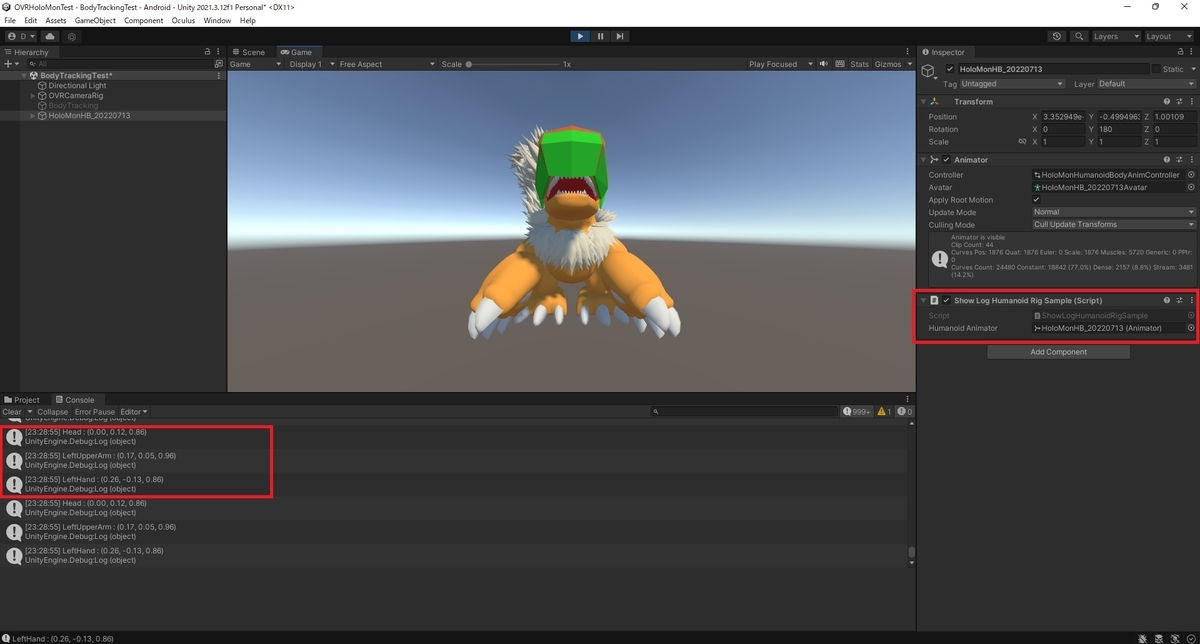
サンプルスクリプトを設定し、動作を確認します。
以下の通り、Humanoid リグの設定を基に各関節の座標が取得できました。