Datadogには、 dogshell と呼ばれるCLIツールがあります。
この dog コマンドを利用して特定のMonitorを mute -> unmute したメモです。
利用したのは dog 0.41.0 です。
Why
背景を簡単に書いておくと、ウェブサイトで夜間メンテを行うケースで、これまでは事前に Downtime をスケジュール設定していました。 しかし、メンテナンスを発動するための仕組みは別途あり、ときどき Datadog 側を忘れてしまうことがありました。
そのため、メンテナンス発動の仕組みの中でAPIなりCLIなりで対象の Datadog Montior をMuteすることで、Downtime設定忘れによる不要なアラートを防ぎたいと考えました。
How
dog monitor show_all
MuteしたいMonitorのIDを show_all と grep で取得します。
今回は外形監視のSyntheics が対象でした。
$ dog monitor show_all | grep Synthe
10599998    xxxxxxxxxxxxxxxxxx synthetics alert
10599999    yyyyyyyyyyyyyyyyy synthetics alert
dog monitor mute
Muteは以下のようにします。成功すればリターン0です。
$ dog monitor mute 10599998
ちなみにすでにMute済みのMonitorに対して実行すると、ちゃんとエラーになります。
bash-3.2$ dog monitor mute 10599998
ERROR: synthetics alert "[Synthetics] Test on xxxxxxxxxxxxxxxxx" is already muted
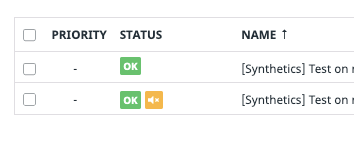
Webからみても、Muteマークが付与されていることを確認できます。
dog monitor unmute
Unmuteも同様、かと思ったのですがトラップが一つありました。
--all_scopes オプションを付与しないと、Unmuteされない問題がありました。
$ dog monitor unmute 10599998 --all_scopes
--all_scopes オプションを付与しないと、Mute済みにもかかわらず以下のエラーが出ます。GitHubのIssueで教えてくれた @therve 氏に感謝します。
bash-3.2$ dog monitor unmute 10599998
ERROR: synthetics alert "[Synthetics] Test on xxxxxxxxxxxxxxxxx" is already unmuted on
Setup
dogshell のインストールは pip で簡単に行えますが、一応メモを残しておきます。
$ pip install datadog
今日(2021-04-30)の最新は 0.41.0 でした。
bash-3.2$ dog --version
dog 0.41.0
helpコマンドを見れば、大体の利用方法はわかります。 もちろんドキュメントにも目を通すべきでしょう。
bash-3.2$ dog --help
usage: dog [-h] [--config CONFIG] [--api-key API_KEY]
           [--application-key APP_KEY] [--pretty] [--raw] [--timeout TIMEOUT]
           [-v]
           {comment,search,metric,tag,event,monitor,timeboard,dashboard,screenboard,dashboard_list,host,downtime,service_check,service_level_objective}
           ...

Interact with the Datadog API

optional arguments:
  -h, --help            show this help message and exit
  --config CONFIG       location of your dogrc file (default ~/.dogrc)
                        (default: /Users/hayashi_yukiya/.dogrc)
  --api-key API_KEY     your API key, from
                        https://app.datadoghq.com/account/settings#api. You
                        can also set the environment variables DATADOG_API_KEY
                        or DD_API_KEY (default: None)
  --application-key APP_KEY
                        your Application key, from
                        https://app.datadoghq.com/account/settings#api. You
                        can also set the environment variables DATADOG_APP_KEY
                        or DD_APP_KEY (default: None)
  --pretty              pretty-print output (suitable for human consumption,
                        less useful for scripting) (default: None)
  --raw                 raw JSON as returned by the HTTP service (default:
                        None)
  --timeout TIMEOUT     time to wait in seconds before timing out an API call
                        (default 10) (default: 10)
  -v, --version         Dog API version

Modes:
  {comment,search,metric,tag,event,monitor,timeboard,dashboard,screenboard,dashboard_list,host,downtime,service_check,service_level_objective}
    comment             Post, update, and delete comments.
    search              search datadog
    metric              Post metrics.
    tag                 View and modify host tags.
    event               Post events, get event details, and view the event
                        stream.
    monitor             Create, edit, and delete monitors
    timeboard           Create, edit, and delete timeboards
    dashboard           Create, edit, and delete dashboards
    screenboard         Create, edit, and delete screenboards.
    dashboard_list      Create, edit, and delete dashboard lists
    host                Mute, unmute hosts
    downtime            Create, edit, and delete downtimes
    service_check       Perform service checks
    service_level_objective
                        Create, edit, and delete service level objectives
bash-3.2$
初回実行時に、APIキー用のファイルを作るように求められるので、作ります。
bash-3.2$ dog monitor show_all
/Users/morihaya/.dogrc does not exist. Would you like to create it? [Y/n]
作ると以下のようなファイルです。
bash-3.2$ cat ~/.dogrc
[Connection]
apikey = hogehoge
appkey = fugafuga
dogshell は基本的な操作を行えるようなので、CIやCDの中でAPIをPythonなどで叩くまでもないケースで重宝しそうですね。
