こんにちは。24新卒のjinyangです。 2回目のブログ執筆となりますが、最近はチーム内で最近話題のRAGについて取り組んでいることもあって、もっぱら生成AI周りを調査したり遊んだりしている今頃です。
とりわけ、最近はMicrosoftが提唱したGraph RAGという手法に熱い関心を抱いております。Graph RAGは、従来のRAGの欠点を克服できる可能性があるアプローチで、情報を取得・処理する際にGraph Databaseを活用するのが特徴です。Graph Databaseとは、データをノード(点)とエッジ(線)で構造化して表現するデータベースのことで、関係性を重視したデータの検索や推論が得意です。従来のリレーショナルデータベースと比べて、複雑な関連性を持つデータのクエリをより直感的かつ効率的に処理できるため、RAGの文脈でも有望な技術とされています。
したがって、今回はGraph RAGを試してみようと思うのですが、巷ではよくWikipediaを情報ソースとして利用したGraph RAGの実験記事を見かけます。そこで、何か別の題材がないかと思索にふけっていたところ、以前から関心のあったレポジトリのコードベース全体をLLMに突っ込んで、コードリーディングを楽に進めるというプロジェクトをGraph RAGで試してみるのはどうかと思いつきました。
では、行ってみよう!
目次:
環境構築
必要なツールのインストール
まず最初に、Rust製のパッケージマネージャー「uv」をインストールします。これは必須ではないので、入れなくても問題ありません!
curl -LsSf https://astral.sh/uv/install.sh | sh
必要なライブラリのインストール
uvを使って、プロジェクトのセットアップをします!
mkdir github-graph-rag
cd github-graph-rag
uv init
uv venv
source .venv/bin/activate
uv add langchain langchain-experimental python-dotenv langchain-openai neo4j langchain-neo4j astroid chainlit
Neo4j Desktopをインストール
neo4j デスクトップダウンロード 詳しいセットアップの仕方は他の公式サイトに委ねるといたします。
インストール後はアプリを開いて、新しいプロジェクトを立ち上げてください。PluginsのAPOCをインストールしておかないと後ほどエラーに悩まされることでしょう。
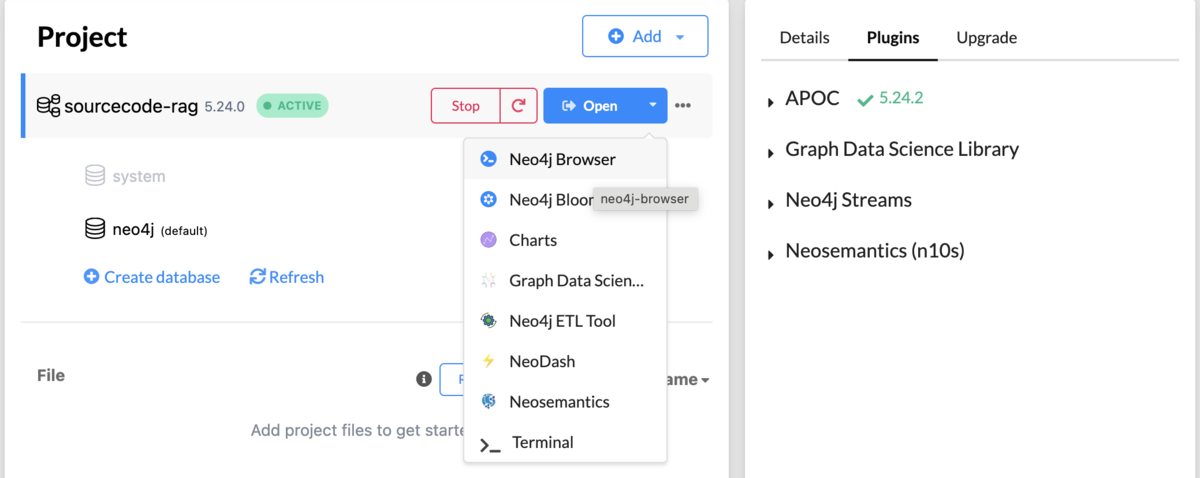
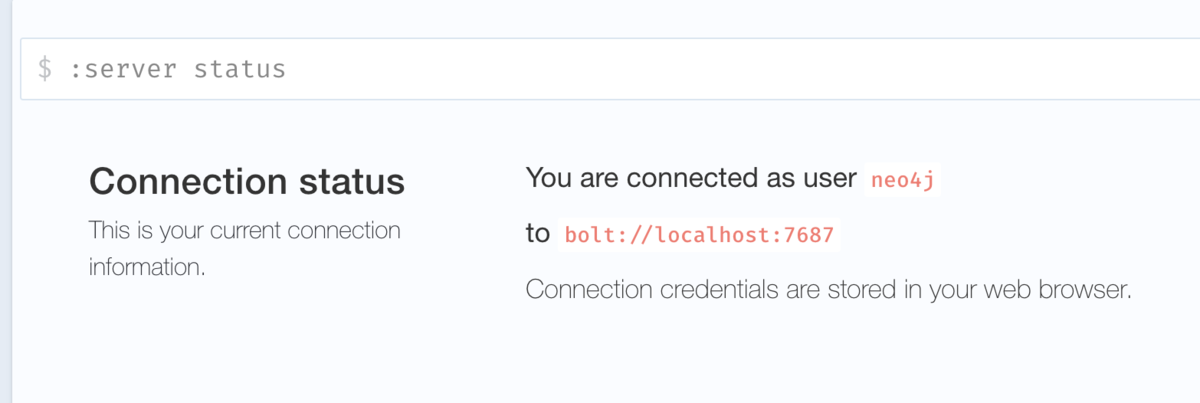
neo4j Browserからはノードやエッジの状態などがみれます。また、初期状態では後ほど必要になる環境変数も書かれているので、メモしておきましょう。
環境変数の設定
プロジェクトのルートディレクトリに.envファイルを作成し、以下の環境変数を設定します:
OPENAI_API_KEY=your_api_key_here
NEO4J_URI=your_neo4j_uri_here
NEO4J_USERNAME=your_username_here
NEO4J_PASSWORD=your_password_here
コードの実装
1. Githubレポジトリのクローン
次にプロジェクトのルートディレクトリにGraph DBに突っ込んでみたいレポジトリをプロジェクトのルートディレクトリ(必ずしもルートディレクトリでなくとも良い)にクローンしてきてください。
コードで書いてもいいと思いますが、私はここをサボってしまいました😅
私は今回gitingestという「github上のレポジトリを丸ごとLLM Friendlyなテキストファイル(markdown)にしてしまう」レポジトリをGraph DBに放り込んでみたいと思います。
git clone git@github.com:cyclotruc/gitingest.git
2. python コードを解析
発想
- graphのノードのラベル:
Class,ExternalModule,Function,Module - edge (node間のRelationship types):
DEFINED_IN,IMPORT_EXTERNAL,IMPORTS_FROM,IMPORT - 各ノードのproperty keysとして、
docstring,relative_path,code,summaryなど属性を持たせた
このように、モジュールの依存関係をグラフとして表すことができれば、例えば、githubレポジトリを抽出するロジックについて教えてとクエリをすれば、
自然とそのロジックおよび依存先のノード情報が取れて、あとはLLMに投げれば解析してもらえると考えました。
解析用のコード(LLMによる自動生成と少し自分による手直し)は少し長くなってしまったので、ドロップダウンを開いてご覧ください。
▶︎クリックして開く
import atexit from pathlib import Path import astroid from astroid.nodes.node_classes import Import, ImportFrom from neo4j import GraphDatabase class CodeAnalyzer: def __init__(self, uri, user, password): self.uri = uri self.auth = (user, password) self._driver = None self.project_root = None atexit.register(self.close) @property def driver(self): if self._driver is None: self._driver = GraphDatabase.driver(self.uri, auth=self.auth) return self._driver def close(self): if self._driver is not None: self._driver.close() self._driver = None def analyze_repository(self, repo_path): self.project_root = Path(repo_path).resolve() # 最初にすべてのPythonファイルをスキャンしてモジュールを作成 for python_file in self.project_root.rglob("*.py"): try: # 相対パスを取得 relative_path = python_file.relative_to(self.project_root) # 複数のエンコーディングを試す content = None for encoding in ['utf-8', 'latin-1', 'cp1252']: try: with python_file.open(encoding=encoding) as f: content = f.read() break except UnicodeDecodeError: continue if content is None: print(f"Error: Could not read {python_file} with any supported encoding") continue # ASTを解析 try: module = astroid.parse(content, path=str(python_file)) except astroid.exceptions.AstroidSyntaxError as e: print(f"Syntax error in {python_file}: {e}") continue except Exception as e: print(f"Failed to parse {python_file}: {e}") continue # モジュールノードを作成 docstring = module.doc_node.value if module.doc_node else "" self.create_module_node(str(python_file), docstring, content) # クラスを解析 for class_node in module.nodes_of_class(astroid.nodes.ClassDef): self.create_class_node( module_path=str(python_file), class_name=class_node.name, docstring=class_node.doc_node.value if class_node.doc_node else "", base_classes=[base.name for base in class_node.bases] ) # メソッドを解析 for method in class_node.methods(): self.create_function_node( module_path=str(python_file), class_name=class_node.name, function_name=method.name, docstring=method.doc_node.value if method.doc_node else "", is_method=True ) # トップレベルの関数を解析 for function in module.nodes_of_class(astroid.nodes.FunctionDef): if function.parent.name == module.name: # トップレベルの関数のみ self.create_function_node( module_path=str(python_file), function_name=function.name, docstring=function.doc_node.value if function.doc_node else "", is_method=False ) # インポート関係を解析 self.analyze_imports(module, python_file) except Exception as e: print(f"Error processing {python_file}: {e}") continue def analyze_imports(self, module, python_file): """モジュールのインポート関係を解析する""" print(f"\nAnalyzing imports for {python_file}") # パッケージルートの特定 package_roots = [self.project_root] src_dir = self.project_root / "src" if src_dir.exists(): package_roots.append(src_dir) # 現在のモジュールのパスから相対的なインポートを解決するためのベースパスを取得 current_package_root = None for root in package_roots: try: _ = python_file.relative_to(root) current_package_root = root break except ValueError: continue if not current_package_root: current_package_root = self.project_root # 通常のimport文の解析 import_nodes = list(module.nodes_of_class(Import)) print(f"Found {len(import_nodes)} import statements") for import_node in import_nodes: for name, asname in import_node.names: print(f"Processing import {name}") try: base_module = name.split('.')[0] found_module = False # 各パッケージルートで検索 for root in package_roots: potential_paths = [ root / name.replace('.', '/') / '__init__.py', root / f"{name.replace('.', '/')}.py" ] for path in potential_paths: print(f" Checking path: {path}") if path.exists(): print(f" Found module at: {path}") self.create_import_relationship( from_module=str(python_file), to_module=str(path), import_type="IMPORTS" ) found_module = True break if found_module: break if not found_module: print(f" Not found in project, creating external module: {name}") self.create_external_module_relationship( from_module=str(python_file), module_name=name ) except Exception as e: print(f"Error processing import {name} in {python_file}: {e}") continue # from import文の解析 from_import_nodes = list(module.nodes_of_class(ImportFrom)) print(f"\nFound {len(from_import_nodes)} from-import statements") for import_node in from_import_nodes: modname = import_node.modname level = import_node.level print(f"Processing from-import: from {modname} import {[name for name, _ in import_node.names]}") print(f" Level: {level}") try: if level and level > 0: # 相対インポートの場合 current_dir = python_file.parent for _ in range(level - 1): current_dir = current_dir.parent target_path = current_dir if modname: target_path = current_dir / modname.replace('.', '/') # まず直接のファイルを探す module_paths = [ target_path / "__init__.py", target_path.with_suffix('.py'), ] else: # 絶対インポートの場合 print(f" Absolute import, searching for: {modname}") module_paths = [] for root in package_roots: module_paths.extend([ root / modname.replace('.', '/') / "__init__.py", root / f"{modname.replace('.', '/')}.py" ]) # モジュールの検索と関係の作成 found_module = False for path in module_paths: print(f" Checking path: {path}") if path.exists(): print(f" Found module at: {path}") self.create_import_relationship( from_module=str(python_file), to_module=str(path), import_type="IMPORTS_FROM", imported_names=[name for name, _ in import_node.names] ) found_module = True break if not found_module: print(f" Not found in project, creating external module: {modname}") self.create_external_module_relationship( from_module=str(python_file), module_name=modname, imported_names=[name for name, _ in import_node.names] ) except Exception as e: print(f"Error processing import from {modname} in {python_file}: {e}") continue def create_module_node(self, path, docstring, code): """モジュールノードを作成する""" try: # 常に相対パスを使用する relative_path = str(Path(path).relative_to(self.project_root)) module_name = Path(relative_path).stem package_path = str(Path(relative_path).parent) print(f"Creating module node: {relative_path}") with self.driver.session() as session: result = session.run(""" MERGE (m:Module {id: $relative_path}) SET m.name = $module_name, m.package_path = $package_path, m.full_path = $relative_path, m.docstring = $docstring, m.code = $code, m.summary = $summary, m.created_at = datetime(), m.file_size = $file_size, m.language = 'python', m.type = CASE WHEN $relative_path ENDS WITH '__init__.py' THEN 'package' ELSE 'module' END, m.is_test = CASE WHEN $relative_path CONTAINS '/tests/' OR $relative_path STARTS WITH 'tests/' THEN true ELSE false END RETURN m.id as id """, relative_path=relative_path, module_name=module_name, package_path=package_path, docstring=docstring, code=code, summary=self._generate_module_summary(code, docstring), file_size=len(code) if code else 0 ) created_id = result.single()["id"] print(f"Successfully created module with id: {created_id}") except Exception as e: print(f"Error creating module node for {path}: {e}") raise def create_class_node(self, module_path, class_name, docstring, base_classes): """クラスノードを作成する""" relative_path = str(Path(module_path).relative_to(self.project_root)) module_id = relative_path class_id = f"{module_id}:{class_name}" with self.driver.session() as session: session.run(""" MATCH (m:Module {id: $module_id}) MERGE (c:Class {id: $class_id}) SET c.name = $class_name, c.full_name = $class_id, c.docstring = $docstring, c.summary = $summary, c.base_classes = $base_classes, c.created_at = datetime(), c.module_path = $module_id, c.is_test = m.is_test MERGE (c)-[:DEFINED_IN]->(m) """, module_id=module_id, class_id=class_id, class_name=class_name, docstring=docstring, summary=self._generate_class_summary(class_name, docstring, base_classes), base_classes=base_classes ) def create_function_node(self, module_path, function_name, docstring, is_method=False, class_name=None): """関数/メソッドノードを作成する""" relative_path = str(Path(module_path).relative_to(self.project_root)) module_id = relative_path # function_idの構築 if is_method: class_id = f"{module_id}:{class_name}" function_id = f"{class_id}#{function_name}" parent_id = class_id else: function_id = f"{module_id}#{function_name}" parent_id = module_id with self.driver.session() as session: base_query = """ MATCH (parent {id: $parent_id}) MERGE (f:Function {id: $function_id}) SET f.name = $function_name, f.full_name = $function_id, f.docstring = $docstring, f.summary = $summary, f.is_method = $is_method, f.created_at = datetime(), f.parent_path = $parent_id, f.module_path = $module_id, f.is_test = CASE WHEN $function_name STARTS WITH 'test_' OR parent.is_test = true THEN true ELSE false END MERGE (f)-[:DEFINED_IN]->(parent) """ session.run( base_query, parent_id=parent_id, function_id=function_id, function_name=function_name, docstring=docstring, summary=self._generate_function_summary(function_name, docstring, is_method), is_method=is_method, module_id=module_id ) def _generate_module_summary(self, code, docstring): """モジュールの要約を生成(実際のプロジェクトではLLMを使用)""" # この実装はプレースホルダー return docstring[:200] if docstring else "" def _generate_class_summary(self, class_name, docstring, base_classes): """クラスの要約を生成(実際のプロジェクトではLLMを使用)""" # この実装はプレースホルダー return docstring[:200] if docstring else "" def _generate_function_summary(self, function_name, docstring, is_method): """関数の要約を生成(実際のプロジェクトではLLMを使用)""" # この実装はプレースホルダー return docstring[:200] if docstring else "" def create_import_relationship(self, from_module, to_module, import_type="IMPORTS", imported_names=None): """プロジェクト内モジュール間のインポート関係を作成する""" try: # 常に相対パスを使用 from_relative = str(Path(from_module).relative_to(self.project_root)) to_relative = str(Path(to_module).relative_to(self.project_root)) print(f"Creating {import_type} relationship: {from_relative} -> {to_relative}") with self.driver.session() as session: # モジュールの存在確認 result = session.run(""" MATCH (m1:Module {id: $from_module}) MATCH (m2:Module {id: $to_module}) RETURN count(*) as count """, from_module=from_relative, to_module=to_relative) if result.single()['count'] < 2: print(f"Warning: One or both modules not found: {from_relative} -> {to_relative}") # モジュールノードを作成(存在しない場合) for module_path in [from_relative, to_relative]: session.run(""" MERGE (m:Module {id: $path}) SET m.name = $name, m.created_at = datetime() """, path=module_path, name=Path(module_path).stem) if import_type == "IMPORTS_FROM" and imported_names: session.run(""" MATCH (m1:Module {id: $from_module}) MATCH (m2:Module {id: $to_module}) MERGE (m1)-[r:IMPORTS_FROM]->(m2) SET r.imported_names = $names, r.created_at = datetime() """, from_module=from_relative, to_module=to_relative, names=imported_names) print(f"Created IMPORTS_FROM relationship with {len(imported_names)} imports") else: session.run(""" MATCH (m1:Module {id: $from_module}) MATCH (m2:Module {id: $to_module}) MERGE (m1)-[r:IMPORTS]->(m2) SET r.created_at = datetime() """, from_module=from_relative, to_module=to_relative) print("Created IMPORTS relationship") except ValueError as e: print(f"Error computing relative path: {e}") except Exception as e: print(f"Error creating import relationship: {e}") raise def create_external_module_relationship(self, from_module, module_name, imported_names=None): """外部モジュールへの依存関係を記録""" from_relative = str(Path(from_module).relative_to(self.project_root)) with self.driver.session() as session: try: session.run(""" MATCH (m1:Module {id: $from_module}) WHERE m1 IS NOT NULL MERGE (m2:ExternalModule {name: $module_name}) MERGE (m1)-[r:IMPORTS_EXTERNAL]->(m2) SET r.imported_names = $names """, from_module=from_relative, module_name=module_name, names=imported_names if imported_names else []) except Exception as e: print(f"Warning: Could not create external module relationship from {from_module} to {module_name}: {e}") def main(): analyzer = CodeAnalyzer("bolt://localhost:7687", "neo4j", "password") try: analyzer.analyze_repository("gitingest") finally: analyzer.close() if __name__ == "__main__": main()
コード実行後
このような状態がneo4j browserから見れていれば成功です!!

3. Graph RAG Pipelineを作成
保存したGraph RAGに対して、langchainを使って簡単にRAGのパイプラインを作成できます。
さらに、chainlitを使えば30秒以内にChatGPTライクなUIを持ったチャットアプリを立ち上げられます。
今回はtext-to-cypherというやり方でやってみたいと思います。
具体的には、cypherとはなんぞやというと、RDBでいうところのSQLです。そう!Graph DBのクエリ言語です。
このtext-to-cypherはすなわち、ユーザの自然言語をいい感じにクエリ言語cypherに変換して、Graph DBから情報を取ってきて、LLMに生成してもらういうことです。
コードを表示
▶︎クリックして開く
import os

import chainlit as cl
from dotenv import load_dotenv
from langchain_neo4j import Neo4jGraph
from langchain_neo4j.chains.graph_qa.cypher import GraphCypherQAChain
from langchain_openai import ChatOpenAI

# 環境変数をロード
load_dotenv(override=True)

# neo4j, OpenAIのクライアントを初期化
def init_chain():
    graph = Neo4jGraph(
        url=os.getenv("NEO4J_URI", "bolt://localhost:7687"),
        username=os.getenv("NEO4J_USERNAME", "neo4j"),
        password=os.getenv("NEO4J_PASSWORD")
    )

    llm = ChatOpenAI(
        model=os.getenv("OPENAI_MODEL_NAME", "gpt-4o-mini"),
        temperature=0
    )

    chain = GraphCypherQAChain.from_llm(
        graph=graph,
        llm=llm,
        verbose=True,
        allow_dangerous_requests=True
    )

    return chain

@cl.on_chat_start
async def start():

    try:
        chain = init_chain()
        cl.user_session.set("chain", chain)

        await cl.Message(
            content="👋ども!Graph RAGマンです。",
            author="Assistant"
        ).send()

    except Exception as e:
        await cl.Message(
            content=f"❌ アプリの初期化に失敗: {str(e)}",
            author="Assistant"
        ).send()

@cl.on_message
async def main(message: cl.Message):

    chain = cl.user_session.get("chain")

    try:

        msg = cl.Message(content="", author="Assistant")
        await msg.send()

        response = chain.invoke({"query": message.content})

        msg.content = response["result"]
        await msg.update()

    except Exception as e:
        await cl.Message(
            content=f"❌ 生成に失敗: {str(e)}",
            author="Assistant"
        ).send()
実際にチャットしてみよう

あら?
なんか短かくない???と思っていたら、
何やら、chainlitがターミナルに何かログを吐いている。cypherへの変換がうまくいっておらず、ただ全てのmoduleを出力しただけとなっていましたね。
> Entering new GraphCypherQAChain chain...

2025-01-29 19:36:02 - HTTP Request: POST https://api.openai.com/v1/chat/completions "HTTP/1.1 200 OK"

Generated Cypher:

cypher
MATCH (m:Module)
RETURN m.name, m.summary

Full Context:
[{'m.name': '__init__', 'm.summary': ' Gitingest: A package for ingesting data from Git repositories. '},
{'m.name': 'repository_ingest', 'm.summary': ' Main entry point for ingesting a source and processing its contents. '},
{'m.name': 'utils', 'm.summary': ' Utility functions for the Gitingest package. '}, {'m.name': 'setup', 'm.summary': ''},
{'m.name': 'conftest', 'm.summary': '\nFixtures for tests.\n\nThis file provides shared fixtures for creating sample queries, a temporary directory structure, and a helper function\nto write `.ipynb` notebooks for testing notebook utilities.'},
{'m.name': 'query_parser', 'm.summary': ' This module contains functions to parse and validate input sources and patterns. '},
{'m.name': 'test_notebook_utils', 'm.summary': '\nTests for the `notebook_utils` module.\n\nThese tests validate how notebooks are processed into Python-like output, ensuring that markdown/raw cells are\nconverted to triple-quoted blocks, code cells re'},
{'m.name': 'notebook_utils', 'm.summary': ' Utilities for processing Jupyter notebooks. '}, {'m.name': '__init__', 'm.summary': ''},
{'m.name': 'test_query_ingestion', 'm.summary': '\nTests for the `query_ingestion` module.\n\nThese tests validate directory scanning, file content extraction, notebook handling, and the overall ingestion logic,\nincluding filtering patterns and subpath'}]

2025-01-29 19:36:03 - HTTP Request: POST https://api.openai.com/v1/chat/completions "HTTP/1.1 200 OK"
ならば、少しせこいかもしれないですが、少しメタ情報も含ませてクエリを投げてみましょう!
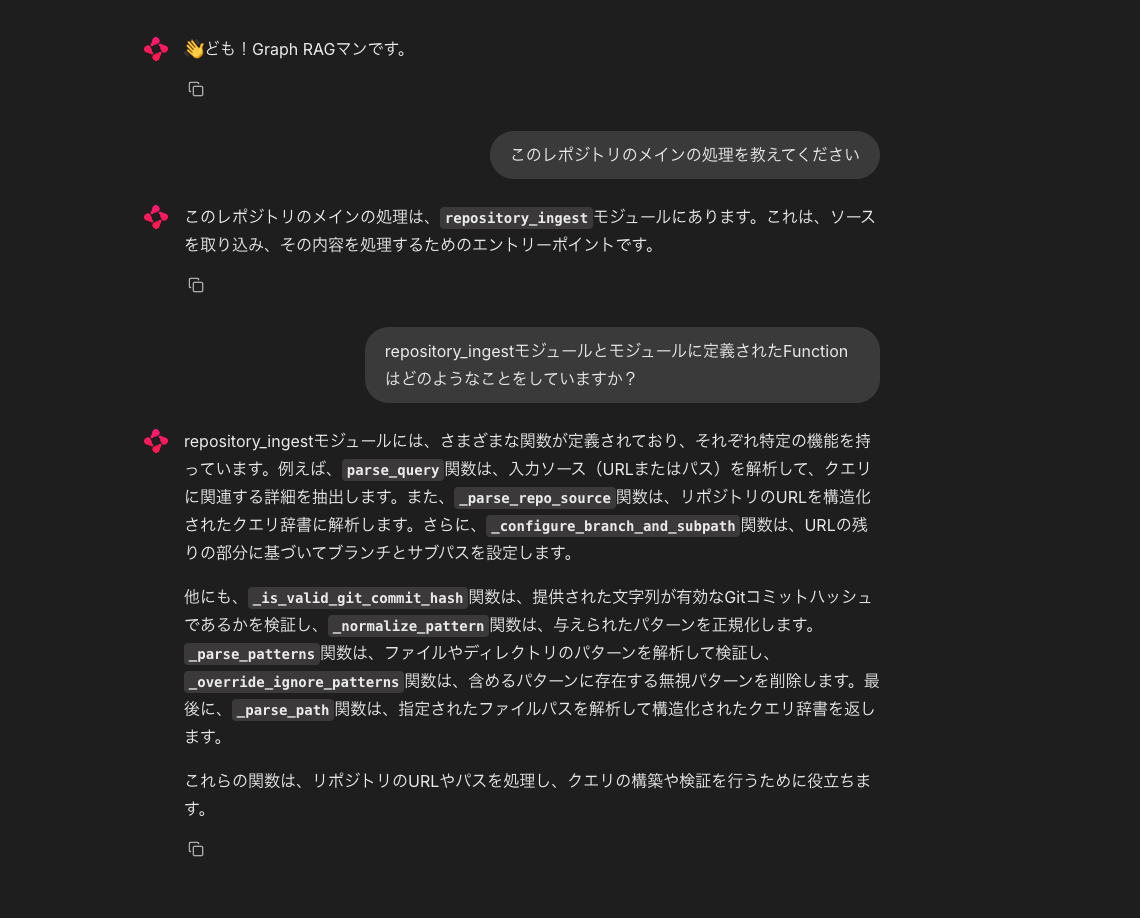
oh! 少しマシになりましたね。
> Entering new GraphCypherQAChain chain...
2025-01-29 19:49:08 - HTTP Request: POST https://api.openai.com/v1/chat/completions "HTTP/1.1 200 OK"
Generated Cypher:
cypher
MATCH (m:Module {name: 'repository_ingest'})-[:IMPORTS_FROM]->(importedModule:Module)<-[:DEFINED_IN]-(f:Function)
RETURN f.name, f.summary

Full Context:
[{'f.name': 'parse_query', 'f.summary': '\n    Parse the input source (URL or path) to extract relevant details for the query.\n\n    This function parses the input source to extract details such as the username, repository name,\n    commit has'},
{'f.name': '_parse_repo_source', 'f.summary': "\n    Parse a repository URL into a structured query dictionary.\n\n    If source is:\n      - A fully qualified URL (https://gitlab.com/...), parse & verify that domain\n      - A URL missing 'https://' ("},
{'f.name': '_configure_branch_and_subpath', 'f.summary': '\n    Configure the branch and subpath based on the remaining parts of the URL.\n    Parameters\n    ----------\n    remaining_parts : list[str]\n        The remaining parts of the URL path.\n    url : str\n'}, {'f.name': '_is_valid_git_commit_hash', 'f.summary': '\n    Validate if the provided string is a valid Git commit hash.\n\n    This function checks if the commit hash is a 40-character string consisting only\n    of hexadecimal digits, which is the standard '},
{'f.name': '_normalize_pattern', 'f.summary': '\n    Normalize the given pattern by removing leading separators and appending a wildcard.\n\n    This function processes the pattern string by stripping leading directory separators\n    and appending a '},
{'f.name': '_parse_patterns', 'f.summary': '\n    Parse and validate file/directory patterns for inclusion or exclusion.\n\n    Takes either a single pattern string or set of pattern strings and processes them into a normalized list.\n    Patterns '},
{'f.name': '_override_ignore_patterns', 'f.summary': '\n    Remove patterns from ignore_patterns that are present in include_patterns using set difference.\n\n    Parameters\n    ----------\n    ignore_patterns : set[str]\n        The set of ignore patterns to'},
{'f.name': '_parse_path', 'f.summary': '\n    Parse the given file path into a structured query dictionary.\n\n    Parameters\n    ----------\n    path_str : str\n        The file path to parse.\n\n    Returns\n    -------\n    ParsedQuery\n        A '},
{'f.name': '_is_valid_pattern', 'f.summary': '\n    Validate if the given pattern contains only valid characters.\n\n    This function checks if the pattern contains only alphanumeric characters or one\n    of the following allowed characters: dash ('},
{'f.name': 'try_domains_for_user_and_repo', 'f.summary': '\n    Attempt to find a valid repository host for the given user_name and repo_name.\n\n    Parameters\n    ----------\n    user_name : str\n        The username or owner of the repository.\n    repo_name : '}]

2025-01-29 19:49:14 - HTTP Request: POST https://api.openai.com/v1/chat/completions "HTTP/1.1 200 OK"
まとめ
GithubのコードベースをGraph DBに保存すると、
- コードの関連性の視覚化
- 自然言語でのコードベースへの問い合わせ
が実現できましたね。
しかし、自然言語からcypherへ変換するステップがうまくいっていませんでした。
おそらく、原因はGraphのshema情報を持っていないと考えられるのですが、であれば、cypherへの変換がそもそも失敗しそうだと思うのです。
今回はここまでとします。次回、Graph RAG text-to-cypherの精度を上げてみた。です!乞うご期待ください。
