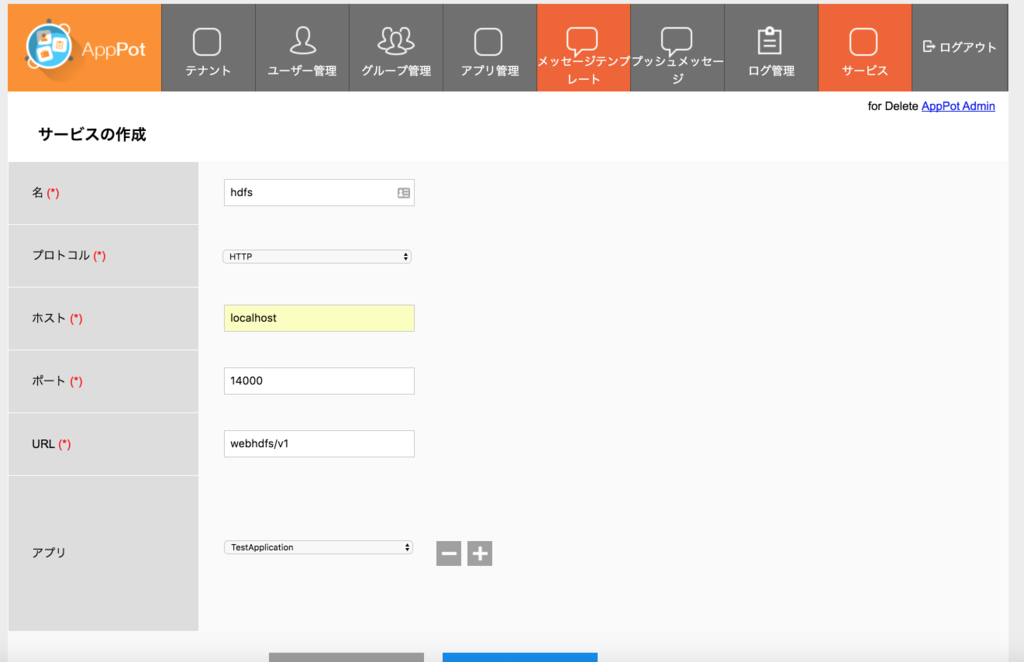
GetAnonymouseToken
- GETメソッド
http://localhost:8080/apppot/api/1/apppot.TestApplication/1.0.0/anonymousTokens?appKey=40c71254aca44664b61635573085ef1d&deviceUDID=bd393116-0b47-4b9e-a186-e64ffc0fbdf2
- Response
{
  "status": "OK",
  "errCode": 0,
  "description": null,
  "results": "e3b82dd1cd964b76a2ee62c0ec97344f"
}
Login
- POSTメソッド
http://localhost:8080/apppot/api/1/apppot.TestApplication/1.0.0/auth/login
- Request
{
  "username": "yamada",
  "password": "12345678@X",
  "appId": "apppot.TestApplication",
  "appVersion": "1.0.0",
  "deviceUDID": "bd393116-0b47-4b9e-a186-e64ffc0fbdf2",
  "isPush": "false",
  "companyId": 1
}
- Response
{
  "status": "OK",
  "errCode": 0,
  "description": null,
  "apppotInfo": "AppPot Server 2.3.6 ",
  "authInfor": {
    "userTokens": "e0f08ddd14d3496d978afdb3530fe64f",
    "validTime": 1474388126575,
    "userId": 2,
    "userInfo": {
      "account": "yamada",
      "firstName": "太郎",
      "lastName": "山田"
    },
    "groupsAndRoles": [
      {
        "groupId": 1,
        "groupName": "開発グループ",
        "description": "",
        "roleId": 2,
        "roleName": "Super Admin"
      }
    ]
  }
}
ファイルの状態確認
- GETメソッド
http://localhost:8080/apppot/api/1/apppot.TestApplication/1.0.0/gateway/hdfs/hoge?user.name=rsogo&op=liststatus
HttpFSの検証で作ったファイルをAppPot経由で参照することができました。
- Response
{
  "status": "OK",
  "errCode": 0,
  "description": "",
  "results": {
    "hoge": {
      "FileStatuses": {
        "FileStatus": [
          {
            "pathSuffix": "hoge",
            "type": "FILE",
            "length": 19,
            "owner": "rsogo",
            "group": "supergroup",
            "permission": "755",
            "accessTime": 1474384290147,
            "modificationTime": 1474384291294,
            "blockSize": 134217728,
            "replication": 1
          }
        ]
      }
    }
  }
}
ファイルの作成
- apppot-token: Loginの結果得られたトークン
- Content-Type: application/octet-stream
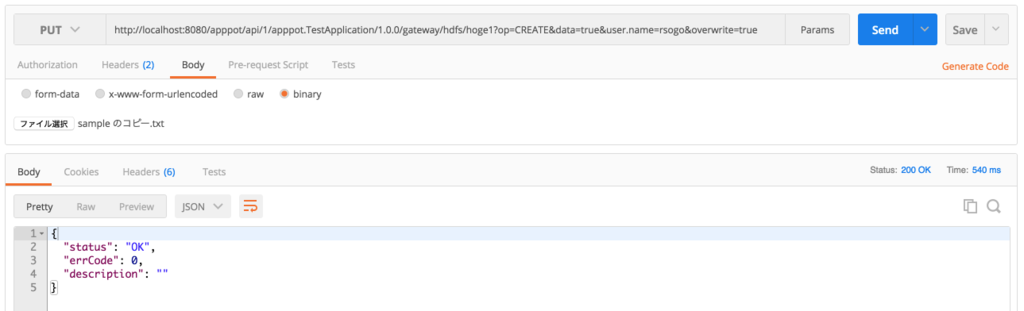
http://localhost:8080/apppot/api/1/apppot.TestApplication/1.0.0/gateway/hdfs/hoge1?op=CREATE&data=true&user.name=rsogo&overwrite=true
POSTMANを使っていますが、ファイルの添付ができるので、Hadoopに投入したいファイルを選択します。
ファイルの読み込み
http://localhost:8080/apppot/api/1/apppot.TestApplication/1.0.0/gateway/hdfs/hoge1?op=open&user.name=rsogo
{
  "status": "OK",
  "errCode": 0,
  "description": "",
  "results": {
    "hoge1": "aaa,bbb"
  }
}
OK
