概要
C:\Windows\Microsoft.NET\Framework64\vX.X フォルダ内の
System.Windows.Forms.dll を Unity プロジェクトの Editor フォルダに追加して
using System.Windows.Forms;
using UnityEngine;

public static class Example
{
    [UnityEditor.MenuItem( "Tools/Hoge" )]
    private static void Hoge()
    {
        var result = MessageBox.Show
        (
            "ピカチュウ",
            "カイリュー",
            MessageBoxButtons.OKCancel,
            MessageBoxIcon.Warning
        );

        switch ( result )
        {
            case DialogResult.OK:
                Debug.Log( "OK" );
                break;

            case DialogResult.Cancel:
                Debug.Log( "Cancel" );
                break;
        }
    }
}
このようなエディタ拡張のスクリプトを作成することで
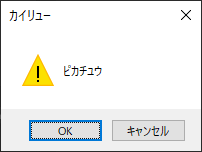
エディタ拡張で Windows のメッセージボックスを表示できます
