はじめに
「ShaderInspector」を Unity プロジェクトに導入することで
Shader で 2つの MaterialPropertyDrawer が使用できます
使用例
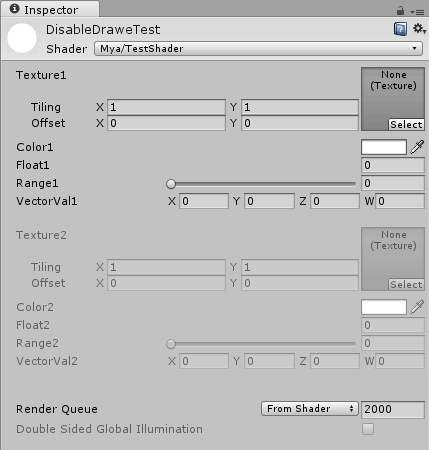
Disable
Shader "Mya/TestShader"
{
    Properties
    {
        _MainTex1 ("Texture1", 2D) = "white" {}
        _Color1 ("Color1" , Color) = (1,1,1,1)
        _Float1 ("Float1" , Float) = 0
        _Range1 ("Range1" , Range(0,1)) = 0
        _VetorVal1 ("VectorVal1" , Vector) = (0,0,0,0)

        [Disable]_MainTex2 ("Texture2", 2D) = "white" {}
        [Disable]_Color2 ("Color2" , Color) = (1,1,1,1)
        [Disable]_Float2 ("Float2" , Float) = 0
        [Disable]_Range2 ("Range2" , Range(0,1)) = 0
        [Disable]_VetorVal2 ("VectorVal2" , Vector) = (0,0,0,0)

        ...
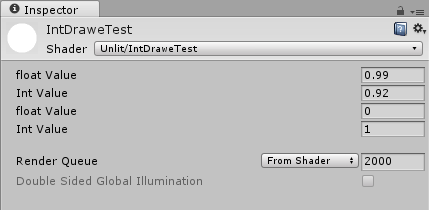
Int
Shader "Unlit/IntDraweTest"
{
    Properties
    {
        _IntValue("float Value" , float) = 1
        _IntValue2("Int Value" , int) = 1
        [Int]_IntValue3("float Value" , float) = 1
        [Int]_IntValue4("Int Value" , int) = 1

        ...