以下の内容はhttps://baba-s.hatenablog.com/entry/2018/02/19/085500より取得しました。


【Unity】エディタ上でカラーコードを変換できる「Hexadecimal to Unity color converter」紹介

はじめに

https://github.com/OlivierEstevez/Hexadecimal-to-Color

「Hexadecimal to Unity color converter」を Unity プロジェクトに導入することで
エディタ上でカラーコードを変換できるようになります

使い方

f:id:baba_s:20180218213150p:plain

Unity メニューの「Window>Color Converter」を選択します
f:id:baba_s:20180218213200p:plain

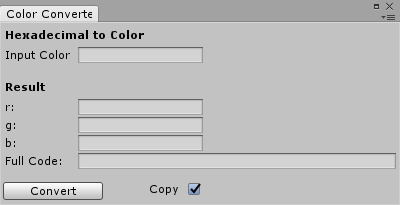
「Color Converter」ウィンドウが表示されたら

f:id:baba_s:20180218213207p:plain

「Input Color」にカラーコードを入力して「Convert」ボタンを押すと
「1, 0.6, 0」のような書式に変換できます



以上の内容はhttps://baba-s.hatenablog.com/entry/2018/02/19/085500より取得しました。
このページはhttp://font.textar.tv/のウェブフォントを使用してます

不具合報告/要望等はこちらへお願いします。
モバイルやる夫Viewer Ver0.14