以下の内容はhttps://baba-s.hatenablog.com/entry/2018/02/01/230200より取得しました。


【Unity】ゲーム中に WinForm を表示できる「Unity Windows Forms」紹介

はじめに

「Unity Windows Forms」を Unity プロジェクトに導入することで
ゲーム中に WinForm を表示できるようになります

使用例

f:id:baba_s:20180130151628p:plain

f:id:baba_s:20180130151639p:plain

f:id:baba_s:20180130151649p:plain

クイックスタート

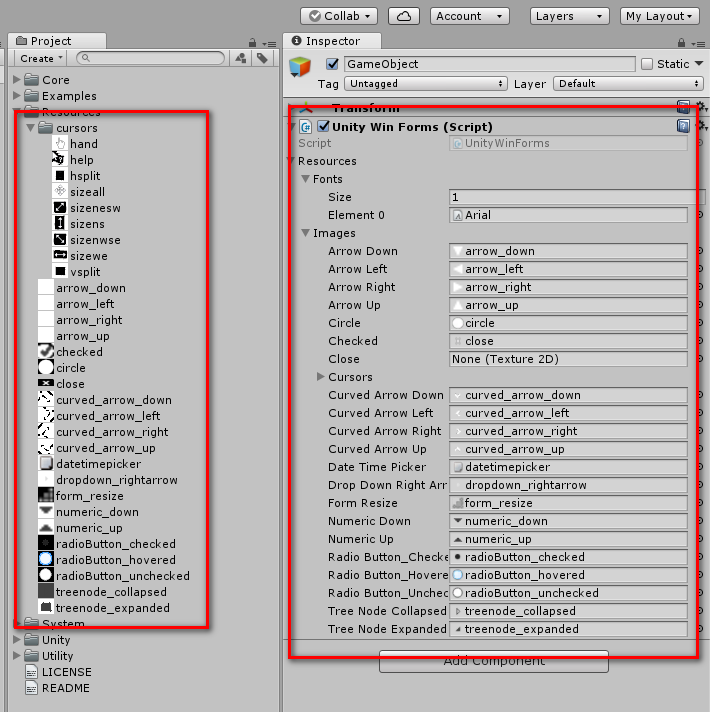
f:id:baba_s:20180130151757p:plain

空のゲームオブジェクトに「UnityWinForms」をアタッチして
「Fonts」と「Images」に使用するフォントや画像を設定します

using System.Windows.Forms;
using UnityEngine;

public class Example : MonoBehaviour
{
    private void Start()
    {
        var form = new Form();
        form.Show();
    }
}

そして、上記のようなコードを記述します

関連記事


以上の内容はhttps://baba-s.hatenablog.com/entry/2018/02/01/230200より取得しました。
このページはhttp://font.textar.tv/のウェブフォントを使用してます

不具合報告/要望等はこちらへお願いします。
モバイルやる夫Viewer Ver0.14