Alibaba CloudのFunction ComputeとAPI Gatewayを使ってサーバレスAPIを構築するときに便利なfunというツールを使います。
公式ドキュメントを参考にしますが、いまいちよく分からない部分がありますので(2018/07/16)、合わせてGitHubのリポジトリも参考にします。
fun - Developer Guide| Alibaba Cloud ドキュメントセンター
準備
まず、funをインストールします。
$ npm install @alicloud/fun -g
or
$ yarn global add @alicloud/fun
設定ファイルの作成
設定ファイルを書きます。公式ドキュメントのfaas.yamlの内容は間違っていると思うので、GitHubの方を参照します。
GitHubの方にはtemplate.ymlを作れと書かれているのでこちらに従います。
追記2018/07/31
以下を見るとtemplate.yml、template.yaml、faas.yml、faas.yamlの4つに対応しているようです。
fun/deploy.js at 62b9925e17529e70f47598ff099b087c6ed02a67 · aliyun/fun · GitHub
追記終
$ mkdir fun
$ cd fun
$ touch template.yml
以下のtemplate.ymlはGitHubのサンプルほとんどそのままです。
# template.yml
ROSTemplateFormatVersion: '2015-09-01'
Transform: 'Aliyun::Serverless-2018-04-03'
Resources:
  fc: # service name
    Type: 'Aliyun::Serverless::Service'
    Properties:
      Description: 'fc test'
    httpFunction: # function name
      Type: 'Aliyun::Serverless::Function'
      Properties:
        Handler: httpFunction.handler
        Runtime: nodejs8
        CodeUri: './'
        Timeout: 60

  HttpFunctionGroup: # Api Group
    Type: 'Aliyun::Serverless::Api'
    Properties:
      StageName: RELEASE
      DefinitionBody:
        '/': # request path
          get: # http method
            x-aliyun-apigateway-api-name: hello_get # api name
            x-aliyun-apigateway-fc:
              arn: acs:fc:::services/${fc.Arn}/functions/${httpFunction.Arn}/
コードを書く
次に、APIで実行されるコードを書きます。
// httpFunction.js
const { hook } = require('fc-helper')

exports.handler = hook(async (context) => {
  context.body = 'hello world!\n'
})
なお、hook関数の引数に入れる関数はasyncであることが必須です。
fc-helperはnpm管理のライブラリなのでpackage.jsonを作成して追加します。
$ yarn init
$ yarn add fc-helper
デプロイする
ではデプロイします。node_ modules/以下も勝手に固めて送ってくれるみたいで便利です。
$ fun deploy
Waiting for service fc to be deployed...
    Waiting for function httpFunction to be deployed...
    function httpFunction deploy success
service fc deploy success

Waiting for api gateway HttpFunctionGroup to be deployed...
    URL: GET http://xxxxxxxxxxxxxxxxxxxxxxxxxxxxxxxxxxx-cn-shanghai.alicloudapi.com/
      stage: RELEASE, deployed, version: 20180716123043059
      stage: PRE, undeployed
      stage: TEST, undeployed
api gateway HttpFunctionGroup deploy success
実際にリクエストを送って動作を確認するにはAPI Gatewayのコンソール画面にある「APIのデバッグ」から行います。
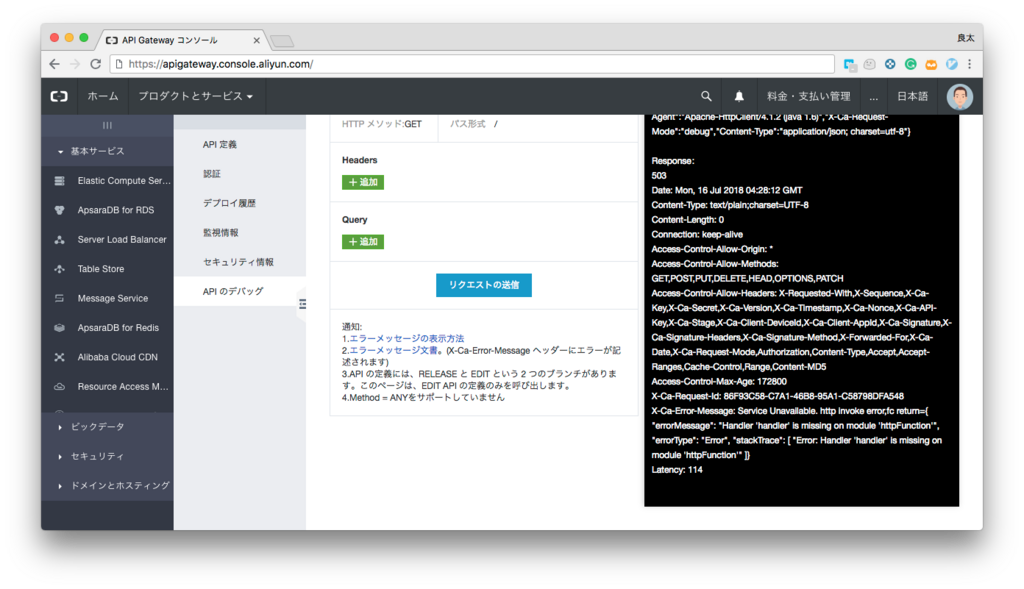
エラーがあったらエラーメッセージが、成功していたら200のレスポンスが返ってきます。
curlでも同じものが確認できます。
$ curl http://xxxxxxxxxxxxxxxxxxxxxxxxxxxxxxxxxxx-cn-shanghai.alicloudapi.com/
HTTP/1.1 200 OK
Server: Tengine
Date: Mon, 16 Jul 2018 04:46:17 GMT
Content-Type: text/plain
Content-Length: 13
Connection: keep-alive
Access-Control-Allow-Origin: *
Access-Control-Allow-Methods: GET,POST,PUT,DELETE,HEAD,OPTIONS,PATCH
Access-Control-Allow-Headers: X-Requested-With,X-Sequence,X-Ca-Key,X-Ca-Secret,X-Ca-Version,X-Ca-Timestamp,X-Ca-Nonce,X-Ca-API-Key,X-Ca-Stage,X-Ca-Client-DeviceId,X-Ca-Client-AppId,X-Ca-Signature,X-Ca-Signature-Headers,X-Ca-Signature-Method,X-Forwarded-For,X-Ca-Date,X-Ca-Request-Mode,Authorization,Content-Type,Accept,Accept-Ranges,Cache-Control,Range,Content-MD5
Access-Control-Max-Age: 172800
X-Ca-Request-Id: 9D0447A1-B5BA-43F9-BFCA-A305AC931844

hello world!
出たエラー
1: 公式ドキュメントに従ってfaas.yamlを作成した時のエラー。GitHubの方を参考にしてtemplate.ymlを作成しましょう。
$ fun deploy
Error: ENOENT: no such file or directory, open '/Users/asmsuechan/src/alicloud_practice/function_compute/fun/template.yml'
2: fun deployで以下のエラーが出る場合はAPI Gatewayが有効化されていません。有効化しましょう。
$ fun deploy
Waiting for service fc to be deployed...
    Waiting for function httpFunction to be deployed...
    function httpFunction deploy success
service fc deploy success

Waiting for api gateway HttpFunctionGroup to be deployed...
ServiceUnOpenError: Your Gateway service has not been opened.
    at httpx.request.then.then (/Users/asmsuechan/.config/yarn/global/node_modules/@alicloud/pop-core/lib/core.js:169:19)
    at process._tickCallback (internal/process/next_tick.js:68:7)
まとめ
公式ドキュメントに書かれている内容が違うのはバージョンが古いからなのでしょうか。といっても最終更新日は2ヶ月前なのですけど。
funコマンドのおかげでGitHubのマスターブランチにマージされた時などにCIから簡単にデプロイが行えるようになります。嬉しいですね。
追記8/6
書きました。
