GitHubにビルドバッチを付けてみた。かっこいい。 - えいあーるれいの技術日記の続きです。
ROS2のC++プロジェクトにもビルドバッチを付けてみました。結論からいうと、普通のROS2環境を構築してビルドすればいいです。ただし、ブロックごとに環境をロードし直す必要があるので注意しましょう。また、ctestは使いません。
ymlの書き方
次のリポジトリにチェックを付けました。
.github/workflows/cmake.ymlに次のように記述しました。ubuntu20.04限定なのでruns-on: ubuntu-20.04としました。
name: CMake

on: [push]

env:
  # Customize the CMake build type here (Release, Debug, RelWithDebInfo, etc.)
  BUILD_TYPE: Release

jobs:
  build:
    # The CMake configure and build commands are platform agnostic and should work equally
    # well on Windows or Mac.  You can convert this to a matrix build if you need
    # cross-platform coverage.
    # See: https://docs.github.com/en/free-pro-team@latest/actions/learn-github-actions/managing-complex-workflows#using-a-build-matrix
    runs-on: ubuntu-20.04

    steps:
    - uses: actions/checkout@v2

    - run: sudo apt update && sudo apt install curl gnupg2 lsb-release
    - run: sudo curl -sSL https://raw.githubusercontent.com/ros/rosdistro/master/ros.key  -o /usr/share/keyrings/ros-archive-keyring.gpg
    - run: echo "deb [arch=$(dpkg --print-architecture) signed-by=/usr/share/keyrings/ros-archive-keyring.gpg] http://packages.ros.org/ros2/ubuntu $(lsb_release -cs) main" | sudo tee /etc/apt/sources.list.d/ros2.list > /dev/null
    - run: sudo apt update
    - run: sudo apt install ros-foxy-ros-base
    - run: sudo apt install ros-foxy-example-interfaces
    - run: sudo apt install ros-foxy-sensor-msgs
    - run: sudo apt install ros-foxy-geometry-msgs
    - run: sudo apt install ros-foxy-joy*

    - name: Create Build Environment
      # Some projects don't allow in-source building, so create a separate build directory
      # We'll use this as our working directory for all subsequent commands
      run: source /opt/ros/foxy/setup.bash && cmake -E make_directory ${{github.workspace}}/build

    - name: Configure CMake
      # Use a bash shell so we can use the same syntax for environment variable
      # access regardless of the host operating system
      shell: bash
      working-directory: ${{github.workspace}}/build
      # Note the current convention is to use the -S and -B options here to specify source
      # and build directories, but this is only available with CMake 3.13 and higher.
      # The CMake binaries on the Github Actions machines are (as of this writing) 3.12
      run: source /opt/ros/foxy/setup.bash && cmake $GITHUB_WORKSPACE -DCMAKE_BUILD_TYPE=$BUILD_TYPE

    - name: Build
      working-directory: ${{github.workspace}}/build
      shell: bash
      # Execute the build.  You can specify a specific target with "--target <NAME>"
      run: source /opt/ros/foxy/setup.bash && cmake --build . --config $BUILD_TYPE

   # skip Testは削除
最小限のROS2パッケージをインストールして、普通にビルドしました。注意すべき点としては、- nameなどのタグで区切られるたびに環境がリセットされます。(ターミナルの切り替えが起こるみたいな感じ)そのため、ビルド直前に必ず$ source /opt/ros/foxy/setup.bashを記述しましょう。
ctestについて
ctestは通りませんでした。そもそも実際の環境でも動きませんでした。
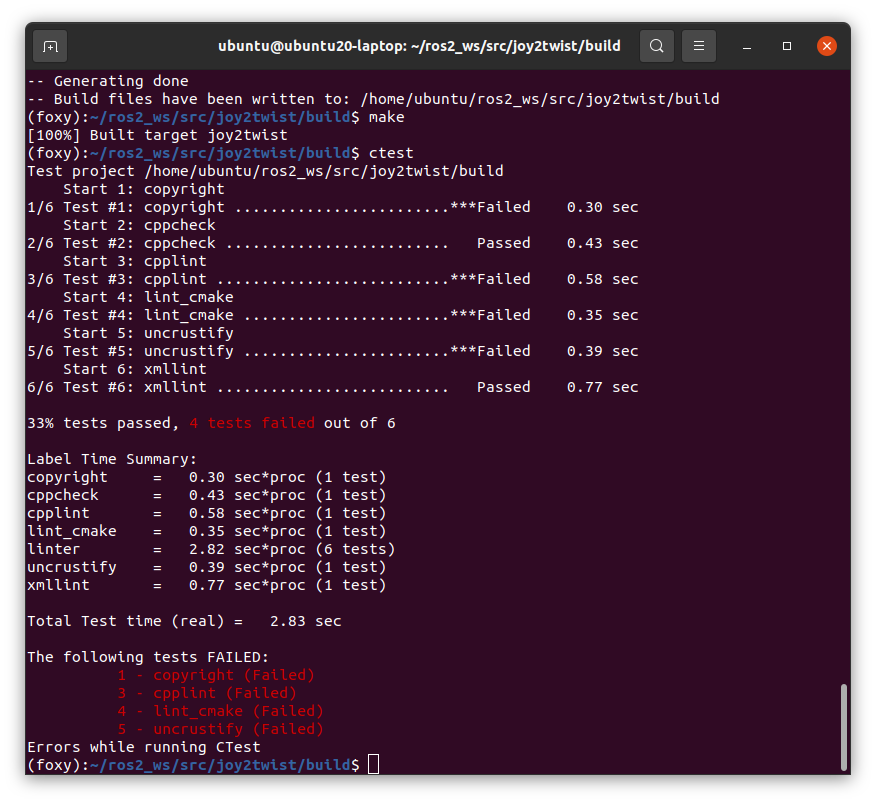
そのため、CMakeLists.txtをそのままの状態でテストするためにも、ctestのステップについては削除しました。
おわりに
ROS2はcmakeでもちゃんとビルドできますが、環境を揃えたいなら、python3-colconとかでテストしたほうがいいのかなーとも思いました。
環境構築手順もテストできるので、便利なツールだと思います。
