アプリにバナー広告を表示するサンプルです。 課金のないアプリはバナー広告を表示して収益化しましょう。
※この記事では自作アプリにAdMobのバナー広告を表示させる方法をご紹介しています。
1.Google Play開発者サービスSDKをダウンロード
Android Studioの「SDKマネージャー」を開いて、下の方の「Extras」にある「Google Play services」にチェックを入れて右下のインストールボタンを押す。
※既にインストールされている場合はこの手順は行う必要はありません。
2.AndroidManifest.xml に以下を追加
<1> インターネットアクセス設定
<uses-permission android:name="android.permission.INTERNET"/>
<uses-permission android:name="android.permission.ACCESS_NETWORK_STATE"/>
<2> グーグルプレイ設定
<meta-data android:name="com.google.android.gms.version"
    android:value="@integer/google_play_services_version" />
<3> 広告表示設定
<activity android:name="com.google.android.gms.ads.AdActivity"
 android:configChanges="keyboard|keyboardHidden|orientation|screenLayout|uiMode|screenSize|smallestScreenSize" android:theme="@android:style/Theme.Translucent" />
3.レイアウトxml ファイルに以下を追加
xmlns:ads="http://schemas.android.com/apk/res-auto"
<com.google.android.gms.ads.AdView
    android:id="@+id/adView"
    android:layout_width="wrap_content"
    android:layout_height="wrap_content"
    android:layout_centerHorizontal="true"
    android:layout_alignParentBottom="true"
    ads:adSize="BANNER"
    ads:adUnitId="ca-app-pub-3940256099942544/6300978111">  //これはテスト用バナーID
</com.google.android.gms.ads.AdView>
4.表示するActivity に以下を追加
import com.google.android.gms.ads.AdRequest;
import com.google.android.gms.ads.AdView;
onCreate 内に追加
AdView adView = (AdView)findViewById(R.id.adView);
AdRequest adRequest = new AdRequest.Builder().build();
adView.loadAd(adRequest);
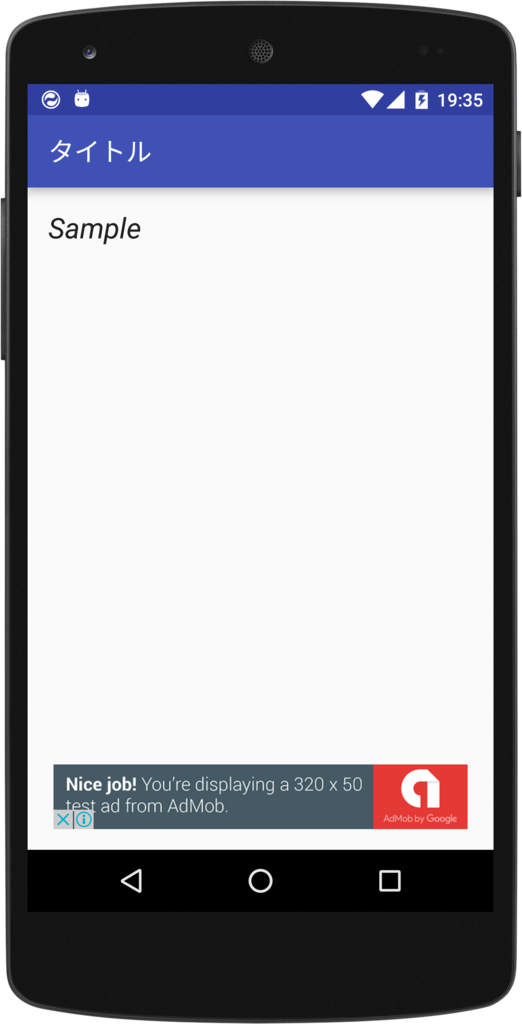
5.結果
サンプルコードを実行すると画面下部にバナー広告が表示されます。
END
