こんにちは。早速ですが、読書記録Webアプリの機能アップを更に図っていきましょう。
今回の主要テーマはページネーション(pagination)です。日本語ではページ割りというのかもしれません。アプリが現在のままだとページの概念がないので、読書記録を登録していくと、どんどん行が下に伸びていってしまいます。
それでは困りますよね。一定の行数を超えたら次のページに移動しないと表示されないようにする必要があります。このような時に利用するのがPagination機能で、実はFlask-SQLAlchemyには、予めこのPagination機能が備わっています。
Pagination機能を利用する
具体的には、Queryオブジェクトのpaginateメソッドを利用します。 例えば、Bookクラスの全てのデータをデータベースから取り出すには
books = Book.query.all()
と記述しました。pagination機能を使うには
books = Book.query.paginate(page=1, per_page=10, error_out=False).items
のように、all()をpaginate().itemsで置き換えます。
paginateメソッドには、上記のように引数を3つ渡します。
page=はページ番号です。1ページから始まります。per_page=は1ページあたりの表示件数です。error_out=は、Trueに設定すると、データのあるページ数を超えてページを設定するとエラーを返します。Falseに設定しておくと、データのあるページ数を超えてページを指定すると、エラーではなく、空のリストが返されます。
paginateメソッドにより、paginationオブジェクトが返されます。上記のitemsはpaginationオブジェクトの属性の一つで、リクエストしたページに属するデータのリストが入っています。上記の場合、1ページ目に属する10件のデータリストとなります。
その他にも使える属性があり、以下のFlask-SQLAlchemyのドキュメントに記載されています(英語ですが)。 https://flask-sqlalchemy.palletsprojects.com/en/2.x/api/
さて、実際にスクリプトを変更していきましょう。 まず、1ページ当たりの表示件数を、使い回しができるように、configクラスで設定しておきましょう。
class Config(object):
    # ...
    ITEMS_PER_PAGE = 3
1ページ当たりの表示件数を3件と少なくしているのは、あまりたくさんデータを入力しなくても、ページネーション機能の確認を容易にするためです。
次に、views.pyを修正していきます。
先ほどは、books = Book.query.paginate(page=1, per_page=10, error_out=False).itemsとしましたが、これだと読書リストをhtmlに渡すだけになりますので、ここでは、Book.query.paginate(page=1, per_page=10, error_out=False)までのPaginationオブジェクトをhtmlに渡すようにします。
そうすることにより、Paginationオブジェクトを渡されたhtml側でPaginationオブジェクトの属性を利用することで、各種処理をできるようになります。
@books.route('/', methods=['GET','POST'])
def index():

    books = Book.query.order_by(Book.date.desc()).paginate(page=1, per_page=app.config['ITEMS_PER_PAGE'], error_out=False)
    authors = db.session.query(Author).join(Book, Book.author_id == Author.id).all()
    return render_template('books/index.html', books=books, authors=authors)
変更前は、books = Book.query.all()で得られた読書リストが渡されていましたので、{% for book in books %}...{% endfor %}でしたが、今回はPaginationオブジェクトが渡されていますので、{% for book in books.items %}...{% endfor %}となっています。
ここまでは1ページ目ですので、2ページ目以降に対応する関するを作成します。1ページ目のページネーションにより表示されたページに飛べるようにします。ページ数がクリックされますので、そのページをpage_numとして関数に引き渡します。
@books.route('/books/pages/<int:page_num>', methods=['GET','POST'])
def index_pages(page_num):

    books = Book.query.order_by(Book.date.desc()).paginate(page=page_num, per_page=app.config['ITEMS_PER_PAGE'], error_out=False)
    authors = db.session.query(Author).join(Book, Book.author_id == Author.id).all()
    return render_template('books/index.html', books=books, authors=authors)
表示する側のindex.htmlは以下の通りです。
{% extends "base.html" %}
{% block content %}
<br>
<table class="table">
  <thead class="thead-light">
    <tr>
      <th scope="col">書籍名</th>
      <th scope="col">著者</th>
      <th scope="col">ジャンル</th>
      <th scope="col">読了日</th>
      <th scope="col">オススメ度</th>
    </tr>
  </thead>

  {% for book in books.items %}
      <tbody>
        <tr>
          <td> <a href="{{ url_for('books.each_book', id=book.id) }}"> {{ book.title }} </a></td>
          {% for author in authors %}
            {% if author.id == book.author_id %}
              <td> <a href="{{ url_for('authors.each_author', id=book.author_id)}}"> {{ author.name }}</a></td>
            {% endif %}
          {% endfor %}
          <td>{{ book.genre }}</td>
          <td> {{ book.date }}</td>
          <td> {{ book.recommended }} </td>
        </tr>
      </tbody>
  {% endfor %}
</table>
<p align="right">合計 {{ books.total }} 冊 </p>

<nav aria-label="Page navigation example">
  <ul class="pagination justify-content-center">
     {% for page in books.iter_pages() %}
      {% if page %}
        {% if page != books.page %}
            <li class="page-item"><a class="page-link" href="{{ url_for('books.index_pages', page_num=page) }}">{{ page }}</a></li>
        {% else %}
            <li class="page-item active"><a class="page-link">{{ page }}</a></li>
        {% endif %}
      {% else %}
        <span> ... </span>
      {% endif %}
    {% endfor %}
  </ul>
</nav>
そして、Paginationの部分は、{% for page in books.iter_pages() %}...{% endfor %}と、Paginationオブジェクト"books"のイテレータiter_pages()を利用しています。ただし、ページが増えてくると、ページ数を返さない場合がありますので、{% if page %}{% else %}{% endif %}にて...を表示するようにしています。
また、その上の行で<p align="right">合計 {{ books.total }} 冊 </p>とあり、Paginationオブジェクトの属性total(全体件数)を利用しています。
views.pyから渡すものをPaginationオブジェクトにすると、html側でいろいろと利用でき、便利ですね。
さて、同様に著者についてもページネーションを適用します。authors/views.pyを以下の通りに変更します。
@authors.route('/authors/index')
def index_author():
    authors = Author.query.order_by(Author.name).paginate(page=1, per_page=app.config['AUTHORS_PER_PAGE'], error_out=False)
    return render_template('authors/index_author.html', authors=authors)

@authors.route('/authors/index/<int:page_num>', methods=['GET','POST'])
def index_author_pages(page_num):
    authors = Author.query.order_by(Author.name).paginate(page=page_num, per_page=app.config['AUTHORS_PER_PAGE'], error_out=False)
    return render_template('authors/index_author.html', authors=authors)
templates/authors/index.htmlも、同様に以下の通り変更します。
{% extends "base.html" %}
{% block content %}
 <br>
 <h4>著者一覧</h4>

 <br>
 <table class="table">
   <thead class="thead-light">
     <tr>
       <th scope="col">著者</th>
       <th scope="col">説明</th>
     </tr>
   </thead>

  {% for author in authors.items %}
    <tbody>
      <tr>
        <td> <a href="{{ url_for('authors.each_author', id=author.id)}}">{{ author.name }}</a> </td>
        <td>{{ author.extras }}</td>
      </tr>
    </tbody>
  {% endfor %}
  </table>

<nav aria-label="Page navigation example">
  <ul class="pagination justify-content-center">
    {% for page in authors.iter_pages(left_edge=2, left_current=2, right_current=5, right_edge=2) %}
      {% if page %}
        {% if page != authors.page %}
            <li class="page-item"><a class="page-link" href="{{ url_for('authors.index_author_pages', page_num=page) }}">{{ page }}</a></li>
        {% else %}
            <li class="page-item active"><a class="page-link">{{ page }}</a></li>
        {% endif %}
      {% else %}
        <span> ... </span>
      {% endif %}
    {% endfor %}
  </ul>
</nav>

{% endblock %}
読書記録を表示させるとこんな感じ。
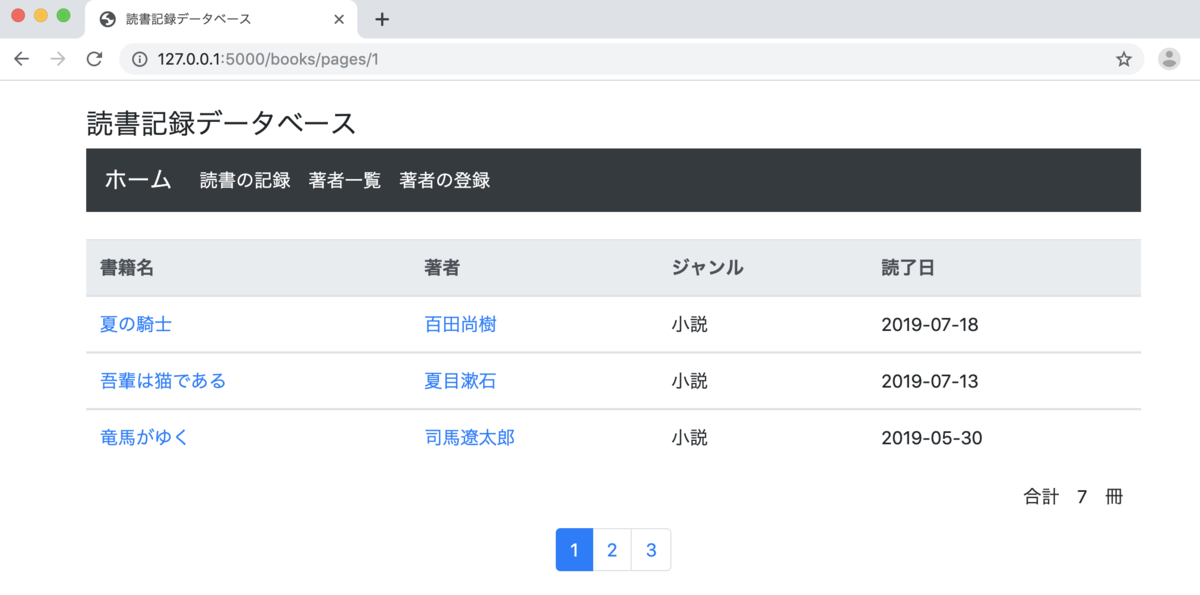
うまく表示できましたでしょうか。PaginationでもBootstrapを利用し、見栄えを良くしています。
修正時のボタン表示の変更
読書記録や著者の登録内容を変更する際に表示されるボタンが「登録」「削除」ではやはり違和感がありますよね。内容を修正する際のボタンは「修正」とするのが良いかなと思います。
forms.pyに以下を追加します。BookFormとAuthorFormをもとにBookUpdateFormとAuthorUpdateFormを作成します。
class BookUpdateForm(BookForm):
    submit = SubmitField('修正')

class AuthorUpdateForm(AuthorForm):
    submit = SubmitField('修正')
そして、views.pyのupdate関数のform=BookForm()とform=AuthorForm()をBookUpdateForm()とAuthorUpdateForm()に修正します。
本日のアップデートは以上です。 次回は読書記録として入力したい「おすすめ度」「コメント」欄を追加するとともに「検索機能」を導入することで、アプリの最終化を図りたいと思います。
ここまでのアプリもアップロードしておきます。ご参考まで。
