Alternative Architecture DOJO へようこそ. Chaseです!先週、初めての技術カンファレンスとして Microsoft AI Tour に参加する機会がありました。今回は、私が参加したセッションについて簡単に振り返りたいと思います。
当日は Alterbooth から約10名が参加しており、今後それぞれのブログ記事も公開されると思いますので、ぜひそちらもチェックしてみてください。いくつかのセッションは英語で行われていたため、できるだけ多く参加するようにしました。私が参加したセッションの内容について、少しでも参考になればうれしいです。
少し背景を説明すると、現在 Alterbooth で取り組んでいるプロジェクトは、C# 開発を支援するために AI を活用することや、GitHub リポジトリ内の知識を収集・要約するツールとして AI を利用することが中心です。私は AI や LLM 全般に対して比較的批判的な立場で、客観的にどれだけの価値や品質を提供しているのかを見るよう心がけています。それでは、前置きはここまでとして、英語で続けさせてください。

Frontier Transformation Keynote
The first session of the day was the keynote speech entitled Frontier Transformation. The speech focuses on how Japanese organizations can become “Frontier Organizations” by combining AI technology with human purpose and trust. With the rise of younger generation’s resistance to AI, building consumer trust is vital to continued success. Rather than treating AI as just a productivity tool, Microsoft emphasizes that AI success does not come from models alone. Instead, it comes from pairing an organization’s unique data and culture with strong security, governance, and compliance controls. This reflects Microsoft’s intuition when it comes to the consumer. It is no longer viable to force AI onto every product and expect instant success, there must be an underlying value that consumers can see.
The keynote focused on demonstrating 3 main tools:
- Work IQ – Understands employee work patterns, meetings, emails, and team context
- Foundry IQ – Creation and orchestration of Agents
- Fabric IQ – Curates data from across systems and gives it business meaning
These tools were shown in action through a “Live” demo. Using a fictional company called “Zava”, Microsoft demonstrated how AI agents work across departments:
- Marketing: Copilot creates review materials using internal policies and business insights
- Finance: Excel Copilot builds dashboards and interprets Japanese accounting terms in minutes
- Supply Chain: AI automatically creates release and logistics plans following company rules
- Development: GitHub Copilot launches a website with no manual coding required
Overall, I think this was a great demonstration of what businesses can achieve using AI as a tool to improve upon an already solid business model. The keynote also touched on Agent 365, a centralized dashboard that can:
- Monitor all AI agents inside an organization
- Track data access, permissions, and agent-to-agent interactions
- Detect security risks and enforce approval workflows
This ensures AI expansion does not compromise corporate security or compliance.
I’ll leave it to my Japanese native colleagues to discuss how the messages directed at Japanese companies was received. Personally, I thought this was an interesting look into the shift within AI culture across Microsoft and the world at large.
The keynote is available in its entirety on YouTube.
Prototype agents with AI toolkit and MCP
Next, I immediately walked over to the Workshop Hall to get some hands-on instruction related to prototyping agents with the AI toolkit and Model Context Protocol (MCP). Given the number of people, there were some difficulties with slow Wi-Fi. However, after 10-15 minutes we were able to get started. We were given instructions on how to connect to a virtual desktop and go through a step-by-step tutorial on:
- Exploring and comparing AI models
- Grounding the models with better prompting and data files
- Creating an agent by combining a chosen model with tools via MCP
I had some experience with this from previous work, but it was my first time using the AI Toolkit VS Code extension. It makes it extremely easy to select and compare 2 models at the same time.
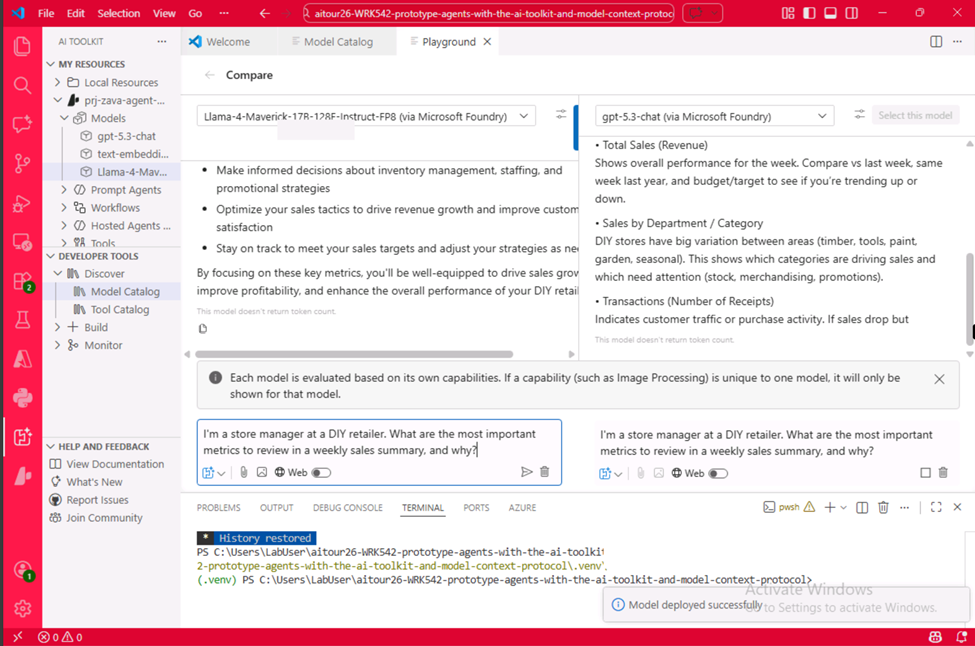
As shown above, you can input the same prompt and send it to two different models and directly compare outputs in real time on the same screen. If a model supports it, this also works with image processing and generation.
This would have made previous work much easier. Given that before, you had to go to the Microsoft AI Foundry playground, deploy your models, create an agent for each, then separately send the prompt and check the output.
At the end, there was a small section on connecting your chosen model to 2 MCP servers that were already established and running locally. I would have liked to see more under the hood of the MCP server side, but all together it was a good intro to AI agent creation and the AI Toolkit.
The session materials are available on Microsoft's GitHub.
End to end security in the age of agentic AI
Next up was a breakout session on end-to-end security in the age of agentic AI by Chief Security Advisor Manager, Mick Dunne.
This ended up being a non-technical talk about the actions Microsoft is taking to support security for AI agents. It began by stressing the importance of observability. As Dunne said, “You can’t protect what you can’t see.” To facilitate observability, attention was brought to 2 different platforms, Microsoft Agent 365 and Microsoft Foundry. In short, Agent 365 is for IT personnel. It includes:
- A registry of all agents within the organization
- Access controls for the agents through Entra and Purview
- Visualization of agent interactions
It is the so called “Full View” built into current ecosystems that requires no new tools or plugins. Foundry, on the other hand, is for devs. It provides the above tools but only for the agents a dev makes.
In terms of platform security, Microsoft Defender, GitHub Advanced Security, and Microsoft Sentinel were briefly mentioned. I will also note that Sentinel’s evolution from a SIEM to an agentic security platform with MCP was mentioned.
Security Copilot, a generative AI-powered security assistant, is now included for all E5 users. Dunne stressed that in the modern AI world, security specialists must use every tool available to better defend their organizations. He also reassured us that Microsoft is using the 100 trillion security signals it receives every day to constantly better its tools.
AI tools for infrastructure management
This breakout was an elementary look at using AI tools for Azure infrastructure management. A quick explanation was given of the main AI tools Microsoft has available:
- Azure Copilot
- GitHub Copilot
- Copilot CLI
A few demos of these tools were then shown:
- How to use GitHub Copilot in VS Code to analyze an ARM template file.
- How Copilot CLI can be used to deploy and maintain a resource group.
- Azure Copilot as a resource to visualize a network environment.
While this information is relatively well-known to those that regularly use AI, it was useful to see the tools being used live (especially CLI, which I haven’t used before) and brush up on how the tools have evolved recently. The speaker did a good job speaking honestly about what his job entails, where AI excels, and where human judgement is a must.
Advanced retrieval for AI apps and agents
The final session I attended was the one I was most looking forward to, an in-depth technical look at advanced retrieval methods for AI apps and agents. Unfortunately, there were moments when I struggled to understand the speaker’s English, so I wasn’t able to get much usable information out of the session. However, I was introduced to a range of topics that I would like to delve into further in my own independent research.
Those topics and technologies are:
- Vector vs keyword searching
- Hybrid + RRF (reverse rank fusion) methods
- Reranking criteria
- PostgreSQL Agentic Graph RAG
The Future of Engineers Closing Keynote
The conference ended with a small keynote entitled The Future of Engineers. There was no English interpretation, and my business Japanese is nowhere near good enough for such a topic, so I’ll leave the rest of the explanation to my Japanese coworkers. My main take away was that Microsoft and Anthropic are partnering, so I expect to see much more Claude being used across Copilot.
In conclusion
My experience was insightful, and it was nice being among many other working software engineers based throughout Japan. This was an amazing opportunity to build my cross-cultural communication skills and strengthen my practice. AI is here, with that comes the need for companies to focus on how to blend this with the work of humans, not flatline it. After this conference, I think Microsoft has positioned itself as a key player in an AI market while maintaining a finger on the pulse of consumer needs. Going forward, I hope my colleagues and I can continue to do the same; creating an industry that uses AI to bolster systems without degradation.
サービス一覧 www.alterbooth.com cloudpointer.tech www.alterbooth.com
