こんにちは、MLBお兄さんこと松村です。
1月はブログを書くことができませんでしたが、今年もどうぞよろしくお願いします。
Azure DevOps Demo Generator とは、Azure DevOps のデモプロジェクトを作成することができるアプリケーションです。
様々なテンプレートが用意されており、デモや検証の用途でそれなりにデータが登録されたプロジェクトが欲しい際に使用すると良いです。
そんな Azure DevOps Demo Generator は Web アプリで提供されていましたが、コンソールアプリケーションとして公開されました。
ソースコードやドキュメントについては GitHub で公開されていますので、内容に沿って実際に使ってみます。
PAT の発行
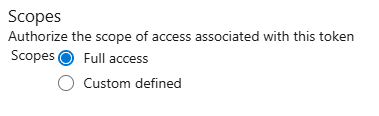
アプリケーションから Azure DevOps に接続するために、PAT (Personal Access Token) を発行します。
実行手順に詳しい説明がなかったのでいくつか試しましたが、スコープはフルアクセスにしておくと良いでしょう。
アプリケーションの発行
Azure DevOps Demo Generator のリポジトリをクローンし、アプリケーションの発行を行います。
なおアプリケーションを実行するには .NET 8 SDK が必要となります。
git clone https://github.com/microsoft/AzDevOpsDemoGenerator
cd AzDevOpsDemoGenerator
dotnet publish src/ADOGenerator/ADOGenerator.csproj -c Release -r win-x64 --self-contained
アプリケーションの実行
エクスプローラーから、作成した実行ファイルを起動します。

まずは作成するデモプロジェクトのテンプレートを選びます。
全部で64個ありますね。Web ページで作るときと同じ数かな?
Welcome to Azure DevOps Demo Generator! This tool will help you generate a demo environment for Azure DevOps.
Template Details
General
  1. eShopOnWeb
  2. Tailwind Traders
  3. PartsUnlimited
  4. MyShuttle
  5. ContosoAir
DevOps Labs
  6. Terraform
  7. Ansible
  8. LaunchDarkly
  9. Azure Machine Learning
  10. Azure Key Vault
  11. Docker
  12. Azure Kubernetes Service
  13. Octopus
  14. Selenium
  15. DeploymentGroups
  16. SonarQube
  17. ReleaseGates
  18. PHP
  19. Python
  20. WhiteSource Bolt
  21. AzureFunctions
Microsoft Learn
  22. Create a build pipeline with Azure Pipelines
  23. Implement a code workflow in your build pipeline using Git and GitHub
  24. Run quality tests in your build pipeline using Azure Pipelines
  25. Scan code for vulnerabilities in Azure Pipelines
  26. Scan open source components for vulnerabilities and license ratings in Azure Pipelines
  27. Manage build dependencies with Azure Artifacts
  28. Host your own build agent in Azure Pipelines
  29. Create a release pipeline with Azure Pipelines
  30. Create a multi-stage pipeline with Azure Pipelines
  31. Manage database changes in Azure Pipelines
  32. Run functional tests in Azure Pipelines
  33. Run non-functional tests in Azure Pipelines
  34. Manage release cadence in Azure Pipelines with deployment patterns
  35. Provision infrastructure in Azure Pipelines
  36. Provision databases in Azure Pipelines
  37. Manage Agile software delivery plans across teams
  38. Automate Azure Function deployments with Azure Pipelines
  39. Automate Docker container deployments with Azure Pipelines
  40. Automate multi-container deployments to Azure Kubernetes Services with Azure Pipelines
  41. Test your Bicep code by using Azure Pipelines
  42. Manage multiple environments by using Bicep and Azure Pipelines
  43. Manage end-to-end deployment scenarios by using Bicep and Azure Pipelines
  44. Review Azure infrastructure changes by using Bicep and pull requests
  45. Publish reusable Bicep code by using Azure Pipelines
Azure Community
  46. Azure Sentinel DevOps
  47. NIST 800-171
  48. WVD Guidance
  49. SAP on Azure
Cloud Adoption Framework
  50. Cloud Adoption Plan
  51. CAF Strategy-Plan-Ready-Governance
  52. Server Migration
  53. AKS_CloudAdoptionFramework
  54. SQL Migration
  55. Windows Virtual Desktop
  56. Knowledge Mining
  57. Azure Governance Readiness
  58. Modern Data Warehouse
  59. Retail Recommender with Azure Synapse
  60. Modern IOT
  61. Secure Research
  62. Unified Data Governance
  63. Modern Data Analytics
FastTrack for Azure
  64. Azure Migrations - IaC
Enter the template number from the list of templates above:
今回は eShop を選んでみます。
認証方法として、①ブラウザでの認証と ②PATでの認証のどちらかを問われます。今回は先程発行した PAT を使用します。
なお、ブラウザの認証を選ぶとエラーが発生します。なにか設定が不足しているのでしょう。(未調査)
ここからプロジェクトの作成が始まり、最終的には完成します。
Enter the template number from the list of templates above:
1
Template 'eShopOnWeb' is present.
Selected template: eShopOnWeb
Choose authentication method: 1. Device Login using AD auth 2. Personal Access Token (PAT)
2
Enter your Azure DevOps organization name:
(自分の組織名)
Enter your Azure DevOps personal access token:
************************************************************************************
Enter the new project name:
eShopDemo
Creating project 'eShopDemo' in organization '(自分の組織名)' using template from 'eShopOnWeb'...
Project eShopDemo created
App Development Team team created
App Development Team team area created
DBA Team team created
DBA Team team area created
Board-Column, Swimlanes, Styles updated
Importing source code
Source code imported to eShopOnWeb repository
Work Items created
Build definition created
Branch Policy created
Queries, Widgets and Charts created
Project created successfully.
Do you want to create another project? (yes/no): press enter to confirm
no
デモプロジェクトの完成
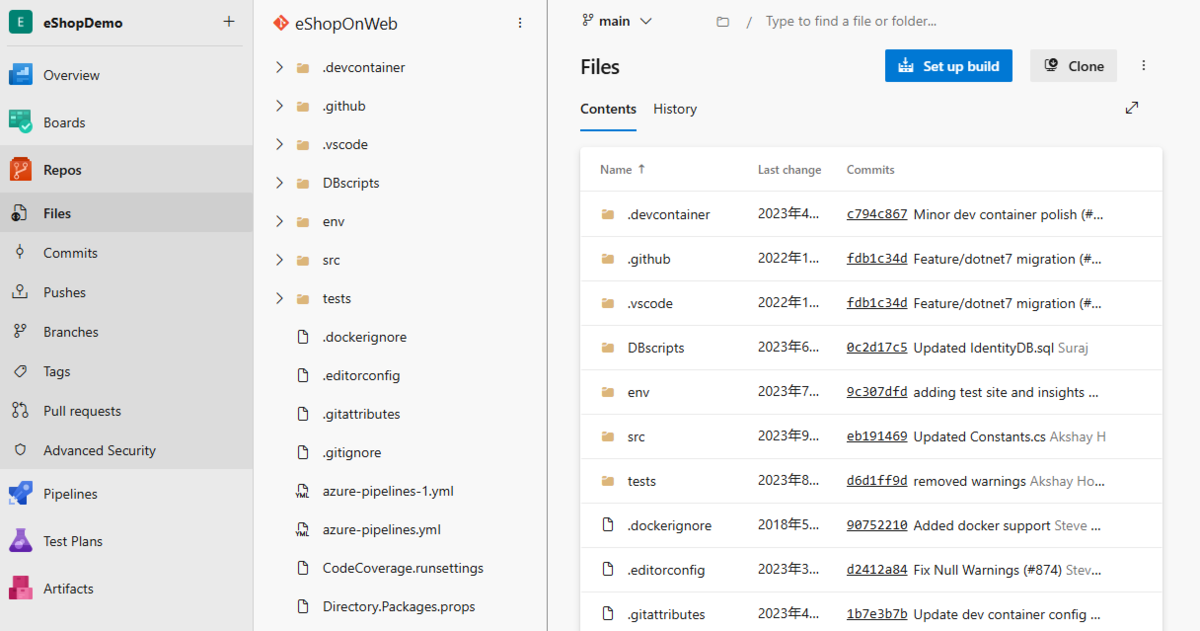
Azure DevOps にアクセスするとプロジェクトが完成しています。
Boards や Repos など、様々なデモデータが用意されていることが分かります。

Web ページの Azure DevOps Demo Generator よりもサクサク準備できますので、必要な方は試してみてください。
サービス一覧 www.alterbooth.com cloudpointer.tech www.alterbooth.com
